
BENFEI USB 3.0 Switch
4.1Editor score
2 in 4 out USB 3.0 ports
5Gbps data transfer speed
External power supply support
Compare the top keyboard and mouse switch for 2 computers to share peripherals seamlessly across dual workstations using USB 3.0 or KVM technology.
Finding the right keyboard and mouse switch for 2 computers allows you to share peripherals across dual workstations efficiently. This guide helps you choose a reliable USB switcher or KVM solution for seamless productivity without constant cable swapping.
We evaluated ten top-rated devices based on port configuration, data transfer speed, build quality, and ease of use. Each product was assessed for compatibility with Windows, macOS, and Linux systems to ensure broad utility in home or office environments.
Each pick highlights specific strengths like budget-friendly designs, high-speed data transfer, or advanced KVM features. Note that availability and pricing fluctuate frequently, so always verify current stock and offers before making your final purchase decision today.
4.1Editor score

4.6Editor score

4.3Editor score
The following table compares all ten devices side by side, highlighting their key specifications, port counts, and unique features to help you find the perfect match for your dual computer setup.



This UGREEN USB 3.0 Switch is a highly versatile device designed for users who need to share multiple peripherals between two computers efficiently. It supports a mix of USB-C and USB-A devices, making it ideal for modern and legacy setups alike. With a rating of 4.0 stars, it delivers reliable performance for keyboards, mice, and printers.
We may earn a commission when you buy through this link, at no additional cost to you.
The standout feature is its ability to handle up to four USB devices simultaneously across two computers. You can use the included controller or push button to switch seamlessly. The 5Gbps data transfer ensures that file transfers remain fast even when connected to older USB 2.0 peripherals via backward compatibility.
While it excels at data sharing, note that it is not a KVM switch and does not support video transmission. If you need to share a monitor as well, you will need a dedicated KVM solution. However, for pure peripheral sharing, this unit is robust and well-built with thoughtful cable inclusion.
This switch is perfect for office workers who maintain separate work and personal machines on the same desk. It allows you to keep a single set of peripherals available to both systems without constant rewiring. We recommend it for anyone needing flexible USB device sharing with reliable data speeds.
The mix of USB-C and USB-A ports allows you to connect a wide range of modern and older devices without extra adapters.
An optional power supply port helps maintain stable performance for high-draw devices like external drives or printers.
We may earn a commission when you buy through this link, at no additional cost to you.
The BENFEI USB 3.0 Switch offers an exceptional value for users seeking an affordable solution to share peripherals between two computers. With a rating of 4.1 stars, it provides a robust 2 in 4 out configuration that supports keyboards, mice, printers, and more without the need for drivers.
We may earn a commission when you buy through this link, at no additional cost to you.
Its 5Gbps data transfer speed ensures that you can move files quickly between connected devices. The switch supports a wide range of operating systems including Windows, macOS, and Linux, making it a versatile choice for mixed environments. The LED indicator helps you see which computer is currently active.
While it includes a power supply slot for high-consumption devices, the adapter is not included. You may need to source a standard USB cable for power if your peripherals demand extra energy. Also, note this is a USB switch only and does not support video sharing or KVM features.
This device is ideal for budget-conscious users who primarily need to share input devices and storage between workstations. It keeps your desk tidy by reducing cable clutter and offers a reliable way to switch between systems. For simple and cost-effective sharing, this is a top choice.
You get high-speed USB 3.0 functionality at a very competitive price point, making it accessible for many users.
It works seamlessly across Windows, Mac, and Linux systems without requiring any additional software installation or drivers.
We may earn a commission when you buy through this link, at no additional cost to you.
This 2 in 2 Out USB 3.0 Switch is designed for users who prioritize simplicity and reliability in their dual computer setup. With an impressive rating of 4.6 stars, it offers a straightforward way to share a keyboard and mouse between two PCs without the complexity of extra ports or software.
We may earn a commission when you buy through this link, at no additional cost to you.
The device features a one-button switch with a clear LED indicator so you always know which computer is active. It supports 5Gbps data transfer speeds which is excellent for file sharing between connected USB devices. The aluminum alloy shell provides a durable build that dissipates heat effectively over time.
Since it only has two ports, it is best suited for sharing just one set of key peripherals. While it does not include an external power input, it draws enough power from the USB bus for most standard keyboards and mice. It comes ready to use with two included USB 3.0 cables.
We recommend this switch for home office users who need a reliable and clean solution for keyboard and mouse sharing. It reduces cable clutter and improves workflow by allowing instant toggling between work and personal computers. For those wanting a plug-and-play experience, this is an excellent choice.
Switching between computers is as simple as pressing a button, and the LED light confirms which system is active.
The aluminum alloy case ensures the switch stays cool and protected from daily wear and tear.
We may earn a commission when you buy through this link, at no additional cost to you.
The UGREEN USB 3.0 Switch in a 2 in 2 Out configuration is a great option for offices that want to share a single printer or scanner between two computers. It has a solid rating of 4.1 stars and works as a simple yet effective USB sharing switch for input devices and peripherals.
We may earn a commission when you buy through this link, at no additional cost to you.
It supports transfer speeds up to 5Gbps which makes moving data or print jobs between systems fast and efficient. The one-button switching with LED indicator ensures you never switch to the wrong computer by mistake. It is fully plug-and-play across Windows, macOS, Chrome OS, and Linux.
While it handles printers and scanners well, it does not support video transmission so you will still need separate monitors for each PC. It is also important to ensure you connect the right cable direction to avoid issues. The package includes everything you need to get started right away.
This switch is ideal for small businesses or shared workspaces where one high-quality printer serves multiple users. It helps reduce costs by eliminating the need for multiple networked devices. For simple printer and peripheral sharing this device delivers consistent performance and ease of use.
Designed to act as a printer splitter so two computers can access a single printer without network configuration.
No drivers are required meaning you can connect the devices and start switching instantly across most operating systems.
We may earn a commission when you buy through this link, at no additional cost to you.
The Hearvo USB 3.0 HDMI KVM Switch stands out as a premium solution for users who want to share both a monitor and peripherals between two computers. With a rating of 4.0 stars, it supports stunning 4K resolution at 60Hz providing a high-quality visual experience across connected devices.
We may earn a commission when you buy through this link, at no additional cost to you.
It includes four USB 3.0 ports allowing you to share keyboards, mice, scanners, and more alongside the video output. The switch features two modes of operation including a remote control so you can place the unit hidden while keeping switching access within reach. It is compatible with major operating systems.
This unit requires no external power supply which simplifies setup and reduces cable clutter. The adaptive EDID ensures smooth transmission by optimizing display settings automatically. While it shares only one monitor at a time it is perfect for tight workspaces where screen real estate is limited.
We recommend this KVM switch for professionals or home users who prefer a single high-resolution display for multiple systems. It enhances productivity by allowing quick switching between work and personal environments without unplugging cables. For a complete switch and video solution this is an excellent choice.
Delivers crystal-clear 4K resolution at 60Hz for smooth video and precise graphics across your monitor.
The included wired remote allows you to place the switch unit out of sight for a cleaner desk setup.
We may earn a commission when you buy through this link, at no additional cost to you.
This UGREEN USB Switch Selector is designed for users who rely on legacy USB 2.0 peripherals and need a reliable switch for two computers. It holds a rating of 4.4 stars and allows one-button swapping between two systems to share up to four USB devices without network software.
We may earn a commission when you buy through this link, at no additional cost to you.
It works flawlessly with printers scanners keyboards and mice across Windows, macOS, Linux and Chrome OS. A separate micro USB port allows for optional power input which helps maintain stability when multiple devices are connected simultaneously. The LED indicator shows which computer is currently active for easy monitoring.
While USB 2.0 speeds are slower than newer standards this switch remains sufficient for most peripheral tasks and file transfers. It is a cost-effective way to manage older devices without needing to upgrade all your hardware. The package includes two USB A to A cables for immediate use.
We suggest this switch for offices or homes that still use older USB peripherals and do not need high-speed data transfer. It offers stability and ease of use at an affordable price point. For reliable 2.0 device sharing this is a trusted option.
Maintains compatibility with older USB 2.0 devices ensuring you can use existing peripherals without adapters.
A micro USB port allows you to add external power for stable operation with multiple connected devices.
We may earn a commission when you buy through this link, at no additional cost to you.
This UGREEN USB 3.0 Switch Selector is designed for users who need to share high-power devices between two computers reliably. With a rating of 4.3 stars it features four USB 3.0 ports that support transfer speeds up to 5Gbps for fast data movement between systems.
We may earn a commission when you buy through this link, at no additional cost to you.
It includes a USB C power port that allows you to connect an external power adapter for high-draw devices like hard drives or printers. This ensures stable performance without disconnections due to insufficient power. The one-button switch with LED indicator makes it simple to know which computer is active.
While it does not include the power adapter itself the design supports it well for demanding peripherals. The switch works with all major operating systems and requires no software installation. Two USB 3.0 cables are included so you can start sharing immediately.
We recommend this switch for users who share external drives or printers alongside keyboards and mice. The power support ensures your devices stay connected even under heavy load. For reliable USB 3.0 sharing with high-power options this is a solid choice.
A dedicated USB C power port allows stable operation for devices that require more energy than a standard USB port provides.
USB 3.0 speeds enable quick file transfers between computers saving time when moving large datasets across systems.
We may earn a commission when you buy through this link, at no additional cost to you.
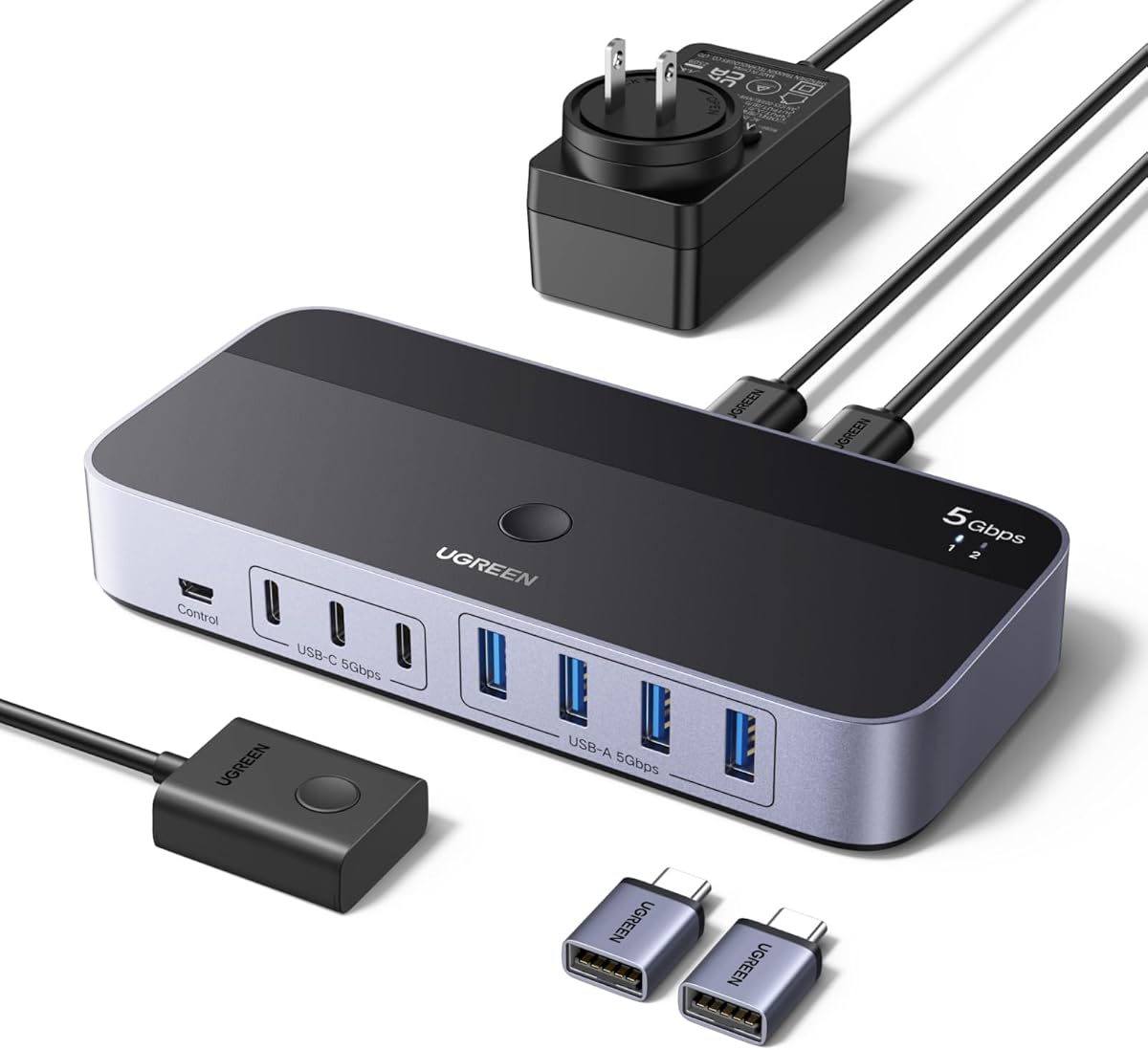
The UGREEN 2-in 7-Out USB 3.0 Switch is a robust solution for users who need to share many peripherals between two computers without extra hubs. It has a rating of 4.3 stars and offers four USB-A and three USB-C ports to accommodate a wide range of modern and legacy devices.
We may earn a commission when you buy through this link, at no additional cost to you.
It supports data transfer speeds up to 5Gbps ensuring that file moves between computers remain fast. The package includes a USB-C to USB-A adapter and a power adapter which simplifies setup and ensures stable performance for high-draw devices. You can switch via button or external controller.
While it provides extensive connectivity it does not support video transmission so it is strictly a USB peripheral switch. The included power adapter reduces the hassle of finding a matching supply for demanding peripherals. It helps keep your desktop tidy by consolidating all connections in one box.
This switch is ideal for power users or shared workspaces with multiple peripherals like cameras, drives, and input devices. It reduces clutter and costs by eliminating the need for separate hubs. For comprehensive USB sharing across two systems this is a highly capable option.
Seven total ports allow you to connect multiple devices simultaneously so you do not need to unplug to switch.
The package includes a USB-C adapter and power adapter so you can start using the switch right out of the box.
We may earn a commission when you buy through this link, at no additional cost to you.
This USB Switch 2 in 2 Out is designed for users who want the simplest possible solution to share a keyboard and mouse between two computers. It has a rating of 4.2 stars and offers a straightforward setup with a push button and an external controller to keep your desk neat.
We may earn a commission when you buy through this link, at no additional cost to you.
It works flawlessly with Windows, Mac, Linux and Chrome OS without requiring any drivers or software. The package includes two USB cables so you can start using the switch immediately. It is powered directly from the computer's USB port which simplifies setup by removing extra power cables.
While it only supports two devices at a time it is perfect for sharing just your primary input peripherals. It is not recommended for mass storage devices like external drives but works well for standard keyboards and mice. The LED indicator shows which computer is currently active.
We recommend this switch for users who want a clean and simple desktop setup without complex wiring. It allows you to switch between work and personal computers with a single click. For basic keyboard and mouse sharing this is a practical and efficient choice.
The included external controller lets you place the switch out of sight while keeping the toggle button within easy reach.
Because it draws power from the USB port you do not need to find an external power outlet for basic peripherals.
We may earn a commission when you buy through this link, at no additional cost to you.
The UGREEN 2-in 7-Out USB 3.2 Switch is a premium choice for users who need the fastest data transfer possible between two computers. With a rating of 4.3 stars it supports speeds up to 10Gbps which is twice as fast as standard USB 3.0 switches ensuring quick file transfers.
We may earn a commission when you buy through this link, at no additional cost to you.
It offers four USB-A and three USB-C ports to handle a mix of modern and legacy peripherals. The package includes a power adapter and cable converter so you can connect MacBooks and older laptops easily. You can switch using a button or external controller to keep your desk clean.
While it is a higher investment than basic switches the speed and port capacity justify the cost for power users. It is not a KVM so it does not support video sharing but excels at handling USB data and peripherals. The adapter ensures stable performance for high-draw devices.
We recommend this switch for professionals or users who move large files regularly between systems and need many ports. It reduces wait times and keeps your desktop organized with one central hub. For high-speed USB sharing this is a top-tier option.
10Gbps speeds allow you to transfer large files in seconds improving workflow efficiency between two systems.
A Type C converter and power adapter are included to ensure compatibility and stable operation for all devices.
We may earn a commission when you buy through this link, at no additional cost to you.
Choosing the right switch depends on your specific needs such as port count, speed requirements, and whether you need video sharing.
Consider how many devices you need to share between computers. A 2 in 2 out switch works for just a keyboard and mouse while a 2 in 4 out or 7 out switch accommodates printers and drives.
USB 3.0 and 3.2 switches offer faster data transfer speeds than USB 2.0 models. If you move large files regularly choose a switch that supports 5Gbps or 10Gbps speeds.
Some switches include an external power port for high-draw devices like external hard drives. Check if the switch supports extra power if you plan to share storage or heavy peripherals.
If you also want to share a monitor choose a KVM switch with HDMI support. A standard USB switch only shares input devices and not video output.
Ensure the switch is compatible with your operating system. Most modern switches are driver-free and work with Windows macOS Linux and Chrome OS.
Look for a switch with a clear LED indicator and a convenient button or remote. This helps you know which computer is active and makes switching easier.
Durable materials like aluminum alloy help with heat dissipation and longevity. A sturdy build ensures the switch lasts longer under daily use.
Check what comes in the box. Some switches include cables and adapters while others require you to purchase them separately.
Connect the switch to your computers using the provided USB cables. Ensure you plug the cables into the input ports on each PC rather than the output ports.
Connect your keyboard mouse and other peripherals to the switch output ports. The LED indicator will show which computer is currently active and receiving signals.
To switch between computers press the button on the switch or use the remote controller. If you experience disconnections try connecting an external power adapter if supported.
Yes most USB switches are compatible with both macOS and Windows systems. They operate at the USB hardware level and do not require specific drivers for either platform.
No a standard USB switch only shares USB peripherals like keyboards and mice. To share a monitor you need a KVM switch with HDMI or DisplayPort support.
Most switches work with power from the USB port alone but high-draw devices like external hard drives may need an external power adapter included or purchased separately.
Yes you can connect USB-C devices using a USB-C to USB-A adapter. Many modern switches include these adapters for mixed setups.
A USB 3.0 switch will not slow down your transfer speeds significantly. It maintains full 5Gbps speeds for connected devices.
This depends on the model. A 2 in 2 out switch supports two devices while a 2 in 7 out switch can support seven devices connected simultaneously.
No most USB switches are plug-and-play and do not require driver installation. They work instantly on supported operating systems.
Yes you can use a USB switch for gaming keyboards and mice. Ensure the switch has low latency for smooth performance.
In this guide we explored ten excellent options for sharing keyboards and mice between two computers. Whether you need a simple 2 port switch or a high-speed 10Gbps model there is a choice for every setup.
Prioritize features that match your workflow such as port count, power support, and switching ease. A reliable switch helps maintain productivity by reducing cable clutter and switching time.
Remember to check current availability and verify the specifications match your devices before purchasing. Prices and stock vary frequently so always review the latest details on the product page.