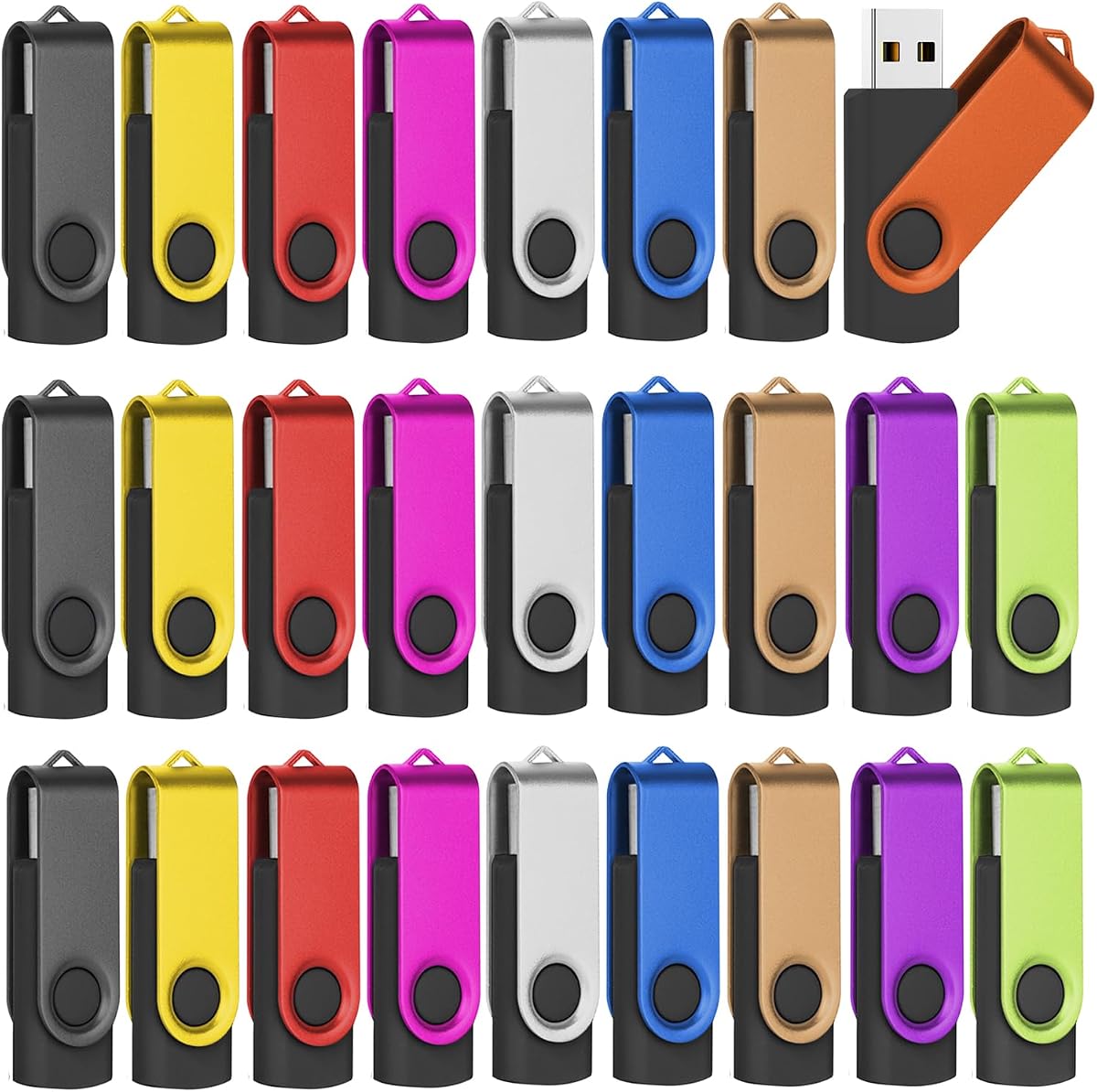
128MB 2.0 USB Flash Drive 50-Pack Thumb Drives Bulk with Lanyards
4.5Editor score
128MB capacity per drive
Includes 50 lanyards
Frosted metal cover design
This guide compares the top bulk USB flash drives for businesses and schools, evaluating capacity, speed, durability, and value across ten leading bulk packs
Bulk USB flash drives are essential for organizations needing reliable portable storage. Whether distributing training materials or backing up data, these drives offer a practical solution for sharing files efficiently across multiple devices without requiring complex software.
We evaluated ten leading bulk packs based on capacity, transfer speeds, durability, and overall value. Each product was analyzed for its suitability in business, educational, and personal contexts, ensuring you find the right balance between performance and cost for your specific needs.
Every pick below highlights key strengths and potential trade-offs to help you decide quickly. Prices and availability can change frequently, so always verify the latest details before purchasing to ensure you get the best deal for your bulk storage requirements.
4.5Editor score

4.6Editor score

4.6Editor score
The following table provides a side-by-side overview of all ten selected bulk USB flash drive options, highlighting their key specifications to help you compare capacity, interface types, and included accessories at a glance.


This pack of ten PNY Turbo Attaché 3 drives stands out for its balance of speed and durability. With USB 3.0 performance and a solid reputation, it is an excellent choice for businesses needing reliable data transfer across multiple devices.
We may earn a commission when you buy through this link, at no additional cost to you.
The key strength lies in its transfer speeds, which are up to ten times faster than standard USB 2.0 drives. This efficiency saves significant time when moving large files like videos or project data between computers, making it ideal for office environments.
One trade-off is the limited count of only ten units, which might be small for very large distribution events. Additionally, the higher cost per gigabyte compared to bulk options with lower capacity may impact tight budgets.
If you need performance and reliability for a small team or department, these drives are highly recommended. They offer a professional touch with minimal hassle, ensuring your data moves quickly and safely every time.
USB 3.0 technology ensures rapid file transfers, reducing wait times during presentations or data backups.
The sliding collar protects the USB connector without needing a removable cap that can get lost.
We may earn a commission when you buy through this link, at no additional cost to you.
This 100-pack offers an excellent solution for large events where simple data sharing is the goal. With 512MB per drive, they are perfect for distributing forms, small documents, or promotional content without needing large storage capacity.
We may earn a commission when you buy through this link, at no additional cost to you.
The standout feature is the sheer volume of drives provided, making it cost-effective for mass distribution. The metal clip and plastic body ensure they are durable enough for temporary use while remaining light enough for easy portability.
However, the storage is limited to half a gigabyte, which restricts use for media files. Transfer speeds are standard USB 2.0, so large files will take longer to move compared to newer standards.
For businesses needing branded or simple giveaways for conferences or school projects, these drives are a smart choice. They provide a convenient way to share essential information without overcomplicating the process.
With 100 units in one order, you can easily supply large groups without multiple purchases.
The small size makes them easy to carry and hand out during busy events.
We may earn a commission when you buy through this link, at no additional cost to you.
This pack combines high capacity with professional reliability, making it a strong candidate for demanding business tasks. The 64GB storage and USB 3.0 speed mean you can handle large media or software installations with ease.
We may earn a commission when you buy through this link, at no additional cost to you.
The main advantage is the combination of storage and speed. At up to 70MB/s transfer rates, these drives significantly reduce downtime during data transfers. The included warranty adds peace of mind for long-term use.
The higher price point may not be suitable for very tight budgets, and 20 units might be too few for massive events. However, the quality and performance justify the investment for critical applications.
If you need durable, high-capacity drives for training sessions or IT support, these are highly recommended. They offer a premium experience with reliable performance and essential protective features.
Transfer large files quickly with SuperSpeed USB 3.0 performance.
Hard plastic covers and rear loops prevent physical damage and loss.
We may earn a commission when you buy through this link, at no additional cost to you.
This 50-pack is an ideal budget solution for schools and businesses needing simple, functional drives. With 128MB of storage, they are perfect for documents, forms, or small multimedia files for presentations.
We may earn a commission when you buy through this link, at no additional cost to you.
The inclusion of 50 lanyards adds immediate value, making these drives easy to attach to keys or bags. Available in different colors, you can organize files or departments effectively without additional effort.
While the storage is modest, the price per unit is highly competitive. Speeds are standard USB 2.0, so they are best suited for text files rather than large media or software.
For educational events or office giveaways where budget is a primary concern, these drives deliver reliable value. They provide a practical and convenient way to share essential data efficiently.
Achieve significant savings with a bulk pack designed for affordable distribution.
Multiple colors help you organize drives by department or file type easily.
We may earn a commission when you buy through this link, at no additional cost to you.
This 50-pack from XUANREG offers straightforward, reliable storage for various uses. With 128MB capacity, these drives are well suited for sharing documents, small images, or essential system updates without unnecessary complexity.
We may earn a commission when you buy through this link, at no additional cost to you.
A key benefit is their broad compatibility across Windows, Mac, and Linux systems. You can plug them into printers, cars, or computers instantly, making them versatile tools for diverse environments.
The limited capacity might not suit large file transfers, and the speeds are standard USB 2.0. However, the inclusion of lanyards helps prevent loss, adding practical value to the package.
For general office use or school projects where simplicity matters, these drives are a solid choice. They deliver consistent performance without requiring extra setup or configuration for users.
Works seamlessly across Windows, Mac, and Linux without drivers or setup.
Compact design ensures easy carrying in pockets or bags anywhere.
We may earn a commission when you buy through this link, at no additional cost to you.
This 20-pack of 16GB drives offers a nice step up in storage for everyday needs. Whether for presentations, backups, or media sharing, the capacity allows for more substantial files than smaller drives.
We may earn a commission when you buy through this link, at no additional cost to you.
The swivel cap design protects the USB connector effectively, reducing wear and tear from frequent use. The integrated loop ensures you can attach them to keys or bags, preventing accidental loss during transport.
Transfer speeds are limited to USB 2.0, which may slow down large file operations. Additionally, 20 units might not be enough for very large distribution, so consider your specific needs.
For individuals or small teams needing reliable portable storage, these drives are a practical option. They balance capacity, protection, and ease of use for a variety of personal or business tasks.
360-degree swivel cap keeps the USB port safe from scratches and dust.
Built-in loop makes it easy to attach drives to keys or backpacks securely.
We may earn a commission when you buy through this link, at no additional cost to you.
EASTBULL focuses on quality, ensuring these 50 drives are double-tested before shipping. This attention to detail makes them a reliable choice for corporate gifts or event handouts where consistency is key.
We may earn a commission when you buy through this link, at no additional cost to you.
The inclusion of 50 lanyards adds convenience, allowing users to attach drives to keys immediately. With 16GB storage, you have enough space for presentations, videos, and essential training materials.
The drives operate at standard USB 2.0 speeds, which may limit transfer efficiency for large data sets. However, the stability and build quality help offset these limitations for general use.
For businesses looking for dependable bulk options, these drives offer a strong combination of reliability and value. They are well suited for distributing materials efficiently across large groups or teams.
Each drive undergoes double testing to ensure consistent performance and durability.
Lanyards for all units are included, making them ready for immediate use.
We may earn a commission when you buy through this link, at no additional cost to you.
This 20-pack provides a practical balance of cost and capacity for everyday needs. With 4GB storage, these drives are ideal for documents, photos, and smaller media files without requiring complex software.
We may earn a commission when you buy through this link, at no additional cost to you.
The LED indicator lights up when the drive is active, offering visual confirmation during data transfers. This feature helps users avoid accidental removal, which could damage data or the drive itself.
Storage capacity is limited to 4GB, which might be tight for modern video files. The USB 2.0 interface ensures broad compatibility but limits transfer speeds for larger datasets.
For simple tasks like sharing reports or small media, these drives are a solid option. They provide straightforward functionality with helpful indicators for safe data handling.
LED lights confirm read/write activity to prevent accidental unplugging.
Pre-formatted for broad compatibility across Windows and macOS systems.
We may earn a commission when you buy through this link, at no additional cost to you.
This bulk pack offers significant volume, making it perfect for large events or company-wide training. With 16GB per drive, you can distribute ample storage for training videos, software, or event materials.
We may earn a commission when you buy through this link, at no additional cost to you.
Like other EASTBULL products, these drives are double-tested for quality assurance. The included lanyards for all 50 units add convenience, ensuring every recipient can carry their drive safely.
The standard USB 2.0 interface may slow down transfers for heavy data usage. However, the large count ensures you can reach all necessary participants without additional orders.
For conferences or workshops requiring reliable handouts, these drives are an excellent choice. They offer a balance of capacity and volume for professional distribution scenarios.
A 50-unit pack ensures enough units for large teams or events.
Double testing guarantees consistent performance and reliability across all units.
We may earn a commission when you buy through this link, at no additional cost to you.
This 10-pack stands out for its high capacity and colorful design. With 64GB per drive, you can store large files like software, videos, or extensive project data without needing additional storage.
We may earn a commission when you buy through this link, at no additional cost to you.
The use of ten different colors helps you easily identify and organize content by type or team. Each drive includes a lanyard, making it convenient to attach to keys or bags to prevent loss.
Transfer speeds are limited to USB 2.0, which may not suit very large file operations. Additionally, the small pack count limits its use to smaller teams or individual distribution.
For users needing high capacity with organizational benefits, these drives are a practical solution. They offer a visually distinct way to manage and share important data across different groups.
64GB per drive handles large files and extensive data sets easily.
Ten different colors help you identify and manage different file types.
We may earn a commission when you buy through this link, at no additional cost to you.
Selecting the right bulk USB flash drives involves evaluating several key factors to ensure they meet your specific needs and budget.
Consider the typical size of the files you plan to store. For simple documents and forms, 128MB or 256MB may suffice. For videos or software, look for 16GB, 32GB, or higher options.
Choose capacity based on your specific data needs to avoid underutilization or running out of space.
USB 3.0 drives offer significantly faster data transfer speeds than USB 2.0. This is crucial for large files or frequent backups. Check the advertised read/write speeds for realistic expectations.
Prioritize USB 3.0 for efficiency if you regularly move large amounts of data.
Bulk drives are often used in varied environments. Look for durable materials like metal casings, protective caps, or swivel designs to prevent damage. Some models also offer warranty coverage for added security.
Select drives with robust physical designs to withstand daily handling and transport.
Ensure the drives work with your existing hardware and operating systems. Most modern drives support Windows, macOS, and Linux. Check for backward compatibility with older USB 1.1 or 2.0 ports if needed.
Choose universally compatible drives to avoid issues across different devices or locations.
Bulk packs often include accessories like lanyards, boxes, or dividers. These extras add value and convenience, especially for events or corporate distribution. Assess the included items before purchasing.
Consider the total value by evaluating accessories included in the bulk package.
Set a budget based on your total needs. While higher capacity and speed usually mean higher costs, bulk pricing can reduce the unit price. Balance features with affordability to maximize your investment.
Compare total package prices rather than just individual unit costs to find the best value.
Reliable brands often include quality checks to ensure each drive works properly. Look for products that mention testing or quality assurance in their descriptions to reduce the risk of defective units.
Prioritize brands with a reputation for quality control to ensure reliability across the entire batch.
Some manufacturers offer warranties on their bulk drives. A warranty can provide peace of mind, especially for higher-cost models. Check the terms and duration of any available support.
Select drives with warranty coverage to protect your investment against manufacturing defects.
To begin using your bulk USB flash drives, simply plug them into an available USB port on your computer. Most drives will automatically be recognized as removable storage. You can then drag and drop files onto the drive without needing to install additional software.
To safely eject the drives, always use the operating system's 'Safely Remove Hardware' feature. This ensures all data has been written completely before unplugging. Proper ejection helps prevent data corruption and extends the life of the drive.
Store your drives in a cool, dry place away from direct sunlight or moisture. Avoid bending the USB connector or exposing the metal contacts to static electricity. Using protective cases or keeping them attached to lanyards can further prevent loss or physical damage.
Bulk USB flash drives are commonly used for distributing files, software, or media to large groups. Businesses use them for training materials, schools for student assignments, and events for promotional giveaways. They provide a reliable, physical method of sharing data without requiring internet connectivity.
Most bulk drives from reputable manufacturers are reliable for standard use. Quality assurance processes often include testing to ensure functionality. However, reliability can vary by brand, so choosing well-reviewed products with warranties adds an extra layer of confidence for your purchases.
Yes, most bulk USB flash drives are compatible with both Mac and Windows systems. They often come pre-formatted in FAT32, which works across platforms. If you need to store files larger than 4GB, you may need to reformat to exFAT or NTFS depending on your needs.
No, bulk USB flash drives are typically plug-and-play devices. They do not require special drivers on modern operating systems like Windows 10/11, macOS, or Linux. Simply connect the drive, and your computer will recognize it as removable storage automatically.
The number you buy depends on your specific needs. For small offices, a 10 or 20-pack may suffice. For large events or schools, 50 or 100-unit packs offer better value. Always consider potential future needs and breakage when deciding on the quantity.
To format a USB flash drive, connect it to your computer and open File Explorer or Disk Utility. Right-click on the drive and select Format. Choose the file system (FAT32, exFAT, or NTFS) and proceed. Be aware that formatting erases all existing data on the drive.
USB 3.0 drives offer faster data transfer speeds compared to USB 2.0. They are also typically backward compatible with USB 2.0 ports. USB 3.0 is ideal for moving large files quickly, while USB 2.0 is sufficient for basic document sharing and lower storage needs.
We have reviewed ten top options for bulk USB flash drives, ranging from budget-friendly 128MB packs to premium 64GB selections. Each product offers unique strengths tailored to different use cases, ensuring you can find a fit for your organization.
When making your choice, prioritize capacity and speed based on your typical file types. Durability and included accessories like lanyards also play a crucial role in value. Selecting the right balance helps maximize your investment and satisfaction.
Prices and availability can change quickly, so verify the latest deals before purchasing. By choosing carefully, you ensure reliable data sharing and efficient workflows for your business or educational needs.