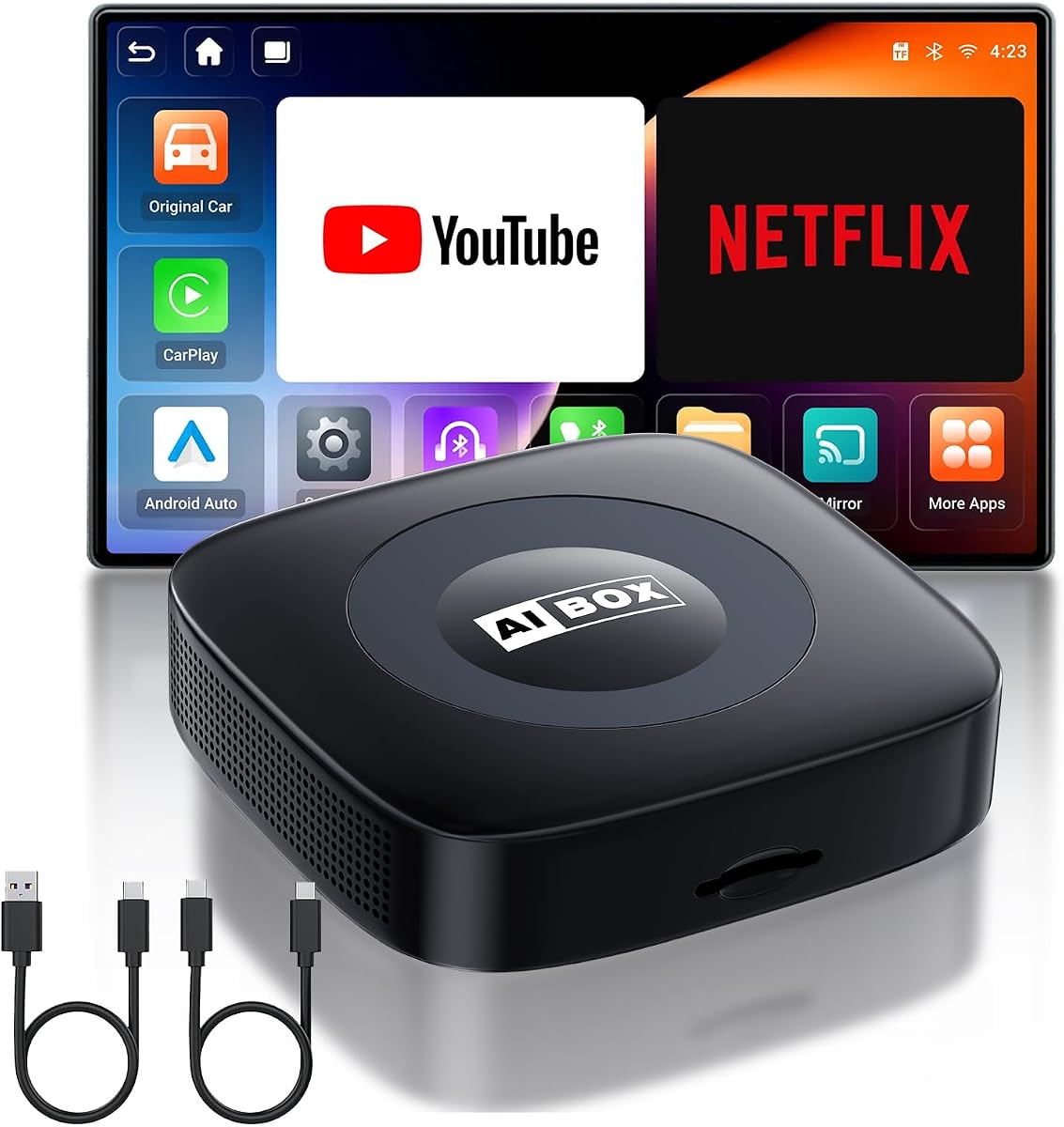
AI Box CarPlay 2026 Upgraded Magic Box
5.0Editor score
Affordable price point for most drivers
WiFi 6 and Bluetooth 5.3 support
Built-in TF card slot for offline media
This guide compares the top Carplay Box with Google Play models available in October 2026 to help you choose the best wireless adapter for your vehicle.
Transforming your factory wired infotainment system into a fully wireless smart hub is now easier than ever with modern Carplay Box with Google Play devices. These compact adapters unlock a world of streaming apps and navigation tools directly on your car screen without needing a phone cable. Drivers seeking convenience and entertainment options will find these boxes indispensable for daily commutes or long road trips.
We have evaluated the top ten Carplay Box with Google Play units based on connectivity stability, app availability, processing power, and ease of setup. Our analysis focuses on real-world performance including streaming quality, auto-connect reliability, and support for essential Android apps. Each product was assessed for compatibility with major car brands and its ability to handle multitasking during active driving sessions.
Each pick in this list highlights key strengths and potential limitations to help you match a device with your specific driving needs. We include detailed reviews of hardware specs, software features, and user-reported experiences to ensure informed decision-making. Please note that pricing and availability fluctuate regularly so check current listings before finalizing your purchase to secure the best deal.
5.0Editor score

4.7Editor score

5.0Editor score
This side-by-side comparison highlights the core specifications and capabilities of the leading Carplay Box with Google Play models available today to help you identify the best fit for your vehicle.


This AI Box Wireless CarPlay Adapter stands out as the top recommendation due to its full Android system and Play Store access. With a strong rating of 4.7 from verified buyers, it consistently delivers reliable performance for drivers seeking app freedom beyond standard CarPlay limits.
We may earn a commission when you buy through this link, at no additional cost to you.
The core strength of this device is its ability to transform your car screen into a genuine Android tablet. You can download YouTube, TikTok, Hulu, and other favorite apps directly onto the box using a mobile hotspot. The screen mirroring feature adds versatility allowing you to cast photos or presentations instantly without extra software.
Setup is remarkably simple requiring only a one-time Bluetooth pairing before the device auto-connects every time you start the engine. While the restriction on video playback while driving is a necessary safety feature it ensures compliance with local laws. The fast auto-connect and easy installation make this a solid choice for most factory wired CarPlay owners.
Drivers who want maximum control over their in-car apps should choose this adapter. It is ideal for those who switch between Android and iPhone users or need full app access during parked stops like charging EVs or waiting in parking lots.
Access the Google Play Store to download any app directly on your car screen for unmatched versatility.
Forget manual pairing after the first setup; the box reconnects automatically when you start your engine.
We may earn a commission when you buy through this link, at no additional cost to you.
The AI Box CarPlay 2026 Upgraded offers an unbeatable combination of price and performance for budget-conscious buyers. With a perfect 5.0 rating from users, it proves that affordability does not mean sacrificing quality or reliability in daily driving scenarios.
We may earn a commission when you buy through this link, at no additional cost to you.
This device excels at providing wireless CarPlay and Android Auto functionality while also acting as a media hub. The compact design reduces clutter and the TF card slot allows offline video playback when mobile signals are weak. Upgraded connectivity with WiFi 6 and Bluetooth 5.3 ensures faster and more stable connections than older adapters.
Performance is smooth thanks to the quad-core processor which handles navigation and streaming without noticeable lag. Although internal storage is modest at 16GB, the TF card support offsets this limitation for media lovers. The inclusion of a three-year warranty adds significant value and peace of mind for long-term use.
Buyers looking for a reliable entry-level AI box will find this model ideal. It fits well in families with mixed phone ecosystems and anyone needing a straightforward upgrade from wired to wireless connectivity without breaking the bank.
WiFi 6 and Bluetooth 5.3 provide faster pairing and more stable streaming than standard adapters.
Use the TF card slot to watch downloaded videos or listen to music when signal is unavailable.
We may earn a commission when you buy through this link, at no additional cost to you.
This premium Android AI Box delivers flagship performance with an 8-core Qualcomm platform and Android 13 OS. Its perfect 5.0 rating reflects top-tier stability and feature richness appealing to drivers who demand high-end technology in their vehicles.
We may earn a commission when you buy through this link, at no additional cost to you.
The standout feature is the ScenePilot AI ecosystem which offers unique tools like DriveChat and privacy locks. The SIM card slot for 4G LTE connectivity means you can enjoy apps and navigation even when your phone is not nearby or when using passenger devices. This level of autonomy is rare in standard adapters.
While the price is higher the device offers exceptional value through advanced software and hardware capabilities. The inclusion of trip history tracking and Bluetooth Lock helps families share vehicles securely without compromising personal data. Setup remains straightforward for compatible factory wired systems ensuring a premium experience out of the box.
Tech enthusiasts and fleet owners should consider this model for its advanced features. It is particularly useful for those who want LTE data independence and need robust privacy controls across multiple drivers sharing the same car.
ScenePilot provides tools like trip logging and privacy locks for a smarter secure driving experience.
SIM card support means you do not need to rely on a phone hotspot for apps or navigation.
We may earn a commission when you buy through this link, at no additional cost to you.
This LAMTTO adapter brings Gemini AI capabilities to your vehicle allowing hands-free planning and voice commands. Although the rating sits lower at 3.7 its unique AI features and robust hardware make it a notable option for tech-savvy users.
We may earn a commission when you buy through this link, at no additional cost to you.
The 4GB RAM ensures smooth multitasking when switching between navigation and entertainment apps. Users appreciate the ability to connect to a phone hotspot for Gemini to answer questions or plan road trips. The HDMI output adds flexibility for showing content on external monitors or rear screens for passengers.
While performance can vary the generous storage and RAM help mitigate slowdowns. The dual-band WiFi ensures stable streaming for video apps when parked. Drivers who prioritize voice AI assistance over raw performance might find this box appealing for its specialized co-pilot features.
Families with passengers needing constant entertainment will benefit from the HDMI port. It is a good fit for those exploring advanced AI assistant capabilities in their car while maintaining standard CarPlay and Android Auto support.
Use voice commands to plan routes or ask questions without taking your hands off the wheel.
HDMI output lets you connect the box to a monitor for shared viewing experiences.
We may earn a commission when you buy through this link, at no additional cost to you.
The CarlinKit box offers generous 64GB storage and an 8-core CPU to handle heavy multitasking. With a solid 4.3 rating it delivers a refined experience for those needing robust storage and Android Auto compatibility.
We may earn a commission when you buy through this link, at no additional cost to you.
Android 13 OS enables access to all modern apps and Google Play support. The 64GB space allows downloading movies and music for offline use without worrying about running out of room. SIM card support lets you connect to 4G networks directly reducing reliance on phone hotspots.
Performance remains stable even with multiple apps running simultaneously. The high core count ensures smooth playback and responsive navigation. While the cost is higher the storage and connectivity options justify the price for power users.
Power users who download large media files should choose this box. It is ideal for road trippers needing offline entertainment and drivers wanting seamless switching between CarPlay and Android Auto.
64GB internal memory allows ample space for downloaded movies and apps without external drives.
Switch effortlessly between CarPlay and Android Auto depending on the phone you are using.
We may earn a commission when you buy through this link, at no additional cost to you.
The Magic Box 3.0 boasts a flawless 5.0 rating and is optimized for streaming video content. Its updated hardware supports 5G WiFi and BT 5.0 ensuring smooth media delivery for passengers.
We may earn a commission when you buy through this link, at no additional cost to you.
Built-in apps like Netflix and YouTube allow passengers to enjoy entertainment when parked. The HDMI connection adds versatility allowing you to output video to other screens if needed. Compact design ensures the box sits unobtrusively near the USB port without cluttering the dash.
Setup is straightforward requiring minimal steps to get started. While hardware is less powerful than flagship models it handles streaming tasks well. The high rating suggests consistent reliability for users needing basic wireless upgrades and video playback.
Passengers who want continuous entertainment on road trips will appreciate this box. It is best for users prioritizing video apps and simple setup over advanced AI features.
Fast 5G WiFi ensures quick buffering and clear streaming even in high-demand scenarios.
Plug and play functionality allows you to start using the box immediately without complex steps.
We may earn a commission when you buy through this link, at no additional cost to you.
This LAMTTO model focuses on family needs with a 4-in-1 smart AI box approach. It supports both CarPlay and Android Auto while adding Gemini AI capabilities and HD output for rear seat screens.
We may earn a commission when you buy through this link, at no additional cost to you.
Parents can use the HD Media output to connect rear headrest displays keeping kids entertained during long drives. Gemini AI handles reminders and questions hands-free so the driver stays focused. Dual-band WiFi ensures smooth streaming of YouTube and other apps when the vehicle is stationary.
Offline USB playback helps fill entertainment gaps in rural areas with poor signal. While the device requires a hotspot it delivers consistent performance. The mix of AI and family-friendly features makes it suitable for households needing shared device support.
Families with children requiring dedicated entertainment will find this box valuable. It is an excellent choice for those wanting AI assistance without sacrificing connectivity for passengers.
HD Media output lets parents connect rear screens so kids stay entertained safely.
Use voice commands to manage reminders or find stops without touching the screen.
We may earn a commission when you buy through this link, at no additional cost to you.
This 5-in-1 adapter offers strong versatility supporting both CarPlay and Android Auto wirelessly. With a 4.4 rating it delivers reliable performance for users needing dual system compatibility in one device.
We may earn a commission when you buy through this link, at no additional cost to you.
Built-in apps like Netflix allow immediate streaming without extra setup. The TF card slot supports offline playback for trips with weak signals. The 4.2GHz processor ensures smooth mirroring and navigation performance. Auto-connect functionality makes daily use effortless for any compatible driver.
While the device switches between systems it does not run CarPlay and streaming simultaneously. This limitation simplifies the interface but restricts multitasking. Still it remains a cost-effective solution for families with both iPhone and Android devices.
Households using multiple phone systems should choose this adapter. It provides flexible connectivity options without requiring separate dongles for different devices.
Switch between CarPlay and Android Auto seamlessly depending on the connected phone.
Use TF card slot to play downloaded videos or music when internet is unavailable.
We may earn a commission when you buy through this link, at no additional cost to you.
The 3-in-1 AI Box emphasizes connection stability with its dual-band WiFi and robust build. With a 4.5 rating it is a reliable choice for drivers needing consistent streaming and fast auto-connect performance.
We may earn a commission when you buy through this link, at no additional cost to you.
Dual-band WiFi prevents interference and ensures smooth streaming even when navigation runs simultaneously. The aluminum alloy casing helps dissipate heat keeping the device stable during extended use. Built-in apps allow immediate entertainment when parked without needing manual app downloads.
Auto-connect occurs within seconds of starting the engine reducing wait time. While video playback is restricted to parked conditions for safety the audio experience remains seamless. This balance of stability and practicality makes it a solid pick for daily commutes.
Drivers prioritizing connection stability and durability should select this box. It is ideal for those needing fast reconnection and reliable streaming during short parking stops.
Using both 2.4GHz and 5GHz ensures stable streaming even in crowded wireless environments.
Aluminum alloy housing provides excellent heat dissipation for stable long-term performance.
We may earn a commission when you buy through this link, at no additional cost to you.
This Magic Video Box delivers straightforward functionality for wireless CarPlay and Android Auto. While its rating is lower at 3.8 it offers essential features like offline media support and dual system compatibility for budget-friendly buyers.
We may earn a commission when you buy through this link, at no additional cost to you.
The TF card slot is a key feature for offline playback allowing music or video streaming without internet. Built-in apps provide immediate streaming options when a hotspot is available. The 4.2GHz processor ensures smooth performance for basic navigation and entertainment needs.
Setup is quick with auto-connect working reliably for most users. It does not require additional apps or complex configurations. Drivers seeking a simple device to replace cables will find this box effective for its price.
Budget buyers needing offline storage options should choose this model. It is suitable for drivers who want dual system compatibility without needing advanced features or LTE support.
TF card slot lets you watch downloaded content when driving through areas with no signal.
Compatible with both iPhone and Android devices for maximum household flexibility.
We may earn a commission when you buy through this link, at no additional cost to you.
Selecting the right Carplay Box with Google Play involves evaluating several key factors to ensure compatibility and performance for your vehicle.
Ensure your car has a factory wired CarPlay or Android Auto system before purchasing. Most boxes do not support BMW Tesla or aftermarket head units so check your vehicle settings to confirm compatibility.
Verify that your car has a wired USB port that enables CarPlay to avoid purchasing an incompatible adapter.
Look for boxes with full Android access and Google Play Store support to download any app you need. Some units restrict apps to pre-installed ones which limits flexibility.
Choose a model with open Play Store access if you want to install new apps like games or travel tools.
Check whether the box supports Dual-Band WiFi for stable streaming and auto-connect. Some models include SIM card slots for LTE data which is useful when phone hotspots are unreliable.
Prioritize models with 5G WiFi support for faster streaming and lower latency during media playback.
Select a box with at least 4GB RAM and 32GB storage for smooth multitasking and app management. Models with higher core counts handle navigation and video without lag.
Ensure internal storage is sufficient for offline apps or consider models with TF card expansion options.
Verify that the device supports screen mirroring if you want to cast content from your phone. Many boxes only allow video streaming when parked for safety compliance.
Look for HDMI outputs if you plan to share content with rear seat passengers or external displays.
Choose products with comprehensive warranties ranging from 12 to 36 months to protect your investment. Good customer support is vital for resolving connection issues quickly.
Read reviews to confirm that the brand responds to support requests within 24 hours for quick solutions.
Opt for boxes running Android 13 or newer to ensure app compatibility and security updates. Older versions may struggle with modern streaming apps.
Check if the device receives Over-the-Air (OTA) updates to maintain performance over time.
Look for plug-and-play models that auto-connect after initial pairing to avoid daily manual setup steps. This feature saves time and improves convenience.
Ensure the setup process is intuitive and does not require extra apps or complex configurations on your phone.
To begin using your Carplay Box with Google Play plug it into your factory wired CarPlay USB port and start the engine. The device should auto-connect to your phone automatically so no manual pairing is needed after setup.
For optimal performance ensure your car is in park before streaming video apps. Connect to a mobile hotspot or use the SIM slot to enable internet access for downloading apps or streaming content.
Regularly clean the box with a dry cloth to remove dust and prevent overheating. Avoid exposing the device to extreme temperatures and ensure the vents remain clear for proper heat dissipation.
Most Carplay Boxes require a mobile hotspot for internet access to stream apps and download content. Some models include a SIM card slot for 4G LTE which removes the need for a hotspot connection.
No video playback is restricted to parked mode to comply with traffic safety laws. This limitation ensures you remain focused on the road while driving and prevents distractions.
Standard Carplay Boxes are not compatible with BMW or Tesla vehicles. You would need a specialized adapter designed specifically for those brands to achieve similar functionality.
Yes most models support both wireless CarPlay for iPhone and wireless Android Auto for Android devices. Some boxes also include full Android functionality for additional app access.
Simply plug the box into your car's wired USB port and start the engine. The device will pair via Bluetooth and auto-connect each time you start the car for seamless operation.
The box may warm up during extended streaming sessions which is normal. Aluminum alloy designs help dissipate heat and ensure stable performance during long drives.
Yes if the box has Google Play Store access you can download any supported Android app directly to the device. This gives you full freedom to install your favorite tools.
You do not need a Carplay Box if your vehicle already supports factory wireless CarPlay. These adapters are designed to upgrade wired systems to wireless connectivity.
The top picks including the AI Box Wireless CarPlay Adapter and LAMTTO models offer the best balance of performance app access and affordability for most drivers. Choosing the right model depends on your need for AI features streaming options and dual system support.
Prioritize connectivity stability and app flexibility when selecting your adapter. Look for boxes with full Android access and reliable auto-connect features to maximize convenience and entertainment during parked stops.
Prices and availability change frequently so check current listings to find the best deal on your preferred model. Always verify compatibility with your vehicle to ensure a smooth upgrade experience.