
HBN Watt Meter Plug with Backlight
4.6Editor score
Wide viewing angle display
9 data display modes
Data storage during outage
Discover the top energy consumption monitors for PC and home devices. This guide compares smart meters, plug-in plugs, and whole-home systems for accurate
Monitoring your computer and home energy use is essential for reducing costs and improving efficiency. The right device helps you track real-time usage without complicated setups or hidden fees. Choosing a reliable monitor ensures you get accurate data to make informed decisions about your power habits and consumption patterns.
We compared ten top-rated monitors based on accuracy, features, ease of use, and value. Each product was evaluated for its ability to track power, voltage, and costs across different appliance types. Our list includes smart plugs, panel monitors, and standalone testers suitable for any home or office environment.
Every pick shows unique strengths like app integration, circuit-level tracking, or simple plug-and-play design. Prices and availability change frequently, so check the latest listings before buying. Use this guide to find the best monitor that fits your specific needs and budget requirements today.
4.6Editor score

4.6Editor score

4.3Editor score
This side-by-side comparison highlights the key specifications and capabilities of each monitor to help you decide quickly. We focus on accuracy, display quality, smart features, and installation complexity across all ten models.


The Emporia Vue 3 stands out as a top choice for comprehensive home energy monitoring with its UL certification and real-time data capabilities. It offers a robust platform to track usage across multiple circuits with high accuracy and safety standards for residential electrical systems.
We may earn a commission when you buy through this link, at no additional cost to you.
Its standout quality lies in the included sixteen branch sensors that allow detailed appliance-level tracking without guesswork. Users can automate management settings in the app to optimize costs and monitor solar integration effectively for smarter home energy decisions.
While the system requires a 2.4 GHz WiFi connection and access to your circuit panel for installation, these requirements ensure precise data transmission. The trade-off is acceptable given the safety certification and long-term data retention features provided for ongoing analysis.
This monitor is ideal for homeowners wanting complete visibility into their power usage and savings potential. We recommend it for those ready to invest in a reliable system that delivers actionable insights and peace of mind regarding electrical safety and efficiency.
Monitor critical loads like HVAC and water heaters directly through the app to identify energy hogs instantly.
UL listing ensures every component meets rigorous safety standards to prevent overheating and short circuits.
We may earn a commission when you buy through this link, at no additional cost to you.
This upgraded watt power meter plug provides an accessible entry point for monitoring energy costs without smart home setup. It displays detailed parameters like volts, amps, and cumulative cost directly on a clear LCD screen for easy reading at any angle.
We may earn a commission when you buy through this link, at no additional cost to you.
Key strengths include its memory function that retains data even after power failures and its ability to warn users when loads exceed safe thresholds. The large display and customizable backlight ensure you can track usage comfortably day or night without straining your eyes.
The main trade-off is the lack of app connectivity and remote access, making it best for local monitoring of specific appliances. However, the affordability and reliability make it a practical choice for renters or those tracking individual devices without complex installations.
We recommend this plug for anyone needing quick, reliable checks on appliance efficiency and cost accumulation. It serves well for identifying high-consumption devices and adjusting habits to reduce bills without a major investment in smart systems.
Calculate electricity bills based on cumulative time and power usage to understand actual device costs.
Visual overload warnings protect your appliances and outlets from damage due to excessive power draw.
We may earn a commission when you buy through this link, at no additional cost to you.
The Meross Smart Home Energy Monitor brings premium smart home capabilities with a focus on privacy and solar integration. It delivers real-time tracking of power and costs while integrating seamlessly with Home Assistant for advanced automation and local control.
We may earn a commission when you buy through this link, at no additional cost to you.
Its standout features include solar surplus detection that automatically powers EV chargers and water heaters to maximize free energy usage. Data stays local without subscriptions or cloud lock-in, ensuring your usage details remain private and under your direct control.
While setup involves accessing your circuit panel and configuring Home Assistant, the benefits of detailed circuit-level monitoring and automation outweigh the effort. This trade-off is acceptable for tech-savvy users seeking robust control over their home energy ecosystem and privacy.
We recommend this monitor for solar homeowners and smart enthusiasts who value data privacy and automation. It is the perfect choice for reducing waste and optimizing energy use with intelligent features that adapt to your daily needs.
Automatically detect solar surplus to power high-use appliances and reduce reliance on grid electricity.
Local storage and no subscriptions ensure your energy data is secure and accessible only to you.
We may earn a commission when you buy through this link, at no additional cost to you.
SURAIELEC offers a precise outlet meter with Class 1.0 accuracy and a wide voltage range suitable for various electrical environments. Its clear backlight display and long-term data hold ensure you never lose track of usage even during power outages.
We may earn a commission when you buy through this link, at no additional cost to you.
The standout quality is its reliable measurement resolution and built-in battery backup for storing data over 90 days. This makes it easy to compare consumption across weeks and months without needing to check the device constantly for updates.
While it lacks app connectivity and requires manual resetting of data, these limitations are balanced by its straightforward operation and durable build. The compact design allows use in tight outlet spaces without blocking the second socket for other devices.
We recommend this for users needing accurate, standalone monitoring without smart features. It works well for tracking specific appliances and understanding cost accumulation with a focus on precision and long-term data retention.
Resolution of 0.001 kWh and 0.1 W ensures accurate readings for low-power devices.
High-quality fire-resistant materials provide safety and efficiency for daily monitoring tasks.
We may earn a commission when you buy through this link, at no additional cost to you.
This smart home energy monitor shines for rental properties and shared apartments by enabling fair electricity bill allocation per room or circuit. It includes sixteen 50A sensors to track usage accurately across different areas without needing separate meters.
We may earn a commission when you buy through this link, at no additional cost to you.
Key strengths include customizable rate templates for peak pricing and a super privacy mode that runs on local MQTT without cloud access. Users can analyze power usage in various time formats and export data for transparent billing among tenants.
The main trade-off is the complexity of installing sixteen sensors in your panel and configuring WiFi settings. However, the benefit of clear cost visibility makes it worth the effort for landlords and shared housing managers needing precise data.
We recommend this system for multi-unit properties seeking fair energy cost distribution. It provides the tools needed to manage resources efficiently while giving residents detailed insight into their own consumption patterns.
Automatic cost calculation based on time-of-use tariffs simplifies fair sharing among roommates.
Run locally on your own server to keep usage data completely private from external services.
We may earn a commission when you buy through this link, at no additional cost to you.
The HBN Watt Meter Plug delivers excellent visibility with its upgraded backlight and wide viewing angle for easy reading. It monitors nine types of data including power, energy, and frequency to give you a broad view of appliance performance.
We may earn a commission when you buy through this link, at no additional cost to you.
Its standout feature is the energy-saving backlight that turns off after fifteen seconds to conserve power while still being visible. The data storage ensures no information is lost during sudden outages, making it reliable for long-term tracking.
While it lacks cost calculation and the backlight duration is short, these factors are manageable for users prioritizing clarity and safety. The simple interface makes it easy to toggle through different parameters and understand usage without complex menus.
We recommend this plug for those needing clear, accurate local readings without smart features. It works well for checking device efficiency and ensuring safe power levels across your home electronics.
Wide angle display ensures you can read data comfortably from any position in the room.
Stored data persists through power failures so your tracking continues seamlessly over time.
We may earn a commission when you buy through this link, at no additional cost to you.
KETOTEK provides a user-friendly experience with its one-click interface to quickly access different electrical parameters. It offers multiple alarm thresholds for load power, energy, and cost to help you catch issues before they escalate.
We may earn a commission when you buy through this link, at no additional cost to you.
Its key strengths include a wide viewing LCD and a built-in chip that stores settings for easy switching between appliances. This convenience allows you to track multiple devices without reconfiguring the meter every time you change sockets.
The lack of app connectivity and manual reset requirements mean it is best for users who prefer a straightforward device. However, the high safety rating and reliable alarms make it a solid choice for monitoring household appliances safely.
We recommend this for users who want simple, effective tracking without smart complications. It serves well for those needing clear data access and alarm warnings to manage their power use responsibly.
One-click switching lets you jump between power data and cost info instantly.
Set thresholds for load, energy, and cost to get visual warnings when limits are exceeded.
We may earn a commission when you buy through this link, at no additional cost to you.
This value pack offers two energy monitors to track multiple devices simultaneously without needing extra purchases. Each plug displays eight modes including total cost and electricity quantity to help you manage usage across different areas.
We may earn a commission when you buy through this link, at no additional cost to you.
Key strengths include the durable ABS fireproof material and the ability to save settings and cumulative data after unplugging. The backlight turns off automatically to conserve power but can be manually activated for reading numbers in dark rooms.
While it lacks app connectivity and the display range is limited, these are acceptable trade-offs for the low cost and dual-unit convenience. It is perfect for households wanting to compare multiple devices side by side with consistent data.
We recommend this pack for families needing cost-effective monitoring for several appliances. It provides the tools to track usage and costs reliably without investing in a smart home system.
Buy two plugs to compare usage patterns between different appliances like TV and PC.
High-quality ABS material ensures fire resistance and longevity for daily plug-in use.
We may earn a commission when you buy through this link, at no additional cost to you.
The P4400 Kill A Watt remains a trusted classic for monitoring electrical usage with its simple interface and reliable performance. It assesses efficiency by tracking daily, weekly, monthly, and yearly usage directly on a large LCD display.
We may earn a commission when you buy through this link, at no additional cost to you.
Its key strength lies in its straightforward operation and compatibility with inverters, making it versatile for different power setups. You can calculate expenses easily and understand consumption trends without needing complex smart features or connectivity.
While it lacks modern app integration and detailed data logging, its reliability and ease of use make it a solid option for basic needs. The large display ensures you can read data easily from a distance without struggling to see numbers.
We recommend this for those needing a simple, proven tool for appliance tracking. It is ideal for users who prefer a plug-and-play solution without the complexity of smart home systems.
One-time setup lets you start tracking usage immediately without technical configuration.
Compare energy costs over time to identify devices that consume more power than expected.
We may earn a commission when you buy through this link, at no additional cost to you.
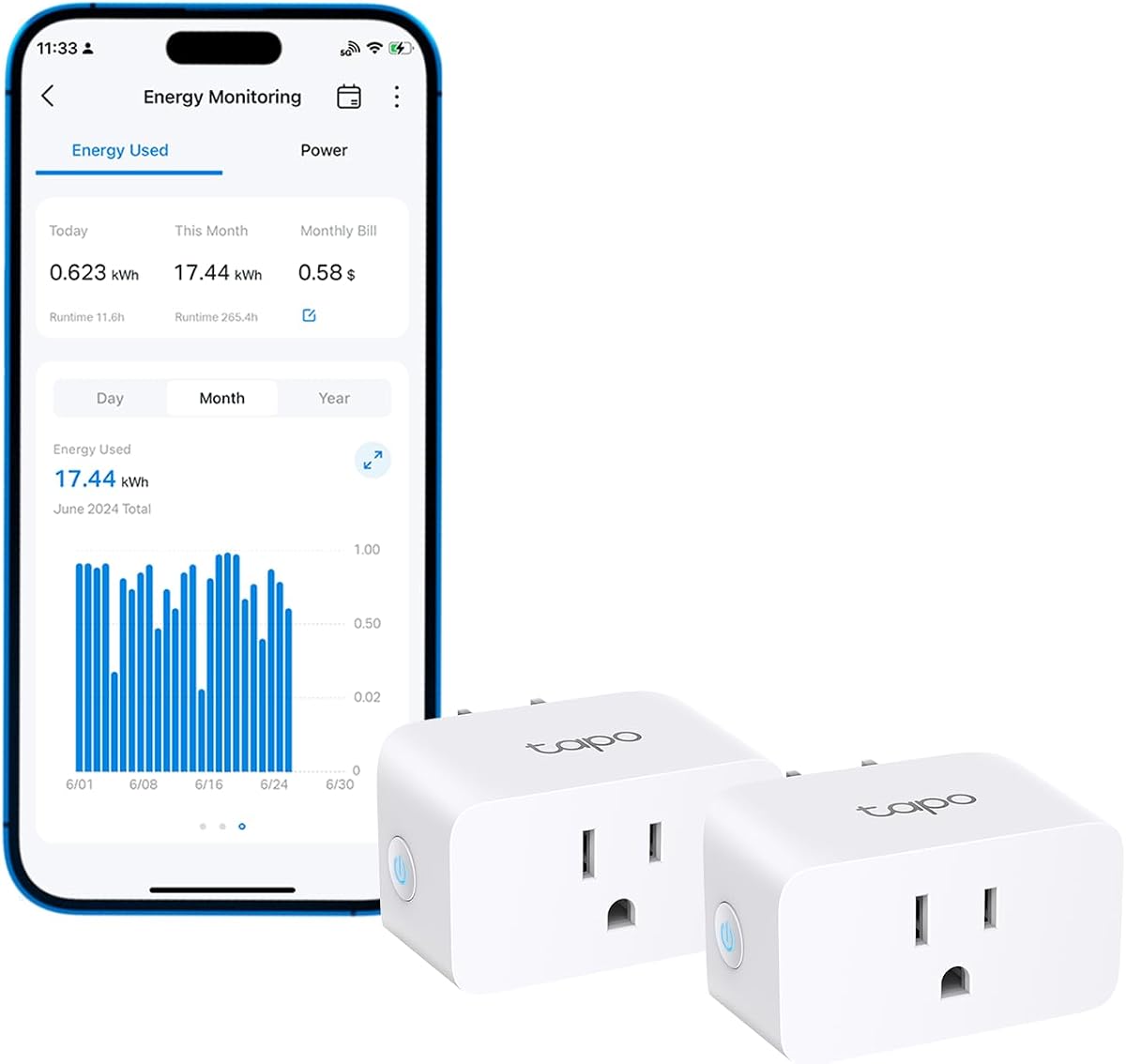
Tapo Smart Plugs offer seamless energy monitoring through their intuitive app with clear charts and usage statistics. They help optimize power use by providing insights into consumption patterns and allowing scheduling for off-peak operation.
We may earn a commission when you buy through this link, at no additional cost to you.
Key strengths include auto-shutoff for overload prevention and support for voice control via Alexa and Google Assistant. You can estimate bills easily and cut power when devices are fully charged to prevent overcharging and save energy.
The main trade-off is the need for WiFi connectivity and a 15A limit on load capacity. However, the convenience of remote access and smart features makes it a great choice for modern home automation setups.
We recommend this for tech-savvy users wanting smart controls with energy monitoring. It works well for those prioritizing convenience and scheduling alongside cost tracking.
Automatically run devices during off-peak hours to take advantage of lower electricity rates.
Auto-shutoff prevents overcharging and reduces wear on connected electronics.
We may earn a commission when you buy through this link, at no additional cost to you.
Selecting the right monitor depends on your specific needs for accuracy, connectivity, and installation complexity. We break down the key factors to consider.
Accuracy determines how closely the monitor reflects actual power usage. Look for devices with at least ±2% accuracy and fine resolution to detect small consumption changes.
Prioritize high accuracy models for reliable billing and efficiency insights.
A clear display with backlight ensures you can read data in any lighting condition. Consider viewing angles and menu simplicity for ease of use.
Choose units with large screens and clear labels for straightforward operation.
Wi-Fi enabled models allow remote tracking and app integration. Decide if you want alerts, automation, or just local data.
Select smart features based on your need for automation versus simplicity.
Panel monitors require electrical access and professional installation. Plug-in models are simpler and safer for users without technical skills.
Choose plug-in units for ease; panel units for full home coverage.
Local data storage protects your information from external access. Cloud-based systems offer convenience but may raise privacy concerns.
Evaluate storage options based on your privacy preferences and internet needs.
Built-in cost calculators simplify budgeting by converting kWh to currency. This feature helps visualize savings directly on the device.
Look for configurable rates to match your local electricity pricing plans.
Certifications like UL ensure the device meets safety standards for home use. Durable materials and overload protection extend product life.
Choose certified monitors with robust construction for long-term reliability.
Check if the device integrates with Home Assistant or your preferred smart home platform. API access enables deeper customization and automation.
Ensure compatibility before buying to avoid integration issues.
Start by plugging in the device securely and setting your local electricity rate in the menu or app. This ensures accurate cost tracking from the first day of use.
Regularly check the display or app logs to identify devices consuming power even when idle. Adjust habits like unplugging unused items or enabling scheduling to reduce waste.
Keep the device clean and free of dust to maintain proper ventilation. Avoid exposing the unit to moisture or direct sunlight for consistent performance.
Yes, plug-in monitors work perfectly with PCs and laptops as long as their power draw is within the device's rated capacity. Monitor the power supply to track total system consumption accurately.
High-quality monitors are accurate within ±2% which closely matches utility readings. Variations occur due to how utilities measure data over different intervals but differences are usually minimal.
Many plug-in monitors function completely offline displaying data locally. Smart models need WiFi for remote access but some offer local modes via LAN or MQTT.
These units are rated for indoor dry environments and not designed for wet areas. Keep them away from moisture and outlets near water sources to maintain safety.
Most modern monitors store data internally so you won't lose readings. After power returns the device continues logging and may show outage gaps in the history.
Yes, panel monitors require opening the electrical box which should be handled by a licensed electrician. Plug-in options are safer for DIY setups.
Some advanced panel monitors support solar integration to track production and usage. Plug-in units typically focus on consumption side of your home energy cycle.
Reset monthly or quarterly depending on how you use the reports. This helps compare usage across different billing periods more effectively.
Choosing the right monitor depends on balancing accuracy features and ease of installation. Plug-in models suit most PC users panel while panel systems offer deeper insights for whole-home control.
Prioritize safety certifications and data privacy when selecting a unit. Consider whether you need smart alerts or basic tracking to guide your final choice.
Prices and availability change frequently so verify the current listings before buying. Use this guide to find the perfect fit for your energy goals.