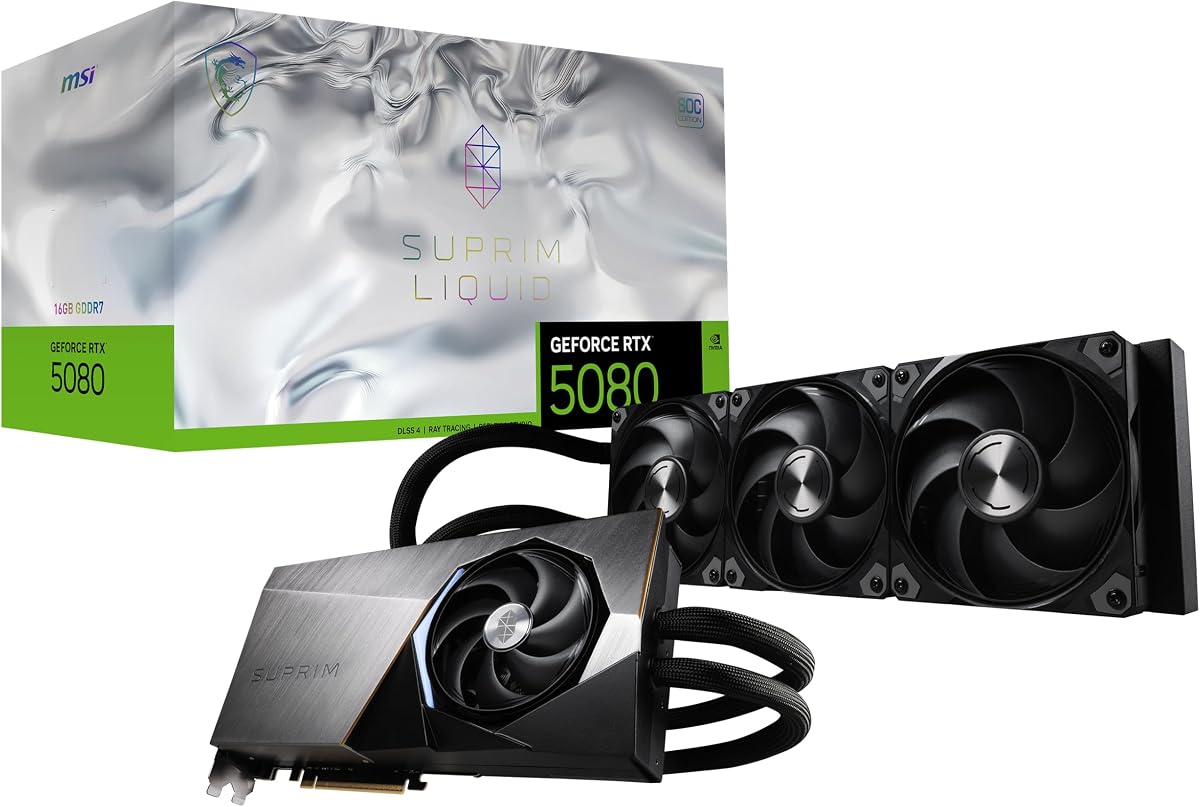
msi Gaming RTX 5080 16G SUPRIM Liquid SOC Graphics Card
4.7Editor score
Liquid cooling solution included
256-bit memory interface
DisplayPort 2.1a support
Explore our expert guide comparing the top 10 flagship graphics cards of October 2026 to help you choose the best GPU for gaming and creative workloads.
Flagship graphics cards represent the pinnacle of visual computing power available to consumers today. These high-end GPUs are designed to handle the most demanding tasks including ultra high resolution gaming and complex professional rendering workloads.
We have compiled this comprehensive list by analyzing performance metrics thermal efficiency and feature sets across the latest generation of discrete graphics processors. Our evaluation focuses on real-world capabilities and architectural advancements rather than raw specifications alone.
Each product selection highlights specific strengths and ideal use cases to help you find the perfect match for your system. Please note that availability and pricing can fluctuate frequently so verify current details before making a purchase decision.
4.7Editor score

4.4Editor score

4.7Editor score
The following table provides a side-by-side overview of key specifications and features for each flagship graphics card included in our guide. This comparison helps you quickly identify differences in memory architecture cooling solutions and connectivity options across the selected models.





The ASUS TUF Gaming GeForce RTX 5090 stands out as a top contender in the flagship category with its impressive 32GB GDDR7 memory configuration. Rated highly by users it delivers exceptional performance for both gaming and professional creative tasks. The integration of the latest Blackwell architecture ensures efficient processing and advanced AI capabilities.
We may earn a commission when you buy through this link, at no additional cost to you.
Key strengths include the robust cooling system featuring Axial-tech fans that maintain optimal temperatures even under heavy loads. The phase-change thermal pads contribute to long-term reliability and consistent performance over time. Military-grade components provide peace of mind regarding power delivery and structural integrity during intensive use.
One trade-off to consider is the physical size of the card which may require a larger chassis for proper clearance. Additionally the power requirements necessitate a capable PSU to ensure stable operation. These factors are acceptable given the performance benefits and future-proof memory capacity offered.
This graphics card is ideal for enthusiasts and professionals who demand maximum memory bandwidth and rendering power. If you are building a high-end workstation or a ultimate gaming rig this model offers the best balance of features and reliability available today.
The 32GB GDDR7 memory allows for handling massive textures and complex 3D scenes without bottlenecks.
Phase-change thermal pads and Axial-tech fans work together to keep the GPU cool during extended sessions.
We may earn a commission when you buy through this link, at no additional cost to you.
The msi Gaming RTX 5080 SUPRIM Liquid SOC brings a premium liquid cooling solution directly to the GPU for superior thermal regulation. This approach ensures that the card operates at peak efficiency without throttling during intense gaming sessions. The Blackwell architecture paired with 16GB GDDR7 memory provides a powerful foundation for modern workloads.
We may earn a commission when you buy through this link, at no additional cost to you.
Standout features include the extreme clock speed of 2760 MHz which boosts frame rates in supported titles. The inclusion of DisplayPort 2.1a and HDMI 2.1b ensures compatibility with the latest high bandwidth monitors and TVs. Users appreciate the build quality and the advanced cooling performance that minimizes noise.
Installation may be more involved compared to standard air cooled cards due to the liquid loop requirements. The price point is also higher than many air cooled alternatives reflecting the premium nature of the cooler. These considerations are worth it for those seeking the quietest and coolest operating flagship card.
Choose this card if you want top-tier thermal performance and are comfortable with liquid cooling setups. It is perfect for enthusiasts who prioritize silence and stability alongside raw gaming power in their high-end system builds.
Integrated liquid cooling maintains lower temperatures allowing for sustained high clock speeds without noise.
DisplayPort 2.1a and HDMI 2.1b support enable 8K gaming and high refresh rate displays.
We may earn a commission when you buy through this link, at no additional cost to you.
The GIGABYTE Radeon RX 9070 XT offers a compelling option for gamers seeking flagship performance without the highest price tag. It delivers strong rasterization performance and includes 16GB of GDDR6 memory for high resolution gaming. The WINDFORCE cooling system ensures efficient heat dissipation with server-grade thermal conductive gel.
We may earn a commission when you buy through this link, at no additional cost to you.
This card stands out for its value proposition making advanced gaming features accessible to a broader audience. The RGB lighting allows for aesthetic customization to match your setup. Users report stable performance and effective cooling even during long gaming sessions.
While it uses GDDR6 instead of the newer GDDR7 memory the bandwidth remains sufficient for current titles. Ray tracing capabilities are present but may not match the very top NVIDIA cards in every scenario. These trade-offs are acceptable given the significant cost savings.
Buy this card if you want strong 4K gaming performance and value. It is an excellent choice for builders who want high end specs without paying premium prices for the absolute latest architecture.
Delivers flagship level rasterization performance at a more accessible price point than competitors.
WINDFORCE system with server-grade gel keeps temperatures low without excessive noise.
We may earn a commission when you buy through this link, at no additional cost to you.
The GIGABYTE GeForce RTX 5080 Gaming OC is a reliable choice for those seeking powerful air cooled graphics performance. Powered by the Blackwell architecture it delivers excellent frame rates and supports DLSS 4 for enhanced visual fidelity. The 16GB GDDR7 memory ensures smooth performance in modern games and applications.
We may earn a commission when you buy through this link, at no additional cost to you.
Users appreciate the WINDFORCE cooling system which balances noise and thermal performance effectively. The card is designed for durability and offers a solid experience for high-end gaming. Setup is straightforward and it fits well in most mid to full tower cases.
One consideration is the physical footprint which requires adequate case clearance. Power supply requirements are also significant so ensure your system can support it. These are minor concerns compared to the overall performance and feature set offered.
This is a great card for gamers who prefer air cooling and want reliable performance. It is well suited for 1440p and 4K gaming setups that need high throughput and stable frame rates.
WINDFORCE system provides efficient heat dissipation for consistent performance during long sessions.
GDDR7 memory offers higher bandwidth for faster texture loading and smoother gameplay.
We may earn a commission when you buy through this link, at no additional cost to you.
The ASUS TUF Gaming GeForce RTX 5080 OC Edition emphasizes durability and reliability for long-term use. Military-grade components and protective PCB coating contribute to its robust construction. The Blackwell architecture and 16GB GDDR7 memory ensure strong performance across a variety of demanding tasks.
We may earn a commission when you buy through this link, at no additional cost to you.
The 3.6-slot design with massive fin array optimizes airflow for efficient cooling. GPU Tweak III software allows for easy performance tuning and monitoring. Users value the attention to detail in manufacturing and the overall stability of the card.
The size of the card requires a case with ample clearance which may not fit compact builds. High power consumption means a sufficient PSU is necessary. These factors are manageable for most standard gaming system configurations.
Choose this card if you prioritize build quality and long-term reliability. It is an excellent fit for enthusiasts who want a dependable powerhouse for high-end gaming and content creation.
Components are tested to higher standards to ensure longer lifespan and consistent performance.
Large fin array and Axial-tech fans work together to keep GPU temperatures low.
We may earn a commission when you buy through this link, at no additional cost to you.
The ASUS TUF Gaming GeForce RTX 5070 Ti delivers strong performance for its class with 16GB GDDR7 memory. The Blackwell architecture enables efficient processing and advanced features like DLSS 4. Phase-change thermal pads ensure optimal thermal performance even under heavy loads over time.
We may earn a commission when you buy through this link, at no additional cost to you.
Military-grade components contribute to a longer lifespan and stable operation. The protective PCB coating helps guard against environmental factors like moisture and dust. Users appreciate the ease of setup and the consistent frame rates in modern titles.
The card requires a PSU with specific connectors so verification is needed before purchase. Its physical size may not fit smaller cases without planning. These considerations are standard for high-end cards and do not detract from the value.
Buy this card if you need a strong performer for high-resolution gaming and want reliability. It is a great option for those who want a balance of performance and durability without the cost of the top-tier models.
Thermal pads outlast traditional paste to ensure sustained cooling performance under load.
PCB coating protects against short circuits from dust or moisture in various environments.
We may earn a commission when you buy through this link, at no additional cost to you.
The ASUS TUF Gaming GeForce RTX 5070 provides powerful performance with 12GB GDDR7 memory for most gaming scenarios. Its 3.125-slot design includes a massive fin array optimized for airflow from three Axial-tech fans. The Blackwell architecture supports advanced rendering and AI workloads efficiently.
We may earn a commission when you buy through this link, at no additional cost to you.
ASUS GPU Guard and bracket secure the GPU to reduce the risk of cracks during handling. Auto-Extreme precision automated manufacturing helps ensure higher reliability across production units. Users find the GPU Tweak III software intuitive for monitoring and tweaking performance.
The 12GB memory may be a limitation for extreme future resolutions or heavy asset loads. The card is still relatively large and requires proper case clearance. These are minor trade-offs for the performance and build quality provided.
This card is ideal for gamers who want strong 1440p performance in a well-built package. It suits those who value stability and reliable cooling in a mid to high-end configuration.
Included bracket secures the card to prevent physical stress during installation or use.
Automated assembly ensures consistent quality and reliability across every unit shipped.
We may earn a commission when you buy through this link, at no additional cost to you.
The ASUS Prime Radeon RX 9070 XT combines performance with a clean and compact design. Its 2.5-slot design allows for greater build compatibility while maintaining cooling performance. Phase-change thermal pads help ensure optimal heat transfer for enhanced reliability during operation.
We may earn a commission when you buy through this link, at no additional cost to you.
Users appreciate the Dual BIOS switch that lets you toggle between Quiet and Performance profiles easily. 0dB technology lets you enjoy light gaming in relative silence when the card is under light loads. Auto-Extreme manufacturing process ensures precision and reliability in production.
Memory bandwidth is limited to GDDR6 which may affect peak performance in some titles. The aesthetic features are more subdued compared to RGB heavy models. These are acceptable trade-offs for a cleaner looking build with solid performance.
Choose this card if you prefer a clean and reliable graphics solution without excessive lighting. It is a good fit for systems where space and noise levels are key considerations.
Switch between Quiet and Performance profiles to match your current activity needs.
0dB technology stops fans during light loads to keep your system quiet.
We may earn a commission when you buy through this link, at no additional cost to you.
The ASUS Dual GeForce RTX 5060 Ti is designed for smaller cases without sacrificing performance. Its 2.5-slot design maximizes compatibility and cooling efficiency for superior performance in small chassis. The Blackwell architecture supports 767 AI TOPS for efficient processing and acceleration.
We may earn a commission when you buy through this link, at no additional cost to you.
0dB technology lets you enjoy light gaming in relative silence during less demanding tasks. Dual ball fan bearings last up to twice as long as sleeve bearing designs for increased reliability. The Dual BIOS feature allows switching between Quiet and Performance profiles for flexibility.
While it is not the most powerful card available it offers strong value in compact builds. It may not match the performance of higher tier cards in extreme scenarios. These limitations are acceptable given its focus on size and efficiency.
Buy this card if you are building a small form factor PC that needs solid performance. It is ideal for 1440p gaming in compact cases where space and noise are priorities.
Compact design fits in smaller cases while maintaining robust cooling efficiency.
Dual ball bearings provide longer lifespan and reliability compared to standard sleeve bearings.
We may earn a commission when you buy through this link, at no additional cost to you.
The VIPERA NVIDIA GeForce RTX 4090 Founders Edition remains a powerhouse despite being from the previous generation. With 16,384 CUDA cores it delivers exceptional performance for rendering and gaming. The card supports 8K 60Hz HDR and Variable Refresh Rate as specified in HDMI 2.1a.
We may earn a commission when you buy through this link, at no additional cost to you.
Fourth Generation Tensor Cores provide up to 2x AI performance which benefits AI workflows and DLSS. Third Generation RT Cores offer up to 2x ray tracing performance for realistic lighting effects. NVIDIA Encoder is designed for streaming and content creation workflows.
Power efficiency is lower compared to newer Blackwell cards but raw performance remains competitive. The physical design requires careful consideration for case fit and cooling. These are acceptable trade-offs for the performance and compatibility it offers.
Choose this card if you need raw rasterization power and already own a compatible system. It is a strong option for 4K gaming and professional workloads that benefit from high CUDA core counts.
Third Gen RT cores deliver up to twice the ray tracing performance of previous generations.
Fourth Gen Tensor cores boost AI tasks and DLSS performance for smoother visuals.
We may earn a commission when you buy through this link, at no additional cost to you.
Selecting the right flagship graphics card involves evaluating several key factors to match your performance needs and system constraints.
The underlying architecture determines processing efficiency and feature support such as ray tracing and AI acceleration. Newer architectures like Blackwell offer improved power efficiency and advanced features like DLSS 4 for better image quality at high frame rates.
Prioritize the latest architecture for future-proofing and compatibility with modern games and applications.
Video RAM capacity is crucial for handling high-resolution textures and complex 3D scenes without stuttering. GDDR7 memory offers higher bandwidth compared to GDDR6 which benefits gaming and creative workloads significantly.
Look for at least 16GB of VRAM for 4K gaming and professional use to ensure smooth performance.
Efficient cooling maintains optimal GPU temperatures and prevents thermal throttling during extended gaming sessions. Solutions range from standard air cooling with multiple fans to advanced liquid cooling for maximum thermal headroom.
Choose a cooling solution that fits your case size and matches your tolerance for fan noise.
Flagship cards often require substantial space inside your PC chassis with wider and longer designs. Verify case clearance and slot availability before purchasing to ensure proper installation and airflow.
Measure your case internal dimensions and compare them to the card specifications for a perfect fit.
High-performance GPUs demand significant power and often require specific connectors like 12VHPWR. Ensure your power supply unit provides enough wattage and the correct cable configuration for stable operation.
Invest in a high-quality PSU with sufficient capacity to avoid potential instability or shutdowns.
Modern cards support latest standards like DisplayPort 2.1a and HDMI 2.1b for high bandwidth displays. These interfaces enable high refresh rates and resolutions like 8K for immersive visual experiences.
Check that your monitor supports the same standards to take full advantage of the card's capabilities.
Vendor software tools allow performance tuning thermal management and system monitoring for optimization. Features like Dual BIOS enable switching between performance profiles to match your usage scenario.
Look for cards that offer reliable software suites for easy management and control.
Install your flagship graphics card into a PCIe slot on your motherboard and secure it with the case bracket. Ensure the power connectors are firmly plugged into the GPU and the power supply to guarantee stable performance.
Keep your system interior clean by regularly removing dust from fans and heat sinks to maintain cooling efficiency. Use compressed air to gently blow away dust buildup without touching sensitive components with the nozzle.
Update graphics drivers regularly from the manufacturer's website to access new features and performance improvements. Monitoring software tools can help you track temperature and fan speeds to identify any potential issues early.
A flagship graphics card is the highest tier model from a manufacturer offering top processing power and advanced features. It typically includes maximum VRAM capacity and fastest clock speeds for demanding gaming and professional workloads. These cards are designed to handle the most intensive tasks like 4K gaming and 3D rendering.
For smooth 4K gaming with high settings you should aim for at least 16GB of VRAM. Modern titles are increasingly demanding and require more memory for textures and assets. Higher VRAM prevents stuttering and ensures stable frame rates in open world environments.
Liquid cooling generally offers lower temperatures and quieter operation compared to high-end air coolers. However it requires more complex installation and maintenance due to pumps and reservoirs. Air cooling remains reliable and simpler for most users who want effective thermal management.
Yes flagship graphics cards usually require high wattage power supplies often 850W or higher. Many newer models use the 12VHPWR connector so ensure your PSU supports it. A quality unit ensures stable power delivery and protects against potential hardware damage.
If you play at 4K resolution or do professional rendering they are worth the investment for their performance. For lower resolutions or casual use mid range cards often provide better value for money. Consider your actual needs and budget before deciding on a flagship model.
Many flagship cards are large and may not fit in compact cases without careful planning. Look for models with smaller form factor designs or measure your case carefully before buying. Some brands offer SFF ready versions designed for tighter spaces.
Ray tracing cores and Tensor cores significantly boost visual fidelity and frame rates via upscaling. High clock speeds and wide memory interfaces ensure data moves quickly to the rendering engines. Efficient cooling keeps the GPU from slowing down during long gaming sessions.
Update drivers regularly and use vendor software to monitor temperatures and adjust fan speeds. Ensure your case has good airflow by adding intake and exhaust fans as needed. Avoid overclocking beyond safe limits to maintain system stability and component longevity.
Our guide highlights top contenders including the ASUS TUF RTX 5090 and msi RTX 5080 SUPRIM for their exceptional performance. Each product offers unique strengths whether you prioritize cooling design memory capacity or value for money in your build.
Prioritize factors like GPU architecture memory type and cooling solutions when selecting a card that fits your system. Matching the card to your specific workload ensures you get the most out of your investment for years to come.
Always check current prices and availability before purchasing as market conditions can change frequently. Verify case clearance and power supply requirements to avoid installation issues when your new flagship graphics card arrives.