
Adesso AKB-132HB Multimedia USB Keyboard
4.2Editor score
Three built-in USB ports for easy access
Multimedia hotkeys for instant control
Quiet membrane switches for comfortable typing
Explore our expert guide comparing the top 10 keyboards with USB ports for connectivity and convenience across various devices and budgets in 2026.
Finding a keyboard with USB port can transform your workspace by reducing cable clutter and improving device connectivity. Whether you need extra hubs for peripherals or seamless integration with your computer, these keyboards offer versatile solutions for modern setups.
We evaluated ten top models based on build quality, hub functionality, compatibility, and user feedback to ensure you get the best value. Our comparison covers everything from budget-friendly options to premium mechanical boards designed for professionals and power users alike.
Each pick highlights key features, pros, and cons to help you decide quickly without reading endless specs. Please note that prices and availability change frequently, so always check current listings before making your final purchase decision today.
4.2Editor score

4.2Editor score
4.3Editor score
This side-by-side comparison outlines the key specifications and unique features of each selected keyboard to help you identify the model that best fits your workflow and connectivity needs.






The Adesso AKB-132HB stands out as an accessible entry point for users seeking a keyboard with USB port functionality. With a solid rating of 4.2 stars, it offers reliable performance for daily tasks without breaking the bank. Its standout feature lies in the three built-in USB hubs that provide easy access for peripherals like mice or flash drives.
We may earn a commission when you buy through this link, at no additional cost to you.
This model excels in convenience through its multimedia controls and Windows one-touch buttons, allowing quick launches of common apps like Calculator or Mail. The membrane key switches ensure a quiet typing environment, which is ideal for shared office spaces. Durability is maintained with a life expectancy up to five million keystrokes, ensuring longevity for regular use.
While it lacks backlighting and premium mechanical feel, these trade-offs are acceptable given its budget-friendly positioning. The lack of lighting means it may be less ideal for dim environments, but the focus remains on practical connectivity. The USB hubs are strategically placed to avoid cable clutter, enhancing overall workspace organization.
Best for home users or small offices needing basic connectivity and media shortcuts, this keyboard delivers essential functions efficiently. If you prioritize cost-effectiveness and hub access over advanced features, the Adesso AKB-132HB is a smart choice. Check current availability to secure the best deal for your setup today.
The three built-in USB hubs allow you to connect multiple peripherals directly to the keyboard without reaching behind the computer.
Membrane switches provide a silent typing experience that is gentle on the ears while lasting up to five million keystrokes.
We may earn a commission when you buy through this link, at no additional cost to you.
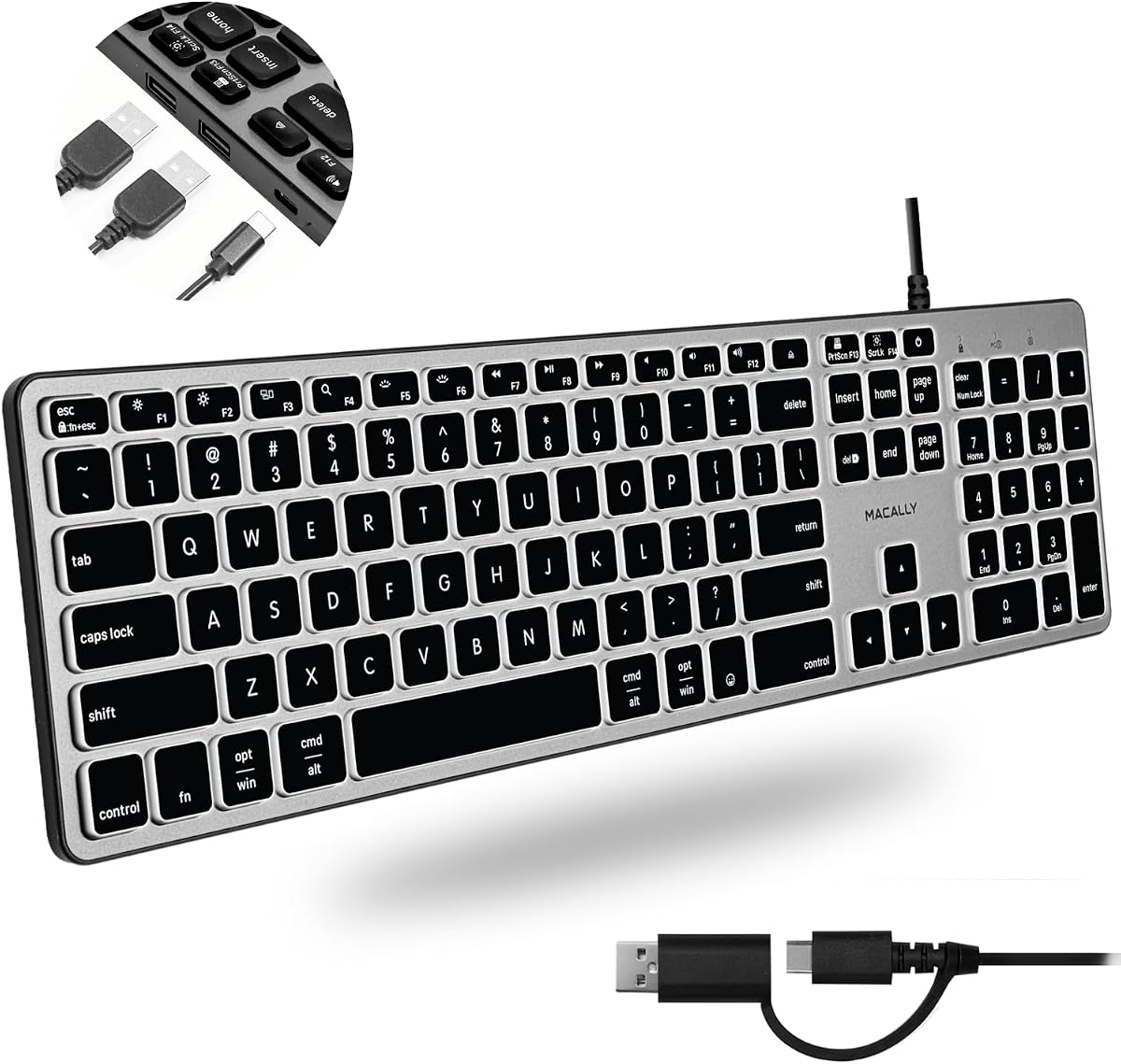
Macally’s Wired Keyboard for Mac earns the Editor's Choice badge for its exceptional blend of versatility and user-friendly features. Boasting a 4.4 rating, it caters to diverse ecosystems from Mac to PC and Android devices. The inclusion of two USB-A and one USB-C port ensures modern connectivity needs are met without additional dongles or adapters.
We may earn a commission when you buy through this link, at no additional cost to you.
The white LED backlit keys with three brightness levels offer comfort in low-light conditions, a significant upgrade over non-illuminated models. Auto OS detection adapts all 107 keys and shortcuts instantly to your system, streamlining setup across different devices. This seamless compatibility makes it a robust choice for multi-device users who value efficiency.
While priced higher than entry-level options, the build quality and feature set justify the investment for professional environments. The dual interface plug simplifies connection types but may require careful cable management if not monitored. US-based support and a two-year warranty add peace of mind, ensuring long-term reliability and responsive service.
Ideal for users juggling multiple operating systems, this keyboard provides reliable performance and essential hub connectivity. Its balanced feature set makes it a top contender for those seeking a unified input solution. Verify current stock levels to ensure availability for your workspace upgrade needs soon.
Auto OS detection ensures all keys and shortcuts work correctly across Mac, Windows, Android, and iPad without manual configuration.
White LED backlighting offers adjustable brightness for visibility, while the mixed USB ports support various peripheral connections.
We may earn a commission when you buy through this link, at no additional cost to you.
The Macally Premium Wired USB C Keyboard represents a sleek solution for modern setups requiring USB-C connectivity. Its 4.2 rating reflects strong performance and aesthetic appeal, making it suitable for Mac users and PC users alike. The space gray finish matches Apple devices perfectly, adding a touch of elegance to any workspace without compromising functionality.
We may earn a commission when you buy through this link, at no additional cost to you.
With 2 USB-A and 1 USB-C ports, it supports up to three external devices directly from the keyboard surface. Quiet scissor switches provide a low-profile typing experience that reduces fatigue during long work sessions. All 107 keys remain fully functional across Mac, PC, and Chrome systems, ensuring versatility for mixed computing environments.
Although designed primarily for newer USB-C devices, this limitation ensures faster data transfer and power delivery capabilities. The lack of multimedia keys is acceptable for users prioritizing clean layouts over complex shortcuts. Lifetime support from Macally underscores confidence in product durability and customer service responsiveness.
Perfect for those invested in the Apple ecosystem or modern PCs with USB-C ports, this keyboard combines style and substance. The integrated typing angle and compact design save desk space while maintaining full-size functionality. Check current listings for availability to enhance your device setup with precision and style.
USB-C wired connection ensures compatibility with latest laptops and Macs while supporting diverse USB-A peripherals.
Space gray finish and low profile scissor switches deliver elegance and comfort for extended daily use.
We may earn a commission when you buy through this link, at no additional cost to you.
The Logitech K120 offers a straightforward, reliable keyboard solution with USB connectivity, ideal for basic workstation needs. Its high rating of 4.6 stars underscores durability and user satisfaction across home and office environments. This model focuses on essential typing performance without extra features that drive up cost or complexity.
We may earn a commission when you buy through this link, at no additional cost to you.
Built with a spill-resistant design and anti-fade keys, the K120 withstands daily wear and accidental spills effectively. The deep-profile keys and full-size layout with number pad enhance comfort during extended typing sessions. Installation is effortless with plug-and-play USB functionality that requires no software drivers or setup steps.
While it lacks USB hubs, the design emphasizes robustness and simplicity for users prioritizing stability over connectivity options. The inclusion of certified recycled plastic reflects Logitech’s commitment to sustainability without compromising product quality. This makes it an eco-friendly choice for environmentally conscious buyers and corporate purchasers.
Best suited for budget-conscious users or shared office desks where durability is key, this keyboard provides dependable everyday performance. Its basic design ensures compatibility across Windows versions while minimizing setup hassle. Verify current availability to secure a long-lasting typing solution for your computer setup.
Spill-resistant build and deep-profile keys ensure long life and comfortable typing even in busy environments.
Plug-and-play USB connection with no driver software needed means you can start typing immediately after plugging in.
We may earn a commission when you buy through this link, at no additional cost to you.
The Perixx PERIBOARD-409H is designed for users needing a compact keyboard with USB hub capabilities without sacrificing essential functionality. With a rating of 4.4 stars, it balances size and performance well for tight desk spaces. The mini layout removes the number pad, freeing up valuable desk real estate for other equipment.
We may earn a commission when you buy through this link, at no additional cost to you.
Two built-in USB hubs on the side provide convenient access for mice or flash drives without needing extra ports on the computer. High-quality ABS key caps with durable UV coating ensure longevity through over 10 million keystrokes. The included 5.9-foot cable offers flexibility in positioning whether the computer sits on or under the desk.
Lacking a number pad and lighting, this keyboard is best for text entry and basic input tasks. The membrane switches offer responsive typing that suits office work environments. No drivers are required for operation, making it easy to deploy across multiple machines with minimal IT intervention.
Ideal for workstations with limited desk space, this keyboard offers reliable input and hub access in a smaller footprint. Users who prioritize cable management and desk organization will find its design practical. Check current listings to confirm availability for your compact workspace setup needs today.
Compact layout eliminates the number pad to save desk space while keeping essential keys accessible.
Two built-in USB hubs on the side offer easy peripheral connections without needing extra computer ports.
We may earn a commission when you buy through this link, at no additional cost to you.
The KOPJIPPOM Large Print Keyboard addresses accessibility needs with oversized fonts and LED backlighting. Its 4.5 rating reflects strong user satisfaction, especially among those needing clearer visibility during typing. This model enhances usability for visually impaired users, elderly individuals, or environments with low light conditions.
We may earn a commission when you buy through this link, at no additional cost to you.
White LED backlighting provides evenly distributed light across keys that can be turned on or adjusted easily. The full-size layout with numeric keypad ensures all standard typing functions remain available without compromise. Ergonomic features like adjustable tilt feet help reduce hand fatigue during extended use sessions.
While multimedia key support on Mac systems is limited, Windows compatibility remains robust for most applications. The spill-resistant construction adds durability for environments prone to accidental spills or frequent use. No drivers are needed for setup, making deployment simple across various Windows and Raspberry Pi systems.
Best for schools, libraries, or home offices requiring accessible typing tools, this keyboard combines visibility and reliability. Its design supports clear text recognition while maintaining comfortable typing ergonomics. Check current stock to ensure availability for your inclusive workspace or assistive technology setup.
Large print keys and white LED backlighting ensure clear visibility for users with vision challenges.
Full-size ergonomic layout and spill-resistant design protect your setup while providing comfortable typing.
We may earn a commission when you buy through this link, at no additional cost to you.
The Dell Wired Keyboard KB216 provides a practical multimedia solution for everyday home or office computing. With a rating of 4.6 stars, it is valued for reliability and simplicity in professional settings. Its black finish and compact design blend well into corporate environments without distraction or excess.
We may earn a commission when you buy through this link, at no additional cost to you.
Chiclet-style keys offer a modern typing experience that reduces accidental presses during fast work. Multimedia controls enhance user interaction with music or video applications directly from the keyboard. The spill-resistant build ensures durability in busy desks, protecting internal components from liquid damage over time.
Although it lacks USB hubs, the focused design keeps the layout clean and functional for standard input needs. Compatibility with Dell desktops and laptops ensures seamless integration within existing business infrastructures. Setup is straightforward with USB connectivity requiring no additional drivers or configuration.
Ideal for office deployments or home use needing basic multimedia functionality and durability, this keyboard delivers consistent performance. Users who prioritize straightforward operation and clean aesthetics will find it well suited. Verify current availability to add dependable input functionality to your workstation setup today.
Chiclet keys and slim profile provide a modern look suitable for corporate offices and home desks.
Spill-resistant construction ensures the keyboard withstands daily wear and accidental spills in busy environments.
We may earn a commission when you buy through this link, at no additional cost to you.
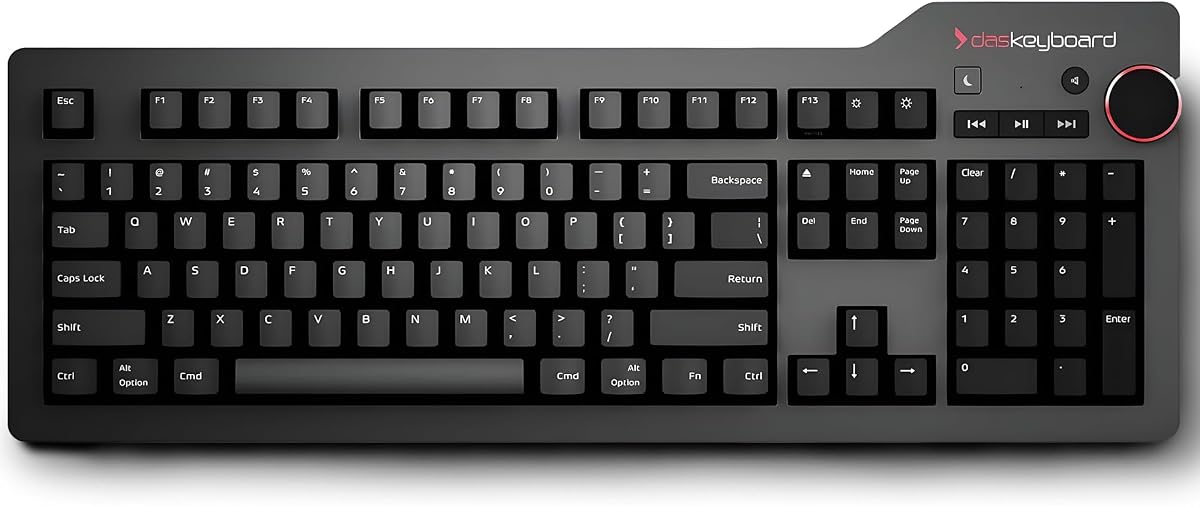
Das Keyboard 4 Professional for Mac delivers an unmatched mechanical typing experience with Cherry MX Blue switches. Rated at 4.3 stars, it attracts users seeking precision and tactile feedback in their input devices. The aluminum top plate adds durability and a premium aesthetic that stands out in professional setups.
We may earn a commission when you buy through this link, at no additional cost to you.
A blazing fast 2-port USB 3.0 hub allows rapid file transfers at up to 5Gb/s, enhancing productivity. Dedicated media controls including a large volume knob simplify audio management without window switching. Full N-key rollover ensures accurate input even during complex keystroke sequences, benefiting gamers and power users alike.
The audible feedback from Cherry MX switches may disturb quiet environments, but offers satisfying confirmation of every keystroke. Mac-specific key functions streamline workflows for Apple users who need seamless OS integration. The detachable footbar ruler allows precise keyboard tilt for optimal ergonomic comfort.
Best for professionals who value premium build and mechanical precision, this keyboard justifies its price with robust features. The USB 3.0 hub significantly improves data workflow compared to slower alternatives. Check availability to upgrade your typing and connectivity experience with professional-grade hardware.
Cherry MX Blue switches provide tactile and auditory feedback for precision typing up to 50 million keystrokes.
USB 3.0 hub offers fast data transfer for large files and efficient peripheral connectivity.
We may earn a commission when you buy through this link, at no additional cost to you.
Das Keyboard 4 Professional is a top-tier mechanical keyboard designed for productivity and precision typing across systems. Its 4.3 rating reflects user appreciation for its tactile feedback and robust build quality. The aluminum top plate ensures longevity while providing a sophisticated look that complements modern desktops.
We may earn a commission when you buy through this link, at no additional cost to you.
Integrated USB 3.0 hubs offer fast data transfer rates for large files and multiple peripheral connections efficiently. Cherry MX Blue mechanical switches deliver precise keystroke feedback up to 50 million times, ideal for heavy typists. Full N-key rollover guarantees that simultaneous keystrokes register accurately during complex tasks.
The lack of backlighting means it may be less suitable for low-light environments, but focus remains on function over flair. Dedicated media controls and volume knob simplify audio management without requiring software. Detachable footbar provides ergonomic tilt for comfortable long-term typing comfort.
Perfect for professionals and enthusiasts seeking high-performance typing and connectivity, this keyboard excels in reliability. Its USB 3.0 hub significantly speeds up workflow for data-intensive tasks. Verify current listings to ensure availability for your professional input device upgrade needs.
Cherry MX Blue switches paired with aluminum top plate deliver unmatched typing precision and long lifespan.
USB 3.0 hub enables rapid file transfers and seamless peripheral integration on your desktop.
We may earn a commission when you buy through this link, at no additional cost to you.
The Genuine Dell Business Multimedia Keyboard provides essential connectivity and productivity tools for corporate environments. Rated at 4.6 stars, it is designed to integrate seamlessly with Dell computers and laptops. Its layout supports common multimedia functions and USB connectivity to improve daily workflow efficiency without clutter.
We may earn a commission when you buy through this link, at no additional cost to you.
Fourteen hot keys allow instant access to functions like email, calculator, and browser shortcuts for rapid task switching. Two USB hub ports enable peripheral connection directly from the keyboard for streamlined cable management. The removable palm rest adds comfort during extended work sessions while the spill-resistant design protects internal electronics.
While lacking modern backlighting, the keyboard focuses on practical functionality and durability suited for business use. Compatibility with specific Dell part numbers ensures correct integration for legacy or specific hardware needs. Setup is plug-and-play with USB connection that requires minimal configuration time for IT staff.
Best for office replacements or Dell-specific workstations needing hub connectivity, this keyboard offers solid performance. Its design prioritizes user convenience and device protection over advanced features. Check current availability to secure a reliable input and connectivity solution for your business setup.
Fourteen multimedia hotkeys allow quick access to common tasks without navigating through menus.
Removable palm rest provides ergonomic support while spill-resistant design ensures durability.
We may earn a commission when you buy through this link, at no additional cost to you.
Selecting the right keyboard with USB port involves considering connectivity, layout, switch type, and compatibility with your devices.
The number and type of USB ports determine how many peripherals you can connect directly. Look for keyboards offering at least two ports, preferably with USB-C support for modern devices. This reduces cable clutter and simplifies setup for mice and drives.
Ensure your chosen model provides the right mix of USB-A and USB-C ports to match your current peripherals.
Membrane switches offer quiet, budget-friendly typing, while mechanical switches provide tactile feedback and durability. Choose based on your environment noise tolerance and typing volume needs over long periods.
Mechanical keyboards last longer but may be louder; membrane is better for shared or quiet offices.
Check if the keyboard supports your operating system’s key layout and shortcut functions. Many models offer auto OS detection to adapt seamlessly across Windows, Mac, and Linux systems.
Auto detection prevents key mapping errors and ensures full functionality without manual configuration.
Comfort is critical for extended typing sessions, so consider keyboard tilt, palm rests, and key profiles. Low-profile designs save space while ergonomic angles reduce hand strain during work.
Adjustable feet and palm rests help maintain proper posture and reduce fatigue.
Spill-resistant designs and durable key caps extend the lifespan of the keyboard. Materials like aluminum tops and high-quality ABS plastics offer better protection against daily wear and spills.
Invest in models with proven durability standards if you work in busy or active environments.
Multimedia keys, backlighting, and volume knobs add convenience for specific use cases. Consider these extras if you frequently adjust audio or need visibility in low light.
Prioritize features that match your workflow needs to avoid paying for unused functions.
Prices vary widely from budget to premium models, so balance cost with expected longevity. A warranty of at least two years provides peace of mind for potential defects or failures.
Check warranty terms and support options to ensure reliable assistance when needed.
Longer cables offer flexibility in positioning the keyboard relative to your computer. Wired USB connections provide stability without battery concerns common to wireless alternatives.
Choose cable length that reaches comfortably to your computer port without excess slack.
Connect the keyboard to an available USB port on your computer for instant plug-and-play functionality. Most models will work immediately without needing driver installation or extra software.
Keep your workspace clean to prevent dust buildup between keys that could interfere with typing. Use a soft cloth or compressed air to gently clean the keyboard surface regularly.
Avoid placing drinks directly over the keyboard to minimize spill risks and ensure longevity of internal components. Use protective covers if you work in environments prone to accidental liquid spills.
Yes, many keyboards with built-in USB ports function as hubs, allowing you to connect mice, drives, and other peripherals directly. This reduces the need for separate hubs and simplifies cable management. Always check the port speed and power ratings to ensure compatibility with your devices.
Mechanical switches offer tactile feedback and longer lifespans, ideal for heavy typists or gamers. Membrane switches are quieter and more affordable, suiting casual users and shared workspaces. Your choice depends on priority for durability versus noise levels and budget constraints.
USB hubs on keyboards support standard USB-A and USB-C devices like flash drives and mice. However, high-power devices might require external power or direct computer connection for reliable operation. Always verify power requirements for devices you intend to connect.
USB-C provides faster data transfer rates and universal connectivity with modern laptops and Macs. It supports reversible plug orientation for easier connection and often includes power delivery features. Choosing USB-C ensures compatibility with newer devices without needing adapters.
Backlit keyboards improve visibility in low-light environments, reducing eye strain during night work. While not essential, they enhance user comfort and efficiency for those working after dark. Consider them if you frequently type in dimly lit rooms or during evening hours.
Many models offer cross-platform compatibility including Mac, Android, and iPad through auto OS detection. Verify key mappings and multimedia functions support for your specific device OS. Most mainstream keyboards work well across major operating systems without special setup.
Spill-resistant designs channel liquids away from internal components through drainage holes and sealed circuits. This prevents short circuits and corrosion that could damage the keyboard electronics. Regular cleaning after spills ensures continued protection and extends the device lifespan.
Most manufacturers offer 1 to 2 year warranties covering defects and material failures. Premium models may include lifetime technical support or extended protection plans. Always review warranty terms for specific coverage details and return policies before buying.
Our top picks highlight models like Adesso for budget users, Macally for versatility, and Das Keyboard for premium mechanical feel. Each delivers reliable USB connectivity with distinct strengths suited for different needs and environments.
Prioritize hub configuration and switch type based on your daily workflow requirements to maximize productivity. Balancing comfort, durability, and price ensures long-term satisfaction with your input device.
Always verify current prices and stock before purchasing since availability changes frequently. Choose the model that best matches your device ecosystem and typing preferences for optimal results.