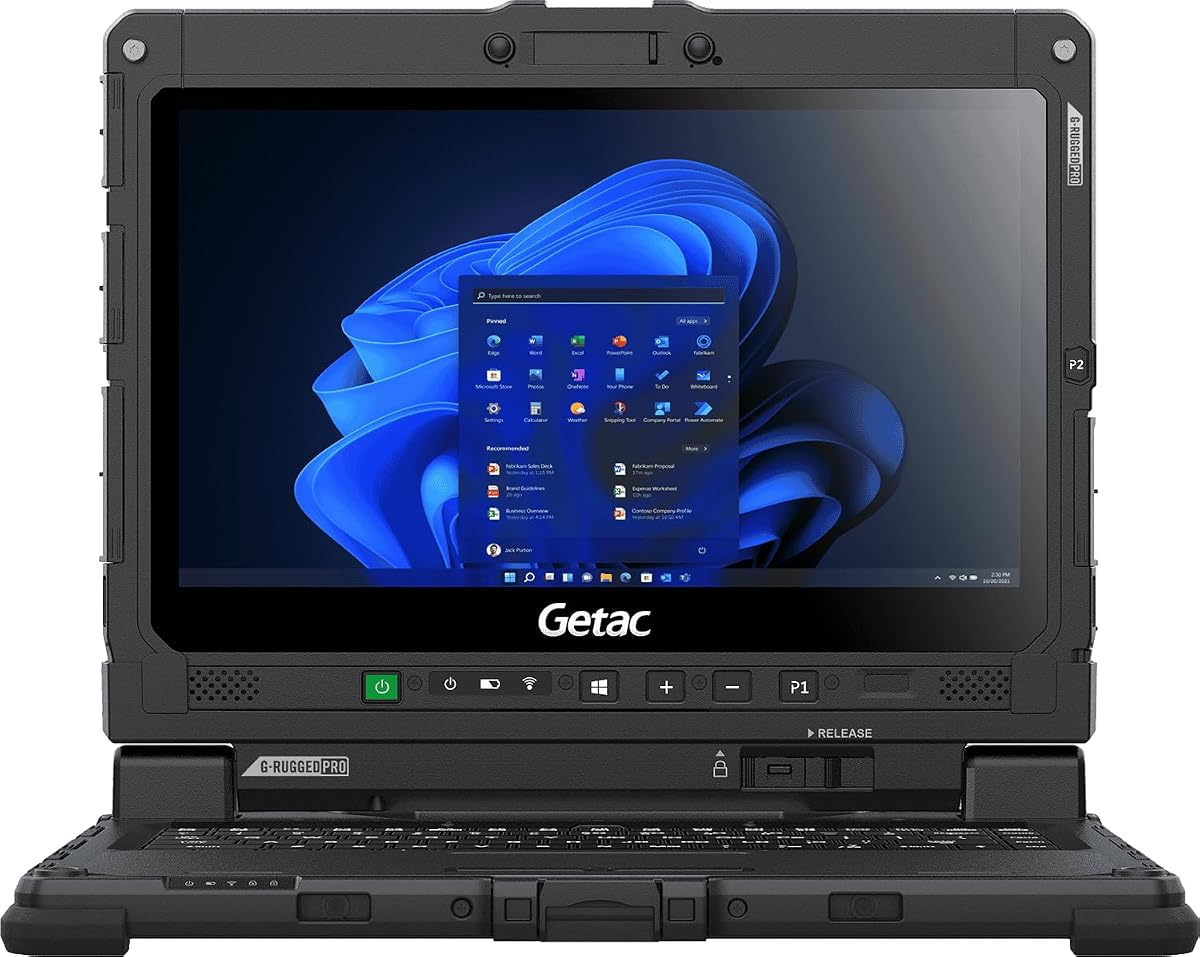
Getac Renewed K120
5.0Editor score
1200 Nits Brightness
Military-Grade Durability
16GB DDR5 RAM
Working outdoors often means battling glare that makes standard screens unreadable. Finding a laptop for bright sunlight requires specific display technology that cuts through harsh conditions effectively.
We evaluated ten top models based on screen brightness, rugged build quality, and performance in extreme environments. Our list covers rugged industrial laptops and consumer devices with high nit ratings.
Each pick details key specs, pros, and cons to help you decide quickly. Note that prices and availability change frequently so check current listings before purchasing your new device.
5.0Editor score

4.1Editor score

4.5Editor score
As an Amazon Associate we earn from qualifying purchases.
The following table provides a side-by-side comparison of all ten selected models highlighting their key specifications and rugged certifications for outdoor use.


The MUNBYN IRX17 stands out as a top choice for professionals working under harsh lighting conditions. Its high rating reflects strong reliability in industrial settings like construction sites or oil rigs where visibility is critical.
We may earn a commission when you buy through this link, at no additional cost to you.
The standout quality is its 1000 nits sunlight-readable display which ensures clear visibility even in direct sun. The Intel i7 processor combined with 32GB of DDR5 RAM delivers exceptional speed for demanding engineering software like AutoCAD or SolidWorks.
While the device is robust it comes with trade-offs such as increased weight due to dual batteries and rugged casing. The price is also higher than consumer laptops but justified by its durability certifications like IP65 and MIL-STD-810H.
This laptop is ideal for field engineers and industrial workers who need a reliable tool outdoors. It balances performance and ruggedness effectively making it a solid recommendation for heavy-duty daily use.
The 1000 nits brightness level is significantly higher than standard laptop screens ensuring text remains readable without squinting or adjusting angles in bright environments.
Certified to withstand water jets and dust entry the IP65 rating ensures the internal components remain protected even when working in rainy or dusty conditions.
We may earn a commission when you buy through this link, at no additional cost to you.
The Getac K120 offers an impressive brightness level of 1200 nits which is among the highest available in this list. Its perfect rating indicates high user satisfaction despite being a renewed model.
We may earn a commission when you buy through this link, at no additional cost to you.
Field professionals appreciate the rugged build that handles drops and extreme temperatures from -29°C to 63°C. The Intel Iris Xe graphics support schematic viewing and the capacitive touchscreen works even with gloves on.
A trade-off is the older 8th Gen processor which may lag slightly behind modern chips in raw speed. The smaller screen size could also be limiting for multitasking compared to 15-inch options.
This model is perfect for budget-conscious buyers needing rugged durability without compromising on visibility. It delivers core functionality for field data entry and mapping tasks at a fraction of new laptop costs.
Built to operate in extreme temperatures from freezing cold to hot deserts this laptop ensures continuous operation where consumer devices would fail or throttle performance.
The multi-touch capacitive screen allows for intuitive interaction even when wearing work gloves which is essential for safety and efficiency in many industrial settings.
We may earn a commission when you buy through this link, at no additional cost to you.
The Getac S510 brings next-gen AI capabilities with the Intel Core Ultra 5 processor. It combines modern features with rugged reliability making it a strong contender for premium outdoor computing needs.
We may earn a commission when you buy through this link, at no additional cost to you.
Key strengths include the 1000 nits touch display which supports accurate input in bright conditions. The 32GB RAM and 1TB SSD provide ample space for complex datasets and professional applications without slowdowns.
While it is one of the pricier options the investment is justified for users needing high-end performance in a durable package. The weight is considerable but manageable given the protection it offers against drops and vibration.
Ideal for senior field engineers or data analysts working outdoors this laptop balances power and durability. It is a future-proof choice that will support demanding workflows for years to come.
The Intel Core Ultra 5 processor includes dedicated AI engines that enhance multitasking and application responsiveness even under heavy industrial software loads.
With a 1TB PCIe NVMe SSD users can store extensive project files and local backups without relying on external drives which are prone to damage in rugged environments.
We may earn a commission when you buy through this link, at no additional cost to you.
The MUNBYN IRX16 offers a balanced mix of power and durability for industrial use. It features the same bright display technology as the IRX17 but at a more accessible price point for many businesses.
We may earn a commission when you buy through this link, at no additional cost to you.
Performance is handled by the Intel i5-1235U which is capable of running AutoCAD and SolidWorks smoothly. The DDR5 RAM ensures fast data transfer while the user-replaceable SSD allows for easy maintenance and upgrades later.
A minor downside is that installing the SIM card requires opening the chassis which may be inconvenient in the field. However the IP65 rating ensures the device remains protected from dust and water ingress during normal operation.
This laptop is excellent for technicians who need reliability without the highest-tier cost. It covers most field tasks effectively and provides a secure physical camera switch for privacy during sensitive work.
The 512GB SSD can be upgraded to 4TB giving users the ability to expand storage as project data grows over time without replacing the entire machine.
Wi-Fi 6 technology provides up to 1800Mbps speeds ensuring stable connections for video conferencing and real-time data analysis even in crowded wireless environments.
We may earn a commission when you buy through this link, at no additional cost to you.
The HP OmniBook 3 is designed for mobility with a lightweight form factor and impressive battery life. While not rugged it offers a high-quality 2K OLED display for visual clarity in decent lighting conditions.
We may earn a commission when you buy through this link, at no additional cost to you.
The Snapdragon processor delivers strong performance for productivity tasks and AI features. The OLED screen provides rich colors and deep blacks making it great for media and design work when not in direct sunlight.
A major trade-off is the brightness level of 300 nits which may struggle in direct sunlight compared to 1000 nits options. It is best suited for shaded outdoor work or indoor use where portability is the priority.
This laptop is ideal for business travelers who need a portable device for meetings and casual outdoor tasks. It offers modern features and efficiency but lacks the specialized outdoor durability of rugged models.
With up to 41 hours of battery life this laptop ensures you can work all day without needing a power outlet which is critical for remote locations.
The Copilot key and Otter.ai integration streamline note-taking and meeting summaries making it efficient for professionals on the go.
We may earn a commission when you buy through this link, at no additional cost to you.
The HP OmniBook 3 16 inch provides a spacious screen for multitasking at a consumer-friendly price. Its high rating suggests reliable performance for general tasks and light creative work.
We may earn a commission when you buy through this link, at no additional cost to you.
The 2K touchscreen offers detailed visuals and the AMD Ryzen 3 processor handles daily applications smoothly. The anti-glare coating helps somewhat with reflections though it is not designed for direct sun exposure.
Memory is limited to 8GB which may slow down heavy multitasking. Users should note that this device lacks rugged certification so it must be protected from harsh elements and accidental drops.
This laptop is a good choice for casual outdoor use or shaded environments where a larger screen is needed. It is affordable and functional but not a replacement for industrial-grade hardware.
The 2K resolution delivers sharp text and images which improves readability and precision when working on documents or designs away from a desk.
Advanced AI noise reduction filters out background sounds during calls ensuring clear communication even in noisy outdoor or office environments.
We may earn a commission when you buy through this link, at no additional cost to you.
The Dell 15.6 Laptop is a reliable option for everyday computing. Its design focuses on comfort and efficiency with features like ComfortView to reduce eye strain during long sessions.
We may earn a commission when you buy through this link, at no additional cost to you.
Performance is driven by the Intel Core i5-1334U which handles multitasking well. The laptop includes onsite service support which adds value by ensuring quick repairs if issues arise.
While it lacks the high brightness of rugged laptops it is suitable for indoor use or shaded outdoor areas. The ComfortView software helps with eye fatigue which is useful for extended work periods.
This is a solid pick for budget-conscious users who need a dependable machine for general tasks. It balances cost and performance effectively but does not offer specialized outdoor protections.
Dell ComfortView software reduces harmful blue light emissions protecting your eyes from strain during prolonged screen time in bright indoor environments.
The 1 Year Onsite Service provides peace of mind as Dell technicians will come to your location to resolve hardware issues quickly.
We may earn a commission when you buy through this link, at no additional cost to you.
The HP 17.3 inch laptop offers a large workspace which is helpful for spreadsheet work and design tasks. Its perfect rating reflects strong performance and satisfaction for general users.
We may earn a commission when you buy through this link, at no additional cost to you.
With 16GB of RAM and 1TB storage it handles heavy multitasking and large file storage. The AMD Ryzen 5 processor provides efficient computing for daily tasks and light graphics work.
The large size makes it less portable and the standard brightness means it should not be used in direct sun. The included laptop cooler helps maintain performance during extended sessions.
This laptop suits users who prioritize screen real estate and storage over portability. It is a powerful choice for home offices or outdoor setups where space and connectivity are not issues.
The 1TB of storage allows you to keep extensive libraries of media and project files accessible without needing external drives for backup.
The physical webcam shutter gives you control over your privacy by physically blocking the camera when it is not in use.
We may earn a commission when you buy through this link, at no additional cost to you.
The Panasonic Toughbook FZ-55 is a trusted choice for public safety and field teams. Its high rating and renewed status make it a cost-effective way to access premium rugged hardware.
We may earn a commission when you buy through this link, at no additional cost to you.
The 1000 nits display ensures visibility in bright conditions while the Intel Core i7 processor handles complex applications. The MIL-STD-810H certification guarantees durability against drops and vibrations.
While it uses an older processor its reliability is unmatched for tough environments. The renewed status means it is refurbished so warranty terms may differ from new models.
This laptop is ideal for government agencies or contractors needing durable tools. It combines practical features like LTE connectivity and a stylus for field work effectively.
The 4G LTE multi-carrier support keeps you online in remote areas where traditional Wi-Fi is unavailable.
The touchscreen with included stylus allows precise input for maps and blueprints without needing a separate mouse.
We may earn a commission when you buy through this link, at no additional cost to you.
The Dell 16 Laptop offers a modern viewing experience with a 16:10 aspect ratio that maximizes vertical space for documents and web browsing. It performs well for general computing tasks.
We may earn a commission when you buy through this link, at no additional cost to you.
The Intel Core 7 processor ensures smooth performance and the 16GB RAM supports multitasking. The ComfortView Plus feature helps reduce eye strain during long work hours.
As a standard consumer laptop it lacks outdoor ruggedness and high brightness. It is best kept in controlled environments or shaded areas to avoid glare and potential damage.
This laptop is a good fit for users prioritizing display ergonomics and modern design. It delivers reliable performance for office work but is not specialized for harsh sunlight or rough terrain.
The 16:10 aspect ratio provides more vertical space than traditional 16:9 screens allowing you to view more content at once.
The FHD camera with temporal noise reduction ensures clear video communication even in less ideal lighting conditions.
We may earn a commission when you buy through this link, at no additional cost to you.
Selecting the right laptop for bright sunlight involves evaluating several technical factors to ensure visibility and performance in outdoor environments.
Brightness is measured in nits and is the most critical factor for outdoor use. Standard laptops typically range from 250 to 300 nits which can become unreadable under direct sunlight. For reliable visibility you should aim for a screen with at least 1000 nits of brightness. High brightness panels allow text and images to remain clear even when the sun is shining directly on the screen. This reduces eye strain and ensures you can see your work accurately without constantly changing angles.
Laptops used outdoors are exposed to harsh conditions such as dust water and physical impacts. Look for devices with IP ratings like IP65 or IP53 which indicate resistance to dust and water jets. MIL-STD-810H certification ensures the laptop has been tested to withstand drops vibration and extreme temperature ranges. A rugged chassis protects the internal components and extends the lifespan of the device in tough environments. This is essential for construction sites or field research where standard laptops would likely fail.
Outdoor work often involves complex applications like CAD or data analysis which require robust processing power. Choose a laptop with a modern multi-core processor and at least 16GB of RAM to handle multitasking. High-performance hardware ensures that the device does not slow down when running demanding software. Adequate RAM helps you switch between tasks smoothly without lag. This is vital for professionals who rely on their laptop for critical decision-making in real time.
Access to power outlets is often limited when working outdoors so long battery life is a key requirement. Look for models that offer all-day battery support to avoid interruptions. Some rugged laptops come with hot-swappable dual batteries allowing you to extend runtime by switching batteries on the go. Efficient processors help maximize battery duration without sacrificing performance. A reliable power source ensures you can complete your tasks without worrying about finding a charger.
Connectivity is crucial for accessing remote data and staying in touch with your team. Ensure the laptop supports modern Wi-Fi standards like Wi-Fi 6 for faster and more stable internet connections. Integrated LTE or 5G options are beneficial for working in remote areas where Wi-Fi is unavailable. Additionally check for multiple USB ports and docking connectors to interface with field equipment. Robust connectivity keeps you productive regardless of your location.
Input methods should be comfortable and functional even when wearing gloves. A backlit keyboard with a membrane design helps in low-light or dusty conditions. A capacitive touchscreen that works with gloves adds versatility to your workflow. The touch interface allows for intuitive navigation of maps and schematics. Ergonomic design reduces strain during long typing sessions and ensures precision in field conditions.
When working in public or industrial settings privacy is a significant concern. Look for laptops with physical camera switches to block the webcam when not in use. Biometric login options like fingerprint readers or facial recognition enhance data security. Secure boot features protect the system from unauthorized access. These security measures ensure that sensitive data remains safe even if the device is left unattended briefly.
While rugged laptops often have higher upfront costs they can be more cost-effective in the long run due to durability. Consider warranty options and support services included with the purchase. A longer warranty reduces the financial risk of hardware failure in demanding environments. Investing in a reliable device minimizes downtime and repair costs over time. Balance your budget with the necessary features to get the best value for your specific needs.
When using your laptop outdoors clean the screen regularly with a microfiber cloth to remove dust and oil residue. This ensures the display remains clear and maximizes the effectiveness of the anti-glare coating. Avoid using harsh chemicals or paper towels that could scratch the screen surface.
A brightness of 1000 nits means the screen emits enough light to overcome glare from the sun. This allows text and images to remain sharp and readable even when exposed to direct sunlight. Standard screens often fail in these conditions as they appear dark or washed out.
Rugged laptops are worth the cost if you work in harsh environments like construction sites or outdoor fields. They are designed to survive drops dust and water which standard laptops cannot handle. This durability reduces the risk of damage and extends the device's usable life significantly.
You can use a standard laptop outside but it may struggle with visibility in bright conditions. The screen will likely appear dim or reflective making it hard to see. It is best used in shaded areas or indoors to avoid glare and potential damage from elements.
A touchscreen is useful for outdoor work if you need to interact with maps or diagrams directly. It allows for quick navigation and input even with gloved hands on supported models. However it is not strictly necessary if you are comfortable using a trackpad or keyboard.
To protect your laptop from rain choose a model with an IP rating like IP65 that seals against water ingress. Always use a protective cover or bag when moving the device outside. Avoid exposing it to heavy precipitation even if it is rated as water resistant.
For field work a battery life of at least 8 hours is recommended to cover a full work shift. Some rugged models support dual batteries which can extend operation time significantly. Ensure you have access to a charging method or backup power for extended tasks.
Choosing a laptop for bright sunlight requires careful consideration of display brightness and build quality. Our top picks like the MUNBYN IRX17 and Getac K120 offer the best balance of visibility and ruggedness for professional use.
Prioritize models with at least 1000 nits of brightness and MIL-STD certification if you work in tough environments. Features like battery life and connectivity are also vital to ensure uninterrupted productivity in remote locations.
Remember that prices and stock availability change frequently so verify current details before making a purchase. Investing in the right device now will save time and resources in your future outdoor projects.