
Overhead Camera Mount Desk Stand, Camera Arm Desk Mount Clamp Stand with 360°Adjustable Magic Arm
4.4Editor score
360 degree ballhead adjustment
C clamp for tables up to 1.77 inches
Includes phone holder and adapter
Finding the right clamp on webcam arm can transform your workspace by freeing up desk space and improving your video quality. A sturdy mount ensures your camera stays steady during important meetings or creative projects without slipping or wobbling unexpectedly.
We evaluated ten top-rated models based on build quality, adjustability, and compatibility with popular devices. Our comparison focuses on real-world performance to help you find a reliable solution that fits your specific setup needs perfectly.
Each pick highlights key features and ideal use cases so you can decide quickly. Note that prices and availability change often, so check current listings before making your final purchase decision today.
4.4Editor score

5.0Editor score

4.3Editor score
As an Amazon Associate we earn from qualifying purchases.
This side-by-side comparison highlights the key specifications and strengths of each model to help you identify the perfect fit for your desk or studio environment.
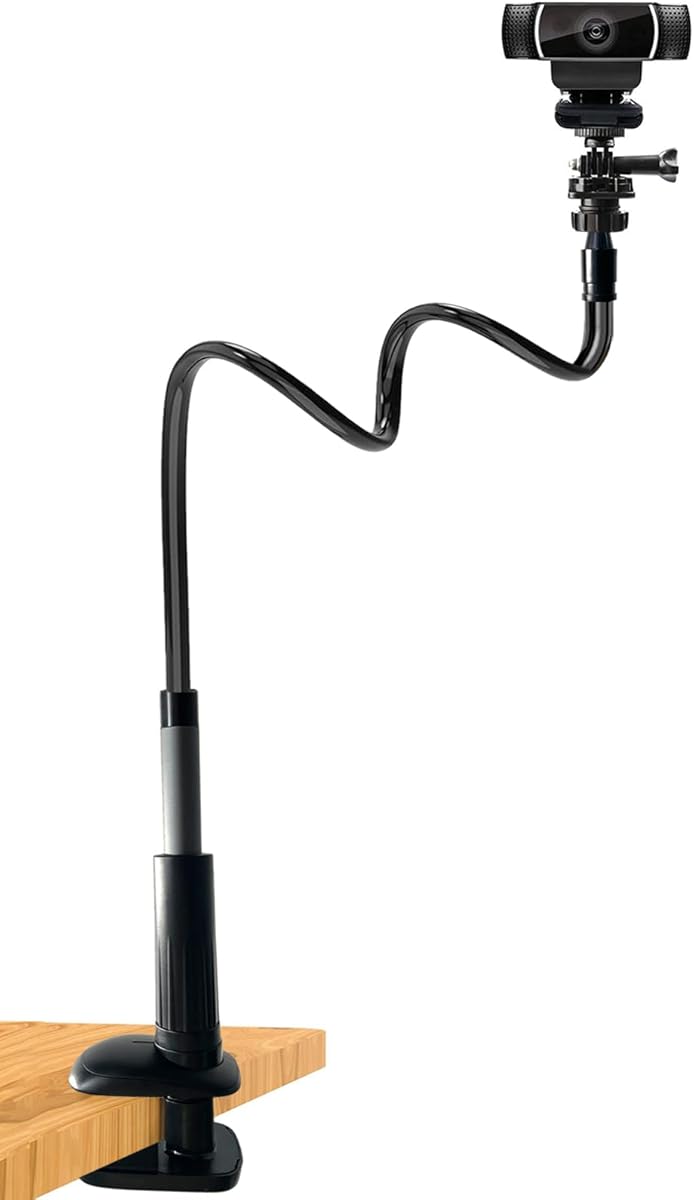


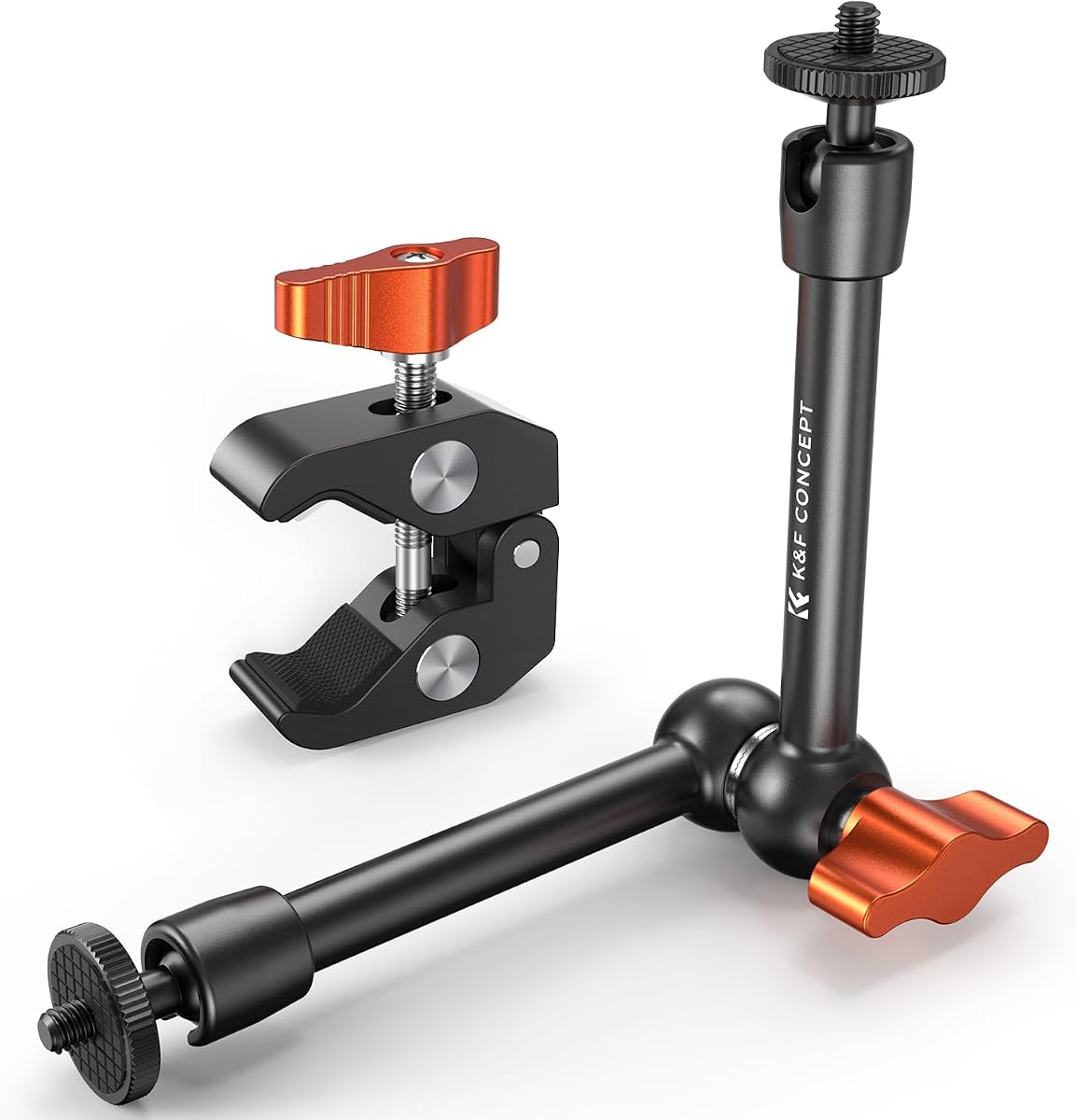


This webcam stand stands out as the top choice for its impressive length and sturdy build. It features a premium aluminum-magnesium alloy core that keeps your device stable while allowing full flexibility. With a perfect rating from users, it handles webcams and phones effortlessly.
We may earn a commission when you buy through this link, at no additional cost to you.
The 36.6 inch reach lets you position your camera exactly where you need it without cluttering your desk. You can shape the arm into S or Z curves to lock it in place securely. The clamp base is thick and durable, protecting your furniture with soft silicone padding.
While it is heavier than some plastic alternatives, that weight ensures your camera does not wobble during use. The foldable design makes storage simple when not in use. It is an ideal all-in-one solution for content creators who need reliable positioning.
If you want a dependable mount that works for Zoom calls and live streams, this is the pick. Its universal thread fits almost any device. We highly recommend it for anyone seeking top stability and reach in a single package.
The extra length allows overhead shots or unboxing videos without moving your desk setup.
The alloy core prevents sagging, ensuring your video angle remains consistent throughout long sessions.
We may earn a commission when you buy through this link, at no additional cost to you.
This model offers an excellent entry point for users needing a flexible camera mount. It comes with a desk stand and overhead arm, providing two mounting options in one package. The included ballhead and phone holder add significant value for the price.
We may earn a commission when you buy through this link, at no additional cost to you.
The desktop stand height adjusts from 32cm to 55cm, giving you room to tailor the view. The holding arm provides 13 inches of reach which is enough for most desk setups. It uses high-quality steel and ABS for durability without breaking the bank.
Keep in mind the max load is only 0.5kg, so it suits lighter webcams and phones best. The arm length is shorter than premium options which might limit overhead flexibility. Still, it is a solid choice for basic needs.
If you are on a tight budget but want a complete setup, this is a smart buy. It covers the basics well and includes what you need to start recording. We recommend it for students or casual streamers.
Use the desk stand for a lower view or the overhead arm for crafting and tutorials.
Getting a phone holder and ballhead in the box saves you from buying separate parts.
We may earn a commission when you buy through this link, at no additional cost to you.
This premium kit is built for creators who demand robust performance and flexibility. The all-metal construction ensures it withstands daily adjustments without losing tension. It includes rotatable clamping blocks that fit both flat surfaces and cylindrical objects securely.
We may earn a commission when you buy through this link, at no additional cost to you.
The arm features anti-twist pins which prevent the connection from loosening during use. This attention to detail is rare in budget models. The foam padding protects your gear from scratches while keeping the grip firm in place.
While it costs more, the durability and versatility make it worth the investment. It supports up to 1 kg so heavier webcams or lights stay put. However, the weight makes it less ideal for frequent packing and travel.
For a permanent studio setup or professional use, this kit is a top choice. It handles varied surfaces and offers secure locking mechanisms. We recommend it for streamers who need reliable equipment mounting.
Rotatable blocks allow clamping on round poles or flat desk edges with equal ease.
Anti-twist pins and foam pads ensure your expensive camera gear stays safe during setup.
We may earn a commission when you buy through this link, at no additional cost to you.
This stand offers impressive height reaching up to 30 inches for overhead shots. The upgraded thick base adds stability that prevents tipping when you adjust the arm. It is designed to fit many webcams and action cameras with a standard thread.
We may earn a commission when you buy through this link, at no additional cost to you.
The gooseneck arm allows flexible positioning so you can find the perfect angle easily. You can clamp it on desks or nightstands up to 2.7 inches thick. Non-slip cushions protect your furniture from scratches during use.
Users note the load limit is only 0.7kg so heavy devices might sag. Bending the tube into an S shape helps reduce bouncing during recording. It is a budget-friendly option for those needing vertical space.
If you need extra height without spending much, this is a strong contender. Just ensure your device is light enough to stay steady. We suggest it for simple video calls or light streaming needs.
The 30 inch extension helps avoid looking down at the camera during long meetings.
The base opens wide to secure on desks or nightstands without slipping.
We may earn a commission when you buy through this link, at no additional cost to you.
This magic arm is longer than typical options giving you more flexibility for overhead shots. It features an anti-deflection design that keeps connections secure even if bumped. The kit includes multiple screws and adapters for phones and cameras.
We may earn a commission when you buy through this link, at no additional cost to you.
Silicone pads and rubber rings are placed throughout to increase friction and protect gear. The clamp can open up to 63mm fitting round or flat surfaces well. This attention to detail makes it a favorite among content creators.
You must be careful with heavy phones as the load limit is 600g. Adjusting the length helps avoid slippage on joints. It is a professional-grade tool for static setups like podcasts or cooking videos.
If you need a reliable overhead mount, this arm delivers stability and reach. Its design reduces wobble during use. We recommend it for streamers looking for a quality magic arm solution.
Anti-deflection interfaces prevent sagging even when holding medium-weight devices securely.
The wide opening fits both standard desks and round tube structures easily.
We may earn a commission when you buy through this link, at no additional cost to you.
This mount is ideal for small setups where space is limited. The flexible gooseneck extends to about 11 inches allowing for tight positioning. It fits lightweight cameras and webcams securely with its durable jaw clamp.
We may earn a commission when you buy through this link, at no additional cost to you.
The mini tripod head allows 360 degree rotation so you can aim the lens precisely. It is easy to install on most light stands or pipes. This makes it a great accessory for mobile creators or travelers.
Do not place the clip on screens as it may damage them. The weight limit is under 500g so keep your device light. It is best for short-range use like close-up product videos.
If you need a small flexible arm for tight spaces, this is a solid option. Its simplicity and price make it accessible for many users. We suggest it for hobbyists or casual content creation.
Its small size lets you carry it anywhere without adding bulk to your gear bag.
The mini tripod head gives you full control over your camera angle.
We may earn a commission when you buy through this link, at no additional cost to you.
This mount is designed to hold devices securely without wobbling. The gooseneck arm is made of aluminum alloy for durability and strength. You can adjust it to different positions for various shooting angles easily.
We may earn a commission when you buy through this link, at no additional cost to you.
The clamp is specifically for flat surfaces and protects your table with soft rubber pads. It works with many webcams and action cameras. Silicone wrapping on the arm prevents debris from falling off during use.
Some users find the arm length is moderate compared to others. It might squeak after long use but remains functional. For desk setups, it offers a clean look and solid stability.
If you want a sturdy mount that stays put, this is a great choice. Its design focuses on reliability for daily work. We recommend it for office workers or home teachers.
Soft rubber pads keep your furniture scratch-free while holding the mount firmly.
You can clamp this mount quickly without needing extra tools for setup.
We may earn a commission when you buy through this link, at no additional cost to you.
This kit is a compact solution for small mounting tasks. The 9.8 inch arm is enough for desk use without taking up much space. It uses a dual ball head design to adjust angles freely.
We may earn a commission when you buy through this link, at no additional cost to you.
You can mount it on poles or tables within the opening range of 15mm to 55mm. The metal design ensures it is sturdy and durable over time. Cushion pads increase friction and protect your gear.
Keep in mind this is for static scenes only and not for movement. The short length means it is best for close setups. It is a practical choice for fixed camera angles.
If you need a small reliable arm for desk use, this fits the bill. Its flexibility is good for tight spots. We suggest it for desktop users or close-up shooters.
Dual ball heads allow easy adjustment of your camera for ideal framing angles.
Its short size makes it perfect for crowded desks without blocking other gear.
We may earn a commission when you buy through this link, at no additional cost to you.
This arm offers a balance of quality and versatility for the price. It includes three sets of ball head adapters for more flexibility. The anti twist pin ensures your device stays firmly connected.
We may earn a commission when you buy through this link, at no additional cost to you.
The clamp works on flat surfaces up to 2 inches or cylindrical objects up to 1.6 inches. This makes it very versatile for mounting on various structures. The non-slip pads protect your equipment from scratches.
While it costs more than generic options the brand quality justifies it. The 55 cm length is enough for most overhead needs. It is reliable for streaming or recording static content.
If you want a trusted brand with solid features this is a great buy. Its compatibility with round objects is a plus. We recommend it for podcasters or content creators.
Anti twist pins keep your device locked in place during adjustments.
Mounting on poles or tripods is easy with its wide clamp design.
We may earn a commission when you buy through this link, at no additional cost to you.
This arm is designed for portability with an 11 inch length that fits in small bags. It has a super clamp that opens up to 55mm for various surfaces. The dual thread screws make it compatible with many accessories.
We may earn a commission when you buy through this link, at no additional cost to you.
The anti-scratch cushions protect your gear while increasing friction. It is easy to adjust the knob to lock positions quickly. This makes it ideal for quick setups and breakdowns.
Keep in mind it is for static scenarios and not heavy movement. The short length is best for tight spaces on desks. It is a high quality tool for travelers.
If you need a reliable arm for on-the-go use this fits well. Its build quality is excellent for the size. We suggest it for mobile photographers or vloggers.
The compact size lets you take your camera setup anywhere with ease.
Adjustments are fast with the knob screw for tensioning or loosening.
We may earn a commission when you buy through this link, at no additional cost to you.
Choosing the right clamp on webcam arm involves considering your desk space device weight and needed reach. Here are key factors to evaluate before making a purchase.
The length of the arm determines how far you can position your camera from the mount point. Longer arms like 30 inches allow for overhead shots or unboxing videos while shorter ones are better for tight desk spaces. Consider where you want the camera to be relative to your body.
Select an arm that gives you enough reach to get the angle you need without cluttering your desk.
Every clamp on webcam arm has a maximum weight limit. Exceeding this can cause sagging or tipping which ruins your video quality. Check your camera and microphone weight against the product specs before buying.
Always choose a mount with a higher load capacity than your total device weight.
The clamp must fit your desk thickness or surface type. Some clamps open up to 2 inches while others are smaller. Round surface clamps allow you to mount on poles or tubes as well.
Measure your desk thickness to ensure the clamp can open wide enough to secure it firmly.
Materials like aluminum alloy offer better stability than plastic. Metal arms are less likely to sag over time and feel more durable. Silicone or rubber padding protects your furniture from scratches during use.
Look for metal construction if you need a long-lasting and stable solution.
360 degree ball heads allow you to rotate and tilt your camera easily. Some arms have multiple joints while others are flexible goosenecks. Good adjustability helps you frame your shot precisely without moving your desk.
Choose a model with smooth rotation joints to find your best viewing angle quickly.
Most models require no tools and use a simple screw or knob to tighten. This saves you time and makes setup straightforward. Ensure the mounting interface matches your camera screw size usually 1/4 inch.
Prioritize tools-free models for quick setup and daily use convenience.
Features like anti-twist pins or thicker bases prevent wobbling during recordings. Some arms allow shaping into S curves for extra support. These details matter during long streaming sessions or video calls.
Look for stability features that minimize movement for crisp video output.
Prices vary based on build quality and included accessories like phone holders. Budget models work well for light use while premium ones offer better durability. Decide what features are essential for your workflow.
Balance your budget with the features you actually need to avoid overspending.
Start by measuring your desk thickness and opening the clamp wide enough to secure it. Place non-slip pads if included to protect the surface. Tighten the clamp knob firmly but do not over-tighten as it might crack.
Mount your camera or phone using the provided screw and adjust the arm to your desired height. If the arm is flexible shape it into an S or Z curve to lock it in place and reduce wobbling.
Clean the clamp pads with a dry cloth to remove dust which helps maintain grip. Check all screws and joints regularly for tightness to ensure long-term stability and safety.
For heavy devices choose a model with a higher load capacity like the K&F CONCEPT 22" Magic Arm Clamp Kit which supports up to 1 kg. Look for all-metal construction and anti-slip features to ensure stability. Avoid lighter plastic arms if you plan to mount large cameras.
Yes but be cautious because glass can scratch or break under pressure. Use clamps with soft rubber pads and ensure the surface is thick enough to support the weight. Consider a freestanding arm if your glass table is thin.
To prevent sagging use a sturdy aluminum alloy arm instead of plastic. Shape flexible arms into an S curve to lock them in place and avoid exceeding the weight limit. Ensure all joints are tightened securely after adjustment.
Most arms support desks up to 2 inches thick but some vary. Check the specific clamp opening width in the product specs. For example the NEEWER 22" Magic Arm fits flat surfaces up to 2 inches or cylindrical objects up to 1.6 inches.
No tools are typically required as they use hand-tightened knobs or clamps. Some models come with included screws for camera attachment. Installation is designed to be simple and quick for most users.
Yes many arms have a universal 1/4 inch screw thread compatible with phone holders. Ensure your phone weight stays within the arm's load limit to prevent dropping. Some kits include a phone clamp directly in the box.
It depends on your needs. Gooseneck arms offer continuous flexibility while magic arms have joints for precise angle control. Both work well for webcams but goosenecks allow for smooth shaping into curves.
Wipe the clamp pads and arm with a dry cloth to remove dust. Check screws periodically and tighten them if loose. Store the arm in a dry place to prevent rust on metal parts.
We found the Webcam Stand Camera Desk Mount to be the top pick for its long reach and solid build. The NEEWER 22" Magic Arm and K&F CONCEPT 22" Kit are great alternatives for overhead setups.
Prioritize load capacity and stability to ensure your video quality remains consistent. A sturdy mount reduces wobbling and keeps your desk space organized during daily use.
Prices and stock change often so verify current details before buying. Use this guide to compare features and find the perfect clamp on webcam arm for your needs.