
Logitech K120 Full Size Wired Keyboard
4.6Editor score
Spill-resistant durable design
Full-size standard layout
Plug-and-play USB setup
Finding the right keyboard for your POS system is crucial for smooth operations. A good model offers durability, ergonomic design, and reliable connectivity to keep transactions flowing efficiently.
We compared ten top models based on build quality, feature sets, and user feedback. This list covers various needs from budget-friendly options to specialized industrial units with integrated readers.
Each pick highlights key strengths and potential trade-offs to help you decide. Note that prices and availability can change frequently, so check current listings before purchasing.
4.6Editor score

4.2Editor score
4.5Editor score
As an Amazon Associate we earn from qualifying purchases.
This side-by-side comparison outlines the key specifications and features of all ten selected products to help you identify the best fit for your specific operational requirements.


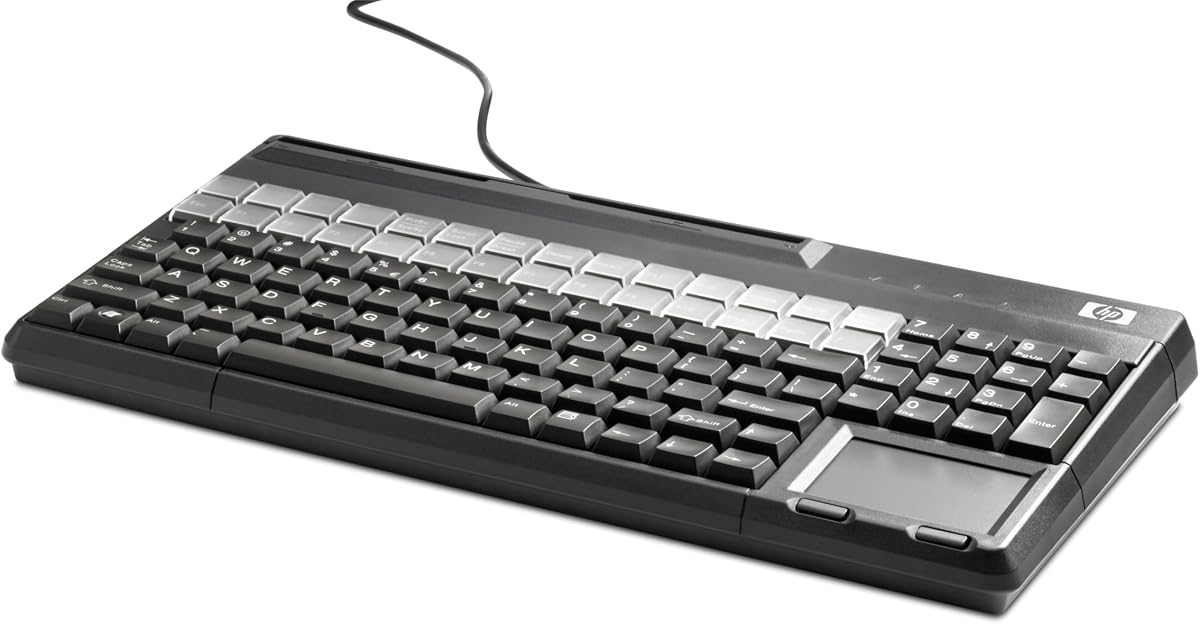
The HP POS Keyboard stands out as a robust solution for dedicated point of sale systems. With 106 keys and 28 relegendable keys, it offers the flexibility needed for specialized retail applications requiring custom key functions.
We may earn a commission when you buy through this link, at no additional cost to you.
Its integrated magnetic stripe reader allows for seamless card processing directly through the keyboard. The included touchpad replaces the need for a separate mouse, saving valuable counter space in busy checkout areas.
While the price is higher than standard keyboards, the specialized features justify the investment for high-volume environments. The layout is standard QWERTY which ensures familiarity for staff training and reduces learning curves.
This keyboard is best suited for retail stores or restaurants that need dedicated POS hardware. It delivers reliability and convenience that standard office keyboards cannot match in these specific operational contexts.
The relegendable keys can be customized to match specific software commands which streamlines the transaction process and reduces the time staff spend navigating complex menus.
By combining keyboard and mouse functions along with a card reader into one unit, this device significantly reduces desk clutter and improves the overall ergonomic layout of the checkout station.
We may earn a commission when you buy through this link, at no additional cost to you.
The Cherry G86-62401 offers a balanced mix of features at a reasonable price point making it a strong candidate for small businesses. Its integrated touchpad means you do not need a separate mouse which simplifies setup.
We may earn a commission when you buy through this link, at no additional cost to you.
Spills are common in food service and retail settings so the spill resistant design is a critical feature. The compact layout ensures it fits easily into tight kiosks or crowded front desk environments without sacrificing usability.
While it lacks some of the advanced features of higher-end POS units it covers the essentials well. The USB connection is standard and reliable ensuring stable performance during busy transaction times.
Choose this keyboard if you need a straightforward all-in-one solution that saves space. It provides the durability and functionality required for daily POS tasks without the high cost of specialized hardware.
Combining the keyboard and touchpad into one chassis is ideal for small shops where counter space is at a premium helping you keep the workspace organized and clutter free.
The spill resistant construction protects internal components from liquid damage reducing the risk of unexpected downtime and replacement costs in busy environments where spills are likely.
We may earn a commission when you buy through this link, at no additional cost to you.
The Logitech K120 is a budget friendly option that delivers reliable performance for basic POS needs. Its full size layout includes a number pad which is essential for quick data entry during transactions.
We may earn a commission when you buy through this link, at no additional cost to you.
Despite the low cost it features a spill-proof design that protects against accidental spills. This durability makes it suitable for casual retail environments where budget constraints are a priority over advanced features.
Setup is incredibly simple with plug and play connectivity via USB. This means you can start using it immediately without installing drivers which is helpful for staff who may not be tech savvy.
While it lacks specialized POS features like relegendable keys it is a solid workhorse for general use. If your software supports standard keyboard input this is an efficient cost-effective choice.
The plug and play nature of this keyboard means you can have it running in seconds which reduces IT overhead and allows staff to focus on customer service tasks immediately.
Spill proof design extends the lifespan of the device making it a smart investment for high traffic areas where accidental liquid exposure is a common risk for standard equipment.
We may earn a commission when you buy through this link, at no additional cost to you.
The Cherry Lpos G86-71411 offers extensive customization with 42 relegendable keys suitable for complex retail systems. This large key count allows you to map frequent actions directly to dedicated keys improving checkout speed.
We may earn a commission when you buy through this link, at no additional cost to you.
Like other dedicated POS units it includes a magnetic stripe reader and USB connectivity. This integration reduces hardware clutter and ensures that card data is captured securely and efficiently during every transaction.
The layout is designed for heavy use with durable materials that withstand constant typing. Its size may be larger than standard keyboards so ensure your counter space can accommodate the footprint comfortably.
This model is ideal for larger stores with diverse product lines requiring complex shortcuts. The ability to customize key legends ensures that staff can access critical functions quickly without navigating through software menus.
With 42 customizable keys you can create shortcuts for common tasks such as voiding items or accessing specific categories which reduces the number of clicks needed to complete a sale.
Having the magnetic stripe reader built into the keyboard eliminates the need for external hardware reducing cable management issues and keeping the checkout area clean and professional.
We may earn a commission when you buy through this link, at no additional cost to you.
The Perixx PERIBOARD-513III combines a full size layout with an integrated touchpad offering a complete input solution. The quiet scissor keys make it suitable for environments where noise reduction is appreciated by staff.
We may earn a commission when you buy through this link, at no additional cost to you.
This keyboard includes physical buttons for the touchpad which offers more precision than touch-only controls. This is useful for POS systems that require cursor navigation without needing a separate mouse.
A six foot cable provides flexibility in placement allowing you to route the connection neatly out of sight. This feature is particularly helpful for fixed installations like kiosks where cable management is essential.
Ideal for small businesses or retail counters needing a versatile keyboard this model balances features and cost. It works well with most standard POS software without requiring special configuration.
The quiet scissor switches provide a laptop like feel that reduces noise and fatigue during long shifts making it more comfortable for staff working extended hours at the register.
Physical buttons for the integrated touchpad ensure reliable clicking which is critical when navigating complex POS interfaces quickly without accidental double taps or missed clicks.
We may earn a commission when you buy through this link, at no additional cost to you.
The Adesso Easy Touch 630Ub is designed for environments where liquids are a major risk. With an IP67 waterproof rating it can withstand submersion ensuring it survives in kitchens or outdoor markets where spills are frequent.
We may earn a commission when you buy through this link, at no additional cost to you.
The keys are larger than standard which improves readability and reduces typing errors. This is particularly useful in fast-paced settings where staff need to input data quickly and accurately without straining their eyes.
Cleaning is straightforward because the waterproof design allows for easy wiping or rinsing. This reduces hygiene concerns and ensures the keyboard remains functional and pleasant to use over time.
While it lacks specialized POS features its durability makes it a smart choice for tough conditions. If your environment is prone to moisture or dirt this keyboard will provide consistent reliable performance.
The waterproof construction ensures that accidental spills or cleaning processes will not damage the device which is vital for maintaining uptime in environments where water exposure is unavoidable.
Larger keys with high contrast printing make it easier to see labels under various lighting conditions which helps staff enter data accurately even during busy peak hours.
We may earn a commission when you buy through this link, at no additional cost to you.
The Cherry G86-71401 offers 127 programmable keys for advanced customization in complex POS systems. This allows businesses to map extensive shortcuts to the keyboard which can significantly speed up transaction workflows.
We may earn a commission when you buy through this link, at no additional cost to you.
An integrated touchpad is included to reduce the need for a separate mouse. This keeps the workspace tidy and ensures that you have cursor control right at your fingertips during data entry.
While it has a lower user rating it remains a capable device for those who need specific programmability. The USB interface ensures reliable connectivity with most modern POS hardware.
Choose this model if your software requires extensive key mappings for efficiency. It is a strong tool for high-volume environments where every second saved at the checkout counts toward overall productivity.
With 127 programmable keys you can assign unique functions to almost any key which allows for highly optimized workflows tailored to the specific needs of your business operations.
Combining the touchpad with the keyboard reduces peripheral clutter making your checkout counter cleaner and easier to manage especially in smaller retail setups with limited space.
We may earn a commission when you buy through this link, at no additional cost to you.
The Cherry KC 1000 is designed for secure transactions featuring an integrated smartcard terminal. This allows for secure card reading directly from the keyboard ensuring that payment data is handled safely.
We may earn a commission when you buy through this link, at no additional cost to you.
It includes a dedicated PIN entry pad which enhances security by separating sensitive input from the main keyboard. This feature is essential for businesses that handle payments requiring chip card authentication.
The keyboard meets high security standards such as FIPS 201 approval making it suitable for regulated industries. It provides the reliability needed for high security environments where data safety is paramount.
While specialized for smartcard use it is a robust choice for businesses needing secure payment processing. Its design ensures that you can handle transactions with confidence regarding data protection.
The integrated smartcard terminal ensures that card data is processed securely reducing the risk of fraud or data breaches which is critical for maintaining customer trust and compliance with payment standards.
Having a separate secure PIN pad protects sensitive entry from being intercepted by software keyloggers providing an added layer of security for financial transactions.
We may earn a commission when you buy through this link, at no additional cost to you.
The Cherry G80-1800 is built for industrial use with durable mechanical switches that withstand heavy use. The compact design fits easily into tight spaces like kiosks or narrow counter setups.
We may earn a commission when you buy through this link, at no additional cost to you.
It supports both USB and PS/2 connections offering flexibility for various systems. This versatility ensures compatibility with older POS hardware while still working with modern devices.
The mechanical switches provide a tactile feedback that can improve typing speed and accuracy. The black switches offer a linear feel that is smooth and consistent throughout the lifespan of the unit.
Ideal for factories or warehouses this keyboard is a reliable tool for data entry in tough environments. Its construction ensures it will last longer than standard office keyboards under demanding conditions.
Mechanical switches provide a consistent and tactile typing experience that reduces fatigue and increases speed over long periods of use which is beneficial for staff entering data frequently.
Support for both USB and PS/2 means you can use this keyboard with a wide range of legacy and modern systems ensuring long term utility even as technology evolves.
We may earn a commission when you buy through this link, at no additional cost to you.
The Logitech K270 offers wireless freedom with a reliable 2.4 GHz connection. This eliminates cable clutter at the checkout counter which improves workflow and reduces tripping hazards.
We may earn a commission when you buy through this link, at no additional cost to you.
With up to 24 months of battery life you rarely need to change batteries. This long life ensures consistent performance without frequent interruptions for battery swaps which is convenient for busy staff.
Its spill-resistant construction adds durability to protect against accidental spills. This feature is valuable for retail or food environments where liquids can be a risk to electronics.
Ideal for setups needing flexible positioning this keyboard provides reliable input without wires. If you value a clean counter space this wireless option is a practical and affordable choice.
Wireless connectivity allows you to place the keyboard in the most comfortable spot for your staff which can improve ergonomics and reduce strain during long shifts at the checkout.
The long battery life reduces maintenance needs and ensures the device is ready for use most of the time which is essential for continuous retail operations without interruptions.
We may earn a commission when you buy through this link, at no additional cost to you.
Choosing the right POS keyboard involves considering durability layout and connectivity to ensure seamless integration with your operations.
POS systems run for long hours so durability is critical. Look for models with spill resistance and robust switches that can withstand constant use without failure.
Choose keyboards designed for heavy use to avoid frequent replacements and ensure reliable operation.
Standard full size layouts with number pads are essential for data entry. Ensure the keyboard fits your counter space without cluttering the checkout area.
Opt for compact designs if space is limited to maintain a clean workflow.
Most modern POS systems use USB connectivity which ensures broad compatibility. Check if your software supports wireless options if you prefer cable-free setups.
USB is generally preferred for stable performance during high-volume transactions.
Some keyboards include touchpads or magnetic readers which can save space and simplify transactions. These features are useful for setups requiring extra input methods.
Assess whether integrated features justify the higher cost for your specific needs.
Relegendable or programmable keys allow you to map frequent actions for faster transactions. This customization can significantly improve workflow efficiency in busy environments.
Prioritize models with customization if your operations require frequent shortcuts.
For transactions involving payments look for keyboards with secure PIN entry or card readers that meet compliance standards. This ensures that sensitive data is handled safely.
Select models with security certifications to protect customer information effectively.
Consider the total cost of ownership rather than just the purchase price. Durability and warranty support reduce long-term costs by minimizing replacements and repairs.
Invest in quality models that balance features with affordability for your business.
Ensure the keyboard works seamlessly with your POS software to avoid input errors. Most standard keyboards are compatible but check for any specific driver requirements.
Test the keyboard with your system before deployment to ensure full functionality.
Connect your keyboard to the POS system using the USB cable or receiver. Allow the system to recognize the device which typically happens automatically without drivers.
Clean the keyboard regularly with a soft cloth to remove dust and debris. Avoid using harsh chemicals that could damage the surface or internal components.
If your keyboard has relegendable keys ensure the legends match your POS software functions to avoid confusion during use. Check your warranty details for specific care instructions.
Look for durability with spill resistance and a standard layout including a number pad. Ensure compatibility with your POS software and consider integrated features like touchpads if needed for space saving.
Wired keyboards provide stable connectivity without battery concerns which is ideal for continuous use. Wireless models offer flexibility but may face interference issues and require battery changes.
Use a soft damp cloth to wipe the keys and surface. Avoid spraying liquids directly onto the keyboard. For spills check if your model is water resistant before cleaning.
Yes standard keyboards work for basic POS functions. However dedicated POS keyboards offer enhanced durability and specialized features that improve efficiency in high volume environments.
A quality POS keyboard can last several years depending on usage. High volume environments require durable models with mechanical switches to ensure longevity and consistent performance.
Most POS keyboards use standard plug and play drivers. However specific features like programmable keys may require manufacturer software to customize key mappings effectively.
Some models have spill resistant designs to protect against accidental liquids. True waterproof keyboards exist but are specialized for harsh industrial environments and cost more.
Follow the manufacturer instructions to print and apply new key legends. Some models also allow software programming to map specific actions to these keys for efficient access.
The HP POS Keyboard and Perixx PERIBOARD-513III offer excellent features for retail workflows. Both provide integrated touchpads and durable builds suitable for busy environments.
Prioritize durability and layout based on your specific needs. A spill resistant model with a standard layout will serve most businesses well without excessive cost.
Check current prices and availability before making your decision as offerings may change. Investing in a reliable keyboard will improve your operational efficiency significantly.