
ORICO 5.25 Trayless Hot Swap Mobile Rack
4.1Editor score
Fits 3.5 inch SATA drives
Tool-free mounting process
Stainless steel construction
Finding a reliable hot swap SATA mobile rack is essential for technicians who need quick access to storage without opening a chassis. These devices allow you to insert and remove drives from external bays safely. A good unit should support your drive size, offer robust cooling, and ensure secure connections for your data.
We evaluated ten distinct models based on their build quality, bay configurations, and ease of use. Our comparison focuses on trayless versus tray-based designs, compatibility with SATA and SAS drives, and the inclusion of features like locks and fans. This list covers options ranging from single bay solutions to high-density multi-bay enclosures.
Each pick highlights specific strengths such as budget friendliness, premium features, or specialized form factors. You will find detailed reviews and technical specifications to help you match a rack to your server or desktop needs. Please note that prices and availability can change frequently, so check current listings before purchasing.
4.1Editor score

4.4Editor score

4.6Editor score
As an Amazon Associate we earn from qualifying purchases.
This side-by-side comparison lists all ten selected models with their key specifications. Use this table to quickly assess which rack fits your specific drive count and interface requirements before reading the detailed reviews below.




The StarTech 3.5in SATA Trayless Mobile Rack stands out as a robust solution for technicians needing frequent access to storage drives. With a rating of 4.4 stars it is highly regarded for its durability and ease of use. The trayless design allows you to slide drives directly into the bay without mounting them in separate cages.
We may earn a commission when you buy through this link, at no additional cost to you.
Its standout quality lies in the 50,000+ insertion rating which ensures long-term reliability for high-frequency swaps. The internal rubber shock absorbers protect your hard drives from vibration and minor impacts during insertion or removal. A lockable drive bay adds a layer of physical security for sensitive data stored on the drives.
While it is limited to a single bay which might not suit high-density needs the trade-off is acceptable for users prioritizing simplicity and durability. The solid aluminum construction helps dissipate heat effectively which is crucial for maintaining drive health during extended operation periods.
This rack is ideal for IT professionals managing servers or workstations where data integrity and quick access are paramount. If you need a reliable single bay solution that withstands daily wear and tear this is a top recommendation for your setup.
The combination of rubber shock absorbers and aluminum housing ensures your drives are physically protected while maintaining thermal stability during operation.
A lockable drive bay prevents unauthorized removal of drives which is essential for environments handling confidential or critical business data.
We may earn a commission when you buy through this link, at no additional cost to you.
The ICY DOCK Dual 2 Bay Mobile Rack is an excellent budget-friendly option for those needing to hot swap 2.5 inch drives. It supports both SSD and HDD formats making it versatile for various storage needs within a 3.5 inch bay. The tool-less design means you can install drives quickly without searching for screwdrivers.
We may earn a commission when you buy through this link, at no additional cost to you.
One of its key strengths is Active Power Technology which powers the LED indicators only when a drive is present. This feature saves energy and reduces noise by not illuminating empty bays unnecessarily. The individual eject buttons with activity lights provide clear visual feedback on drive status.
However it is limited to 2.5 inch drives so it will not accommodate standard 3.5 inch hard drives without adapters. Additionally it lacks a built-in fan which may be a concern in hot environments or for high-performance SSDs that generate significant heat.
This dock is perfect for users with a tight budget who need a reliable multi-drive solution for smaller form factor drives. If you primarily work with laptops drives or compact SSDs this offers great value and convenience without breaking the bank.
Active Power Technology ensures that only active drive bays draw power for LEDs which keeps the unit efficient and reduces unnecessary light pollution.
A three-year manufacturer warranty provides peace of mind and protects your investment against potential defects in the first few years of use.
We may earn a commission when you buy through this link, at no additional cost to you.
The ICY DOCK ExpressCage MB324SP-1B offers a premium experience with four bays for 2.5 inch drives making it a powerhouse for storage expansion. Its 4.6 rating reflects its robust build and advanced features designed for professional environments. The ExpressTray system combines the ease of tool-less installation with the stability of trays.
We may earn a commission when you buy through this link, at no additional cost to you.
Key strengths include a three-speed fan control system allowing you to adjust cooling based on thermal needs. The locking latch design ensures secure connections for both SATA and power cables which prevents accidental disconnections during hot swaps. It also supports drives up to 12.5mm thick providing flexibility for different SSD heights.
While it commands a higher price it the density and feature set justify the investment for serious users. The requirement for a 5.25 inch drive bay means it is not suitable for cases with limited optical drive space but this is standard for most rackmount servers.
This enclosure is ideal for data center racks or workstations requiring high-density storage with reliable cooling and security features. If you need a premium solution for four drives that balances performance and safety this is a top-tier choice.
The three-speed fan control allows precise temperature management ensuring drives stay cool under load without unnecessary noise when idle.
Locking latches on connectors prevent cables from loosening over time which is critical for maintaining stable data and power delivery during swaps.
We may earn a commission when you buy through this link, at no additional cost to you.
This StarTech backplane turns a single 3.5 inch bay into a hot-swappable interface for two 2.5 inch drives. It is designed for technicians needing to interface with SATA I II and III drives without software or drivers. The trayless design simplifies the installation process significantly.
We may earn a commission when you buy through this link, at no additional cost to you.
The open-top design and vented slot divider promote passive heat dissipation which helps maintain optimal temperatures for connected drives. It includes a screw kit and necessary SATA cables making it a ready-to-use solution out of the box. Dedicated front eject buttons provide quick access to the drives.
One trade-off is that it uses only one 3.5 bay slot limiting expansion potential in systems with limited internal space. However for two drive needs it offers a compact and effective solution without complex mounting hardware requirements.
It is a solid choice for users who need a straightforward way to hot swap two small form factor drives. If you value simplicity and include all necessary accessories this backplane is a reliable option for your workstation.
The open-top design allows air to flow directly over the drives which helps prevent overheating during sustained read write operations without active fans.
Having the screw kit and cables included reduces the need to source additional parts ensuring you can start using the rack immediately.
We may earn a commission when you buy through this link, at no additional cost to you.
The Kingwin Tray-Less Rack supports SATA I/II/III and SAS interfaces delivering peak performance for your dual drive setup. Its key lock feature adds a layer of security which is valuable in shared work environments. The combination of ABS and metal materials ensures a sturdy connection for drives.
We may earn a commission when you buy through this link, at no additional cost to you.
Heat dissipation is handled effectively by the design which helps maintain ideal operating temperatures for both SSDs and HDDs. The key lock feature keeps data safe by preventing unauthorized removal of drives which is a great security benefit for shared systems.
While it offers great versatility with SAS support users should verify their controller compatibility before purchase. Also the lack of an explicit warranty in some listings requires checking with the seller for support policies before committing to a buy.
This enclosure is perfect for server computers and cloud storage applications requiring easy drive access and secure storage. If you need a reliable dual bay solution that balances security and performance this is a strong contender.
Supporting both SATA and SAS interfaces ensures this rack can be used in a wider variety of systems from desktop PCs to enterprise servers.
The built-in key lock prevents accidental or unauthorized removal of drives which is essential for maintaining data safety in unsecured rooms.
We may earn a commission when you buy through this link, at no additional cost to you.
With a perfect 5.0 rating this ICY DOCK enclosure supports up to six 2.5 inch drives in a single 5.25 inch bay. It is a top choice for high-density storage needs where space efficiency is critical. The ExpressTray system allows for tool-less installation while maintaining stability.
We may earn a commission when you buy through this link, at no additional cost to you.
Key features include dual 40mm fans for effective cooling which is vital when running multiple drives simultaneously. Active Power Technology ensures LEDs only light up when a drive is installed saving energy and reducing visual clutter. It supports both SATA 6Gbps and SAS 3.0 12Gbps for high-speed transfers.
The main consideration is the requirement for a 5.25 inch bay which might not be available in smaller chassis. Additionally the higher cost reflects the density and quality but might not be necessary for casual users with fewer drive needs.
This is ideal for media servers or data centers requiring compact but massive storage expansion. If you need six drives in one bay with reliable cooling and easy access this model is unmatched in the market.
Fitting six 2.5 inch drives into a single 5.25 inch bay maximizes storage capacity without taking up additional internal chassis space.
Dual 40mm fans with speed control ensure that heat is dissipated effectively even with all bays occupied by high-performance drives.
We may earn a commission when you buy through this link, at no additional cost to you.
The ORICO mobile rack is a straightforward and budget-friendly option for inserting 3.5 inch SATA drives into a 5.25 inch bay. It features a stainless steel construction that provides superior heat dissipation and durability. The tool-free mounting process allows you to lock your drive in place without any extra hardware.
We may earn a commission when you buy through this link, at no additional cost to you.
A standout feature is the on/off button which lets you switch between connection and sleep mode easily. This simplifies power management and prevents drives from spinning up when not needed. Hot swapping is supported for plug-and-play functionality while the system is running.
While it lacks advanced features like individual locks or complex LED arrays it excels in simplicity and cost-effectiveness. For users who need a basic and effective adapter to access drives externally this is a practical choice.
This is best for home users or small offices needing simple access to external storage without complex setups. If you value a no-frills design that gets the job done at a low cost this rack is highly recommended.
The tool-free process means anyone can install a drive quickly without needing technical skills or specialized screwdrivers.
The included on/off button gives you direct control over drive power which can save energy and extend drive life.
We may earn a commission when you buy through this link, at no additional cost to you.
This Rosewill enclosure converts space of three 5.25 inch bays into four 3.5 inch drive slots offering significant storage expansion. It supports SATA I/II/III and SAS 6Gbps making it versatile for different drive types. A single rear 120mm exhaust fan provides effective airflow and cooling for all drives.
We may earn a commission when you buy through this link, at no additional cost to you.
The rugged design using durable steel and ABS ensures years of reliable use in demanding server environments. It is hot-swap supported for convenient drive replacement without shutting down the system. This model compatibility with Rosewill systems can simplify integration for existing setups.
However it requires three contiguous optical drive bays which is a significant space commitment in any PC case. Users should verify case space before purchase to ensure it fits properly without blocking other components.
This is perfect for enterprise systems needing four drives in a reliable and rugged package. If you have the space and need high capacity with strong airflow this model is an excellent choice.
The dedicated 120mm fan ensures air moves efficiently through the cage preventing heat buildup that could shorten drive life.
Using steel and ABS materials together balances weight and durability ensuring the cage can withstand frequent use and vibrations.
We may earn a commission when you buy through this link, at no additional cost to you.
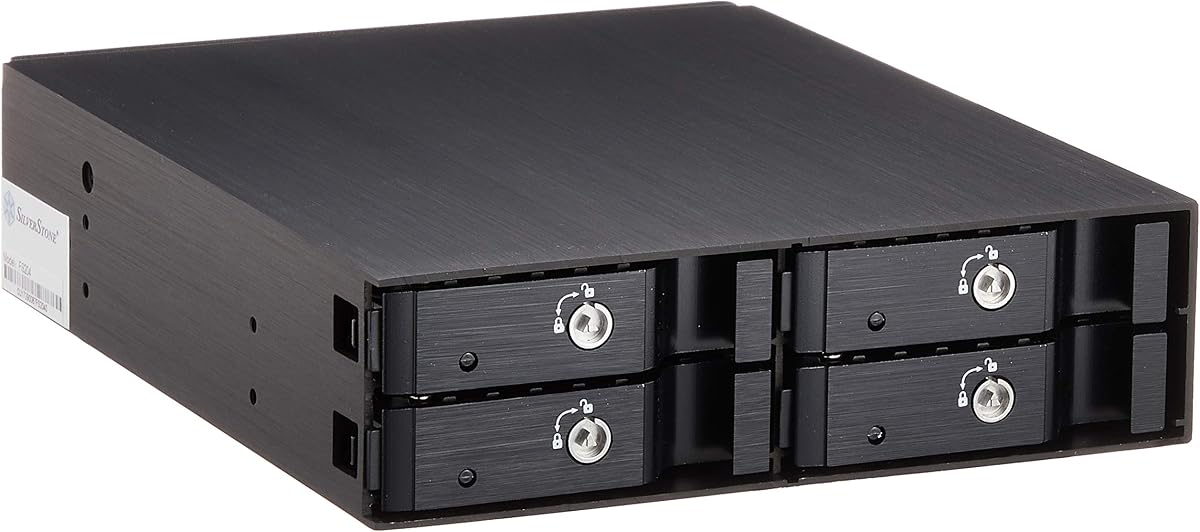
The Silverstone SST-FS204B offers a premium aesthetic with an all-aluminum body and a hairline brushed finish that looks great in open cases. It fits four 2.5 inch drives in one 5.25 inch bay and includes individual metal key locks for each drive. A built-in cooling fan ensures excellent heat dissipation for all drives.
We may earn a commission when you buy through this link, at no additional cost to you.
Key strengths include the individual locks which add significant security for valuable data and the sleek design that blends well with modern hardware. Independent drive status LEDs provide quick visual confirmation of each drive state without needing software checks.
While the price is higher and limited to 2.5 drives the build quality and design justify the cost for enthusiasts. The cooling system is integrated meaning you don't need to rely on case airflow to keep drives safe.
This is ideal for enthusiasts needing secure storage in a visually appealing package. If you want security and performance with a premium look this rack is a strong recommendation for your system.
Each drive has its own metal key lock allowing you to secure specific drives independently without needing extra cases or boxes.
The built-in fan guarantees consistent airflow over all four drives which prevents hotspots and maintains stable performance during heavy use.
We may earn a commission when you buy through this link, at no additional cost to you.
This LYNICESHOP backplane is designed with a unique space-saving layout that uses three contiguous optical drive bays to expand to five hot-swap positions. It supports both SATA and SAS interfaces allowing for diverse drive configurations. The aluminum alloy frame ensures corrosion resistance and durability over years of use.
We may earn a commission when you buy through this link, at no additional cost to you.
A standout feature is the dual power supply design which makes operation safer and more stable by reducing the risk of power failure. A fan is included to provide excellent heat dissipation capability extending the service life of the cage and drives. The perfect rating suggests high customer satisfaction with its performance.
The main trade-off is the requirement for three optical drive bays which is a large footprint for any PC case. Users should measure their case space carefully before purchasing to ensure it fits properly.
This is ideal for users needing a unique five bay solution with robust power redundancy. If you value safety and stability in a high-density setup this backplane is a reliable choice.
Dual power supplies reduce the risk of drive loss during power fluctuations ensuring your data remains accessible and safe at all times.
The design converts three optical bays into five drive slots maximizing storage capacity in a way that standard cages cannot.
We may earn a commission when you buy through this link, at no additional cost to you.
Choosing the right mobile rack involves considering your drive count, bay size, and security needs. This guide breaks down the critical factors to ensure you get the best performance and reliability for your setup.
Ensure the rack supports your specific drive size such as 2.5 inch or 3.5 inch. Some units are trayless and require bare drives while others use trays. Verify if it supports SATA or SAS interfaces as not all models handle both.
Count how many drives you need to swap at once. Single bay units are simple but multi-bay units like 4 or 6 bay options offer higher capacity. Consider the physical space in your case such as 3.5 inch or 5.25 inch slots.
Drives generate heat which can affect longevity. Look for racks with built-in fans or open-top designs for passive cooling. A cooling system with fan control allows you to balance noise and temperature based on your environment.
Material matters for longevity. Aluminum and steel enclosures dissipate heat better and are more durable than plastic. Check the insertion rating to see how many hot swaps the connector is rated for before wear becomes an issue.
If you store sensitive data look for racks with lockable bays or individual key locks. This prevents unauthorized removal of drives and adds physical security which is crucial for shared workspaces or public systems.
Confirm the rack is labeled as hot-swap ready so you can plug and play without shutting down the system. This feature is vital for servers or PCs that must remain online 24/7 without interruption.
Tool-less designs allow you to install and remove drives quickly without screwdrivers. This saves time during maintenance or upgrades. Consider if the unit comes with necessary cables or mounting hardware in the box.
A longer warranty period indicates manufacturer confidence in the product. Check if the brand offers customer support for technical issues. This protects your investment against defects and ensures help is available if problems arise.
Start by mounting the mobile rack into your computer case using the provided screws and aligning it with the front panel bezel. Ensure the rack is stable and flush with the case before connecting power and data cables to the backplane.
When installing a drive insert it fully until the connection is secure and the drive is level in the bay. If your rack has locking mechanisms or trays ensure they are tightened to prevent vibration from loosening the connection during operation.
Regularly clean the dust filters and fans to prevent overheating. If your rack has a power switch use it to spin down drives when not in use to extend their lifespan. Always eject drives safely through the OS if the rack does not have a physical eject button.
No you cannot fit a standard 3.5 inch drive into a rack designed for 2.5 inch drives. You must choose a model that specifically supports the dimensions of your drive type. Some racks offer adaptors but it is safer to match the rack to the drive size directly.
Most mobile racks are plug and play and do not require specific drivers. They appear as standard SATA drives to your operating system. However ensure your motherboard supports hot-swap in BIOS for best compatibility.
Yes a cooling fan is highly recommended especially for multi-bay racks. Drives generate heat and without proper airflow they can overheat leading to data loss. Fans help maintain safe operating temperatures during extended use.
This depends on the specific model you choose. Single bay units allow one drive swap at a time while multi-bay units allow you to swap multiple drives simultaneously. Always follow the manufacturer guidelines for safe swap procedures.
Some mobile racks support SAS drives while others are SATA only. Check the product specifications for SAS support such as SAS 3.0 or 6Gbps. If you use SAS drives ensure the backplane explicitly lists compatibility.
Yes that is the main purpose of a hot-swap rack. You can remove and insert drives without shutting down the system provided your OS and controller support it. Always use the eject function safely before pulling a drive out.
We have reviewed ten top mobile racks ranging from budget single-bay units to high-density multi-bay solutions. Whether you need simple access to one drive or a server-grade four bay enclosure there is a perfect fit for your needs.
Prioritize build quality and cooling features to ensure your drives last longer and perform reliably. Security features like locks are essential if you handle sensitive data and need to prevent unauthorized access in shared environments.
Remember to check current prices and availability as these can change quickly. Select a rack that matches your case space and drive size to avoid compatibility issues. With the right choice you will have a powerful and convenient storage solution.