
Switch Cooling Fan with Bottom Cooling
4.0Editor score
Bottom cooling design
Vertical stand included
Affordable price point
This guide compares the top cooling fans for Nintendo Switch docks to prevent overheating and ensure optimal performance during long gaming sessions.
Keeping your Nintendo Switch cool during extended gaming sessions is essential for performance and longevity. Overheating can cause throttling and unexpected shutdowns. A dedicated cooling fan for your dock helps maintain safe temperatures effectively.
We evaluated ten top-rated cooling solutions based on airflow efficiency, noise levels, build quality, and ease of installation. Our analysis focuses on models designed for original, OLED, and newer dock configurations to help you find the right match.
Each selection includes detailed specifications and real-world usage insights to guide your decision. Remember that product availability and pricing fluctuate regularly so check current listings before purchasing to secure the best deal available today.
4.0Editor score

4.6Editor score

4.4Editor score
The following table provides a side-by-side comparison of all ten selected cooling fans. Review key specifications such as fan count, power source, and unique features to identify which model aligns best with your specific console dock setup and gaming needs.



This cooling fan stands out as the top choice for Switch owners seeking reliable thermal management. With a 4.6 rating it offers comprehensive features like LED temperature displays and adjustable speed settings.
We may earn a commission when you buy through this link, at no additional cost to you.
The ability to monitor real-time temperature ensures you never risk overheating during intense sessions. The fan speed ranges from silent operation to high-power cooling providing flexibility for any gaming scenario.
While noise increases at maximum speed the trade-off is acceptable for the cooling performance provided. The inclusion of joystick caps and a stabilizer pad adds value beyond simple cooling functionality.
Ideal for daily players who want peace of mind regarding console health this unit delivers consistent results. Its comprehensive warranty and support make it a safe investment for long-term use.
The LED display shows exhaust temperature in Celsius allowing you to react instantly to heat spikes.
Three buttons let you toggle power and speed levels easily without needing complex setups.
We may earn a commission when you buy through this link, at no additional cost to you.
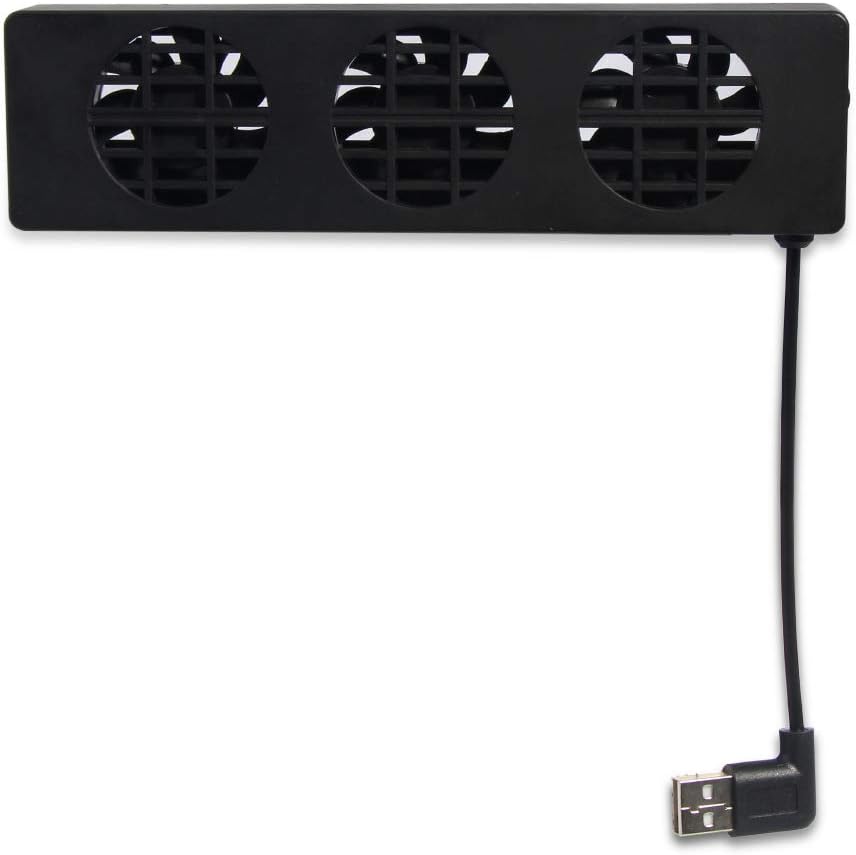
The TNP model focuses on raw airflow through three integrated fans. This approach targets heat dissipation directly at the console dock interface where temperatures often peak during usage.
We may earn a commission when you buy through this link, at no additional cost to you.
Its design prioritizes simplicity with plug-and-play USB power and no extra tools needed. Turbo and normal modes allow quick adjustments based on current gameplay intensity levels.
However the rating suggests potential durability or performance inconsistencies compared to newer models. Users may find it adequate for casual use but less robust for extended high-load sessions.
Consider this option if you need a straightforward cooling solution without extra features. It works best for original dock users who prefer functional design over aesthetic enhancements.
Multiple fans distribute airflow evenly across the dock surface to reduce hot spots effectively.
Installation requires only inserting the unit and connecting a USB port for immediate power.
We may earn a commission when you buy through this link, at no additional cost to you.
This unit is engineered specifically for the Switch 2 docking environment. It combines cooling with storage and connectivity expansion making it a multifunctional accessory for modern setups.
We may earn a commission when you buy through this link, at no additional cost to you.
Dual fans ensure adequate heat dissipation while six card slots keep your game collection organized. Three USB ports allow charging multiple peripherals without sacrificing dock space.
RGB lighting adds a customizable visual element that enhances the gaming atmosphere. While tailored for the newer console it represents the evolution of cooling accessories.
Switch 2 owners will find this the most versatile option available today. It balances thermal performance with practical utility for a complete dock experience.
Six dedicated slots hold game cards securely reducing clutter and preventing loss near your setup.
Three output ports support simultaneous charging for controllers and headsets without extra adapters.
We may earn a commission when you buy through this link, at no additional cost to you.
GLDRAM offers a premium cooling experience tailored specifically for the 2021 OLED dock model. Its blue light tech and extensive card storage make it a standout for OLED enthusiasts.
We may earn a commission when you buy through this link, at no additional cost to you.
The unit fits perfectly with the official base design maintaining the sleek aesthetic. Fourteen game card slots provide ample storage while the Type-C cable ensures modern connectivity.
High-quality ABS material guarantees durability and resistance to wear over time. While priced higher than basic fans the build quality justifies the investment for serious collectors.
If you own an OLED Switch this model provides the most seamless integration. It delivers effective cooling while enhancing your setup's visual appeal and organization.
Designed to match the official dock finish this unit blends invisibly into your entertainment center.
Fourteen slots accommodate your entire game library keeping cards accessible and protected.
We may earn a commission when you buy through this link, at no additional cost to you.
Dobe provides a clean white cooling fan designed to complement the OLED Switch aesthetic. It focuses on quiet operation and simplicity for users who prefer understated accessories.
We may earn a commission when you buy through this link, at no additional cost to you.
The white finish matches the console body perfectly reducing visual clutter. A high-speed fan inside maintains internal airflow without generating excessive noise during play.
While it lacks advanced features like displays multiple fans it fulfills its core purpose well. The Type-C power connection aligns with the OLED dock's modern standards.
Ideal for minimalists this unit prioritizes silence and visual harmony. It is a solid choice if you value aesthetics alongside functional cooling for your OLED setup.
Engineered for low noise it keeps the environment peaceful even during long gaming marathons.
The white casing mirrors the OLED console ensuring a cohesive look in your setup.
We may earn a commission when you buy through this link, at no additional cost to you.
This fan focuses on efficient heat dissipation through a turbo-speed 3000 RPM motor. Its white design suits OLED setups while maintaining a compact form factor.
We may earn a commission when you buy through this link, at no additional cost to you.
The USB power requirement ensures easy integration with dock ports. Blue LED lighting adds a subtle visual cue indicating active cooling status.
Space-saving design keeps your entertainment area tidy without compromising airflow. While it lacks advanced customization it provides consistent cooling for daily use.
Suitable for users seeking a no-fuss cooling solution this model balances size and performance. It ensures stable temperatures during typical gaming sessions effectively.
Running at 3000 RPM it generates rapid airflow to quickly lower dock temperatures during use.
The compact build saves space allowing other accessories to fit easily in your setup.
We may earn a commission when you buy through this link, at no additional cost to you.
Bewinner offers a robust cooling bracket featuring three internal fans for maximum heat dissipation. The material quality ensures longevity while the compact design fits standard dock profiles.
We may earn a commission when you buy through this link, at no additional cost to you.
Turbo and normal modes let you balance cooling power with noise levels. The side switch provides quick access to adjust settings during gameplay.
This unit is built for utility prioritizing performance over decorative elements. It supports consistent airflow to maintain safe operating temperatures over time.
Ideal for those seeking a strong cooling solution without complex electronics this bracket delivers steady results. It remains a reliable choice for standard dock configurations.
Three fans working together create a high-volume airflow that rapidly reduces internal heat.
A side switch allows instant switching between turbo and normal modes without unpluging.
We may earn a commission when you buy through this link, at no additional cost to you.
OSTENT presents a value-oriented three-fan cooling dock for budget-conscious buyers. It uses USB power for convenience and offers dual-speed settings for flexible usage.
We may earn a commission when you buy through this link, at no additional cost to you.
The insertion mechanism is straightforward requiring no tools to install on the dock back. Three fans provide decent ventilation for typical heat management needs.
While cost-effective the lower rating suggests potential noise or durability issues. It may require more frequent replacement compared to higher-end alternatives.
Best for casual users who need basic cooling without high spending. This model offers functional performance at an accessible price point.
A budget-friendly choice that delivers essential heat dissipation without extra costs.
Insert the unit directly into the dock back for immediate cooling without additional steps.
We may earn a commission when you buy through this link, at no additional cost to you.
This model offers incredible value for its price point while delivering functional cooling capabilities. It includes an LED display for speed monitoring and comes with practical accessories.
We may earn a commission when you buy through this link, at no additional cost to you.
Bottom cooling design helps draw heat away efficiently while the vertical stand adds utility. Adjustable speeds let you balance noise and performance based on your environment.
Although it uses older Micro USB technology it remains effective for most users. The included stabilizer pad ensures secure placement during intense gaming sessions.
For those prioritizing affordability this unit provides essential features without extra cost. It is an excellent entry-level choice for protecting your console.
At a very competitive price it offers essential thermal management without breaking your budget.
The stand adds height and stability to your console improving both cooling and ergonomics.
We may earn a commission when you buy through this link, at no additional cost to you.
This specialized cooling fan comes from the Japanese market offering a black finish to match OLED docks. Its design focuses specifically on fit within the OLED dock housing.
We may earn a commission when you buy through this link, at no additional cost to you.
While detailed specs are not provided it appears tailored for local Switch OLED users. The black finish complements darker gaming setups effectively.
Import products may lack local support but provide unique aesthetic options. Ensure voltage and power compatibility before purchase to avoid connectivity issues.
Consider this if you prefer an imported accessory with specific color matching. It serves as a niche option for dedicated OLED Switch fans.
The black color blends seamlessly with dark gaming setups for a polished look.
Designed for the Japanese market it offers unique styling not commonly found elsewhere.
We may earn a commission when you buy through this link, at no additional cost to you.
Selecting the right cooling fan depends on your specific dock model, budget, and feature requirements. This guide outlines key factors to consider before making your final purchase decision.
Ensure the cooling fan matches your specific dock version such as original or OLED or Switch 2. Mismatched units may not fit properly or connect to power ports correctly leading to poor performance or damage.
Check product descriptions for explicit compatibility claims before buying to guarantee a perfect physical and electrical fit with your console.
Fans typically use USB Type-C or Micro USB cables connected to the dock. Modern OLED docks prefer Type-C so verify cable types to avoid needing extra adapters for power supply.
Consistent power is critical for stable cooling so match the fan's input to your dock's available USB outputs.
Adjustable speed controls let you balance cooling power against noise levels. High speeds cool better but may produce audible fan noise that can disrupt quiet gaming sessions at home.
Look for models offering silent modes for low-speed usage and turbo modes only when necessary for maximum heat removal.
ABS plastic and durable materials ensure the fan withstands constant use without cracking. Cheaper units may feel flimsy or fail prematurely under sustained thermal loads during gaming.
Invest in solidly constructed fans to maintain performance over time without requiring frequent replacements for the dock.
Some models include LED displays for temperature monitoring or RGB lights for aesthetics. These features add value but may not be necessary if you only prioritize basic cooling functionality.
Decide if extra functionalities justify the cost based on your personal preferences and setup style for your console.
A lifetime or long-term warranty provides peace of mind against manufacturing defects or early failures. Reliable customer support ensures you can resolve issues quickly without losing your investment entirely.
Prioritize brands that offer clear warranty terms and responsive service to protect your purchase effectively.
Compact designs save space on your entertainment center while still providing adequate cooling coverage. Ensure the unit does not block other ports or interfere with nearby cables in your setup.
Choose a design that blends well with your existing gear to maintain a clean and organized appearance overall.
Higher-priced models often offer better build quality and more features. However budget options can still provide sufficient cooling for casual players who do not need advanced controls.
Balance your budget with required features to get the best value without overspending on unnecessary functionalities for your needs.
Connect the cooling fan to an available USB port on your dock before inserting the console. Secure the connection and ensure the fan sits flush against the back of the dock for optimal airflow.
Turn the fan on using its control button or switch before starting your game session. Monitor LED displays if available to ensure the temperature remains within safe operating ranges.
Regularly clean dust from fan blades and vents to maintain efficiency and prevent overheating. Use compressed air or a soft cloth to remove debris that could block airflow or damage the motor.
Yes cooling fans actively lower temperatures by increasing airflow around the dock and console. This reduces thermal throttling and prevents automatic shutdowns during long gaming sessions effectively.
Not always as designs vary by dock model. Always check compatibility details to ensure the unit fits and powers correctly without risking damage to your console.
Most units draw power from a dock USB port via a cable. Connect the included cable to the dock and fan for immediate operation without extra adapters.
Some noise is expected especially at higher speeds. Adjustable settings allow you to lower speeds for silent operation when full power is not required for cooling.
Clean every few months or when airflow feels weak. Dust accumulation can block vents and reduce efficiency so regular maintenance keeps performance consistent.
Using external cooling fans typically does not void the warranty as they do not open the console. However always verify with manufacturer guidelines before modifying your setup.
Some models like the Switch Cooling Fan with Bottom Cooling explicitly support Steam Deck. Check product specs to confirm compatibility before purchasing for use with non-Nintendo devices.
Normal mode is usually sufficient for casual play. Use turbo mode only when temperatures rise significantly during extended or intensive gameplay sessions.
The top picks include the LED-equipped model for comprehensive monitoring, the budget-friendly vertical stand option, and the premium OLED-specific fan with extensive card storage.
Prioritize compatibility with your dock model and balance fan speed features against noise preferences to find the right fit for your setup needs.
Prices and stock fluctuate frequently so verify current availability and pricing before completing your purchase to secure the best deal available today.