
Acer Nitro V 16S AI Gaming Laptop
4.4Editor score
Ryzen 7 260
32GB DDR5 RAM
180Hz Display
Finding the right gaming laptop for Diablo 4 requires balancing power with portability. You need strong graphics and fast processors to handle intense battles and stunning visuals smoothly.
We compared ten real products based on their specs, ratings, and features. Our list covers options from budget-friendly picks to high-end machines for serious players.
Each pick shows key details like GPU, CPU, and display. Note that availability and pricing can change quickly, so check the latest listings before buying.
4.4Editor score

4.4Editor score

4.3Editor score
As an Amazon Associate we earn from qualifying purchases.
This side-by-side comparison highlights the key specifications of each laptop to help you find the perfect machine for your needs.



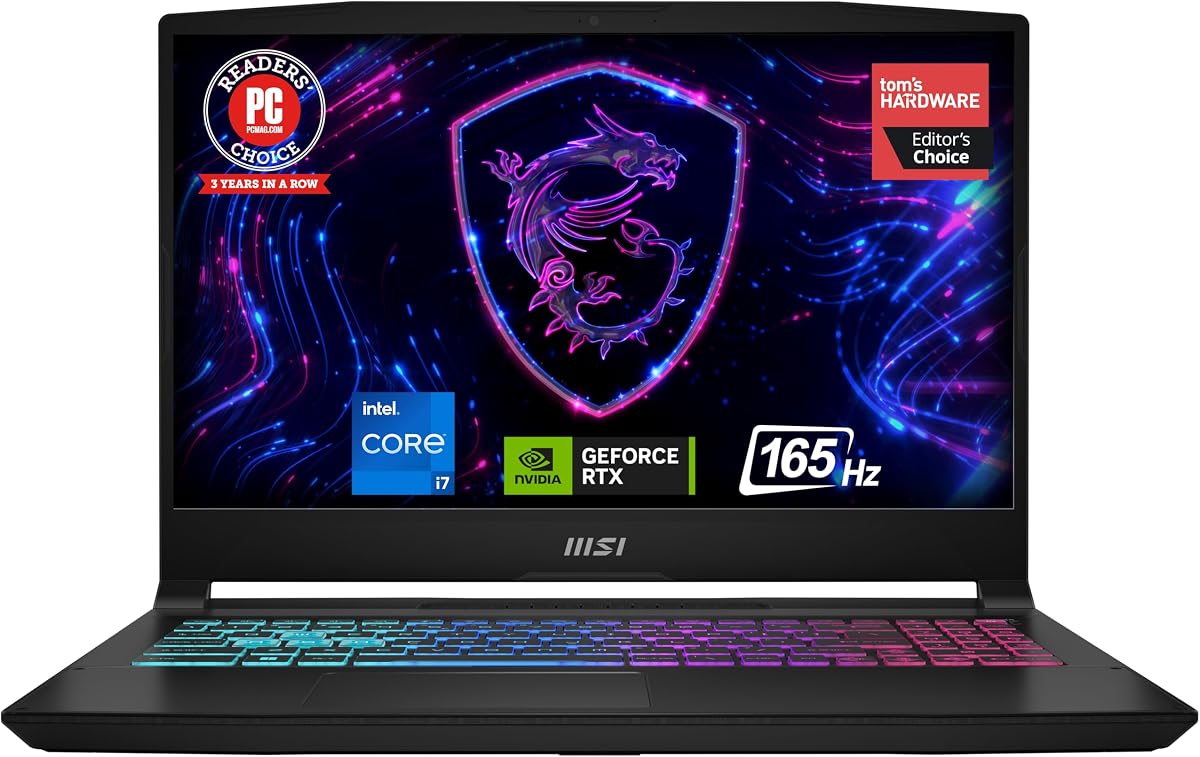

This laptop delivers strong performance for gaming with its RTX 5060 and Core i7 processor. It received a solid rating from users who appreciate its smooth visuals and build.
We may earn a commission when you buy through this link, at no additional cost to you.
The RTX 5060 GPU powered by Blackwell architecture supports DLSS 4 and Max-Q for efficient gaming. The 165Hz display ensures fluid motion during intense combat scenes in Diablo 4.
While powerful, the system can run warm under heavy loads, though ROG cooling helps manage temperatures. Battery life is typical for gaming laptops but may need charging during long sessions.
It is an excellent choice for players wanting high fidelity and responsiveness. The combination of speed and visuals makes it a top contender for Diablo 4.
The RTX 5060 enables ray tracing and DLSS 4 for enhanced visuals and frame rates.
ROG Intelligent Cooling uses vapor chambers and liquid metal to keep the system cool.
We may earn a commission when you buy through this link, at no additional cost to you.
This budget-friendly option offers impressive specs including a Ryzen 7 260 and RTX 5060. Users value the high RAM and fast display for smooth gaming experiences.
We may earn a commission when you buy through this link, at no additional cost to you.
The laptop features AI-powered performance with up to 38 AI TOPS and Blackwell architecture graphics. The 180Hz display provides vibrant colors and smooth motion for action games.
Though it lacks the latest Wi-Fi 7, it still offers stable connectivity via Wi-Fi 6. Build quality is decent but may not feel as premium as higher-end models.
Ideal for gamers seeking value without sacrificing performance. The high RAM and fast GPU make it a strong pick for budget-conscious players.
With 32GB DDR5 RAM, multitasking and game loading are incredibly fast.
DLSS 4 and Ray Reconstruction enhance visuals and performance via neural rendering.
We may earn a commission when you buy through this link, at no additional cost to you.
This premium model offers top performance with the RTX 5070 Ti and Core Ultra 9. It delivers stunning visuals and speed for the most demanding games.
We may earn a commission when you buy through this link, at no additional cost to you.
The ROG Nebula display features 2.5K resolution and 240Hz refresh rate for crisp, fluid images. DLSS 4 and Blackwell architecture ensure cutting-edge graphics and efficiency.
While expensive, the hardware justifies the cost for enthusiasts seeking the best. Cooling is robust but the system may be heavy for daily travel.
Perfect for serious gamers wanting the ultimate experience. The high-end components provide unmatched performance and visual fidelity.
The 2.5K Nebula display offers exceptional clarity and contrast.
Core Ultra 9 275HX handles complex tasks and gaming loads easily.
We may earn a commission when you buy through this link, at no additional cost to you.
This laptop balances performance and features with an Core i7 and RTX 4050. It received a high rating for reliability and gaming capability.
We may earn a commission when you buy through this link, at no additional cost to you.
The RTX 4050 supports DLSS 3.5 for improved ray tracing and visuals. The 165Hz display ensures smooth gameplay and the Thunderbolt 4 port offers flexible connectivity.
While the GPU is not the latest, it handles many games well. The design is compact but may struggle with very long sessions under load.
Great for users wanting a balanced machine at a reasonable price. The high rating suggests consistent performance for daily use.
Thunderbolt 4 allows fast data transfer and external display support.
Core i7 provides enough power for gaming and content creation tasks.
We may earn a commission when you buy through this link, at no additional cost to you.
This model features a large 17.3 inch screen for immersive gaming. Users appreciate the thin design and strong GPU for smooth visuals.
We may earn a commission when you buy through this link, at no additional cost to you.
The Intel Core 7 240H and RTX 5060 deliver responsive gameplay and AI boosts. Cooling is efficient with a shared-pipe thermal design for stable sessions.
While portable for its size, it is still heavier than 15 inch models. The refresh rate is good but slightly lower than some competitors.
Ideal for those prioritizing screen real estate. The balance of size and performance makes it a unique choice.
A 17.3 inch screen provides a wide view for better immersion.
Shared-pipe thermal design keeps noise low while gaming.
We may earn a commission when you buy through this link, at no additional cost to you.
This laptop stands out with a perfect rating and high RAM. Users love the smooth multitasking and reliable gaming performance.
We may earn a commission when you buy through this link, at no additional cost to you.
The AMD Ryzen 7 7445HS and RTX 4050 provide strong speed. With 32GB DDR5 RAM, you can run apps and games without slowdown.
While the GPU is mid-tier, the RAM ensures stability. The design is clean but the refresh rate is slightly lower than some rivals.
Excellent for users needing extra memory. The high rating reflects consistent satisfaction.
32GB DDR5 allows for seamless multitasking and heavy loads.
OMEN Gaming Hub helps manage settings and performance.
We may earn a commission when you buy through this link, at no additional cost to you.
This entry-level option offers great value with a fast display and GPU. Users find it suitable for casual gaming and school tasks.
We may earn a commission when you buy through this link, at no additional cost to you.
The RTX 4050 and Core i5 provide solid performance for the price. The 165Hz screen helps keep motion smooth during fast games.
Limitations include lower RAM and storage which may need upgrades. It is a good starting point for those on a tight budget.
Best for beginners needing a capable machine. The high rating shows users are happy with the value.
165Hz display ensures smooth visuals even in entry models.
Thunderbolt 4 offers high speed data and charging.
We may earn a commission when you buy through this link, at no additional cost to you.
This laptop brings a high refresh rate and solid specs. Users appreciate the smooth visuals and reliable cooling for long sessions.
We may earn a commission when you buy through this link, at no additional cost to you.
The RTX 5050 and Core 7 240H provide good performance. The 180Hz display ensures fluid motion and vibrant colors for gaming.
While the GPU is lower tier, it still handles games well with DLSS. The dual-fan cooling helps maintain stability under pressure.
Great for users wanting a smooth display at a good price. The high rating indicates strong user satisfaction.
180Hz refresh minimizes blur for smoother animations.
NitroSense allows customization of fan speeds for better control.
We may earn a commission when you buy through this link, at no additional cost to you.
This model offers strong GPU power with the RTX 4070. Users appreciate the QHD display and solid performance for demanding games.
We may earn a commission when you buy through this link, at no additional cost to you.
The Core i7 and RTX 4070 unleash ray tracing capabilities. The 165Hz QHD screen provides vivid colors and pixel density for immersion.
While powerful, the rating is lower than other models, suggesting some trade-offs. Battery life is typical for high-end gaming laptops.
Ideal for users prioritizing GPU strength. The QHD screen adds to the visual experience.
RTX 4070 unleashes full glory of ray tracing effects.
QHD display brings more vivid colors and detail.
We may earn a commission when you buy through this link, at no additional cost to you.
This laptop features a slim chassis and strong GPU. Users value the flexibility of the hinge and smooth performance for games.
We may earn a commission when you buy through this link, at no additional cost to you.
The AMD Ryzen 7 260 and RTX 5060 enable fast multimedia and gaming. GiMATE AI helps manage tasks intuitively for better productivity.
While thin, it maintains power for gaming needs. The hinge design adapts to different scenarios easily.
Great for users needing a portable yet powerful machine. The rating shows consistent performance and design appeal.
0.76 inch slim chassis makes it easy to carry.
GiMATE provides intuitive control and personal interfaces.
We may earn a commission when you buy through this link, at no additional cost to you.
Selecting the right gaming laptop involves balancing several key factors. Understanding these elements helps you make a choice that suits your needs.
Diablo 4 benefits from modern GPUs with ray tracing and DLSS support. Look for models with RTX 50 series or 40 series cards for smooth performance and visuals.
A strong GPU ensures high frame rates and detailed textures during intense gameplay.
A fast CPU handles multitasking and game physics efficiently. Intel Core i7 or AMD Ryzen 7 processors are ideal for balanced performance.
Prioritize newer generations for better AI support and overall speed.
Refresh rates above 144Hz reduce motion blur and improve responsiveness. Higher resolution like 2.5K or QHD offers clearer details.
A good screen enhances immersion and helps you react quickly to threats.
At least 16GB of RAM allows smooth gameplay and background apps. Fast SSDs ensure quick boot times and loading of game assets.
Consider models with upgradable slots for future expansion needs.
Effective cooling prevents throttling during long gaming sessions. Look for advanced thermal designs like vapor chambers or multiple fans.
Good cooling keeps the system quiet and maintains consistent performance.
If you travel often, choose a lighter model with a slim design. Battery life is usually shorter for gaming but can help for casual use.
Balance size and weight with the performance you require.
Fast Wi-Fi and multiple USB ports allow flexible setups. Wi-Fi 7 offers lower latency which is great for online play.
Ensure the laptop has ports for your peripherals and external displays.
Durable materials ensure the laptop lasts through daily use. Check for sturdy hinges and a solid keyboard.
A well-built unit protects your investment and offers a better feel.
Keep the laptop on a flat, hard surface to allow proper airflow. Avoid soft surfaces like beds that can block vents and cause overheating.
Regularly update your drivers and software to ensure optimal performance. Check for system updates frequently to fix bugs and improve stability.
Clean the vents and keyboard periodically to remove dust. Use compressed air to blow out debris and prevent blockages.
For smooth gameplay, look for GPUs like the RTX 5060 or higher. These cards support ray tracing and DLSS for better visuals and performance.
At least 16GB of RAM is recommended. Many modern models come with 32GB which helps with multitasking and future needs.
Yes, 144Hz is a good baseline for smooth visuals. Higher refresh rates like 165Hz or 240Hz provide even smoother motion.
Many laptops have open slots for memory upgrades. Check the specs to see if the RAM is soldered or expandable.
Gaming laptops usually last a few hours on battery when not gaming. Expect shorter life during intense tasks.
Wi-Fi 7 offers lower latency and faster speeds which is great for gaming. Wi-Fi 6 is still sufficient for most users.
Use a cooling pad and keep vents clean. Avoid using the laptop on soft surfaces that trap heat.
Most run Windows 11 Home which supports all major games and apps. Check compatibility with your preferred software.
Our top picks offer a range of options from budget to premium. The Acer Nitro V 16S stands out for value while the ASUS ROG Strix models lead in performance.
Prioritize GPU and display quality for the best experience. Ensure the cooling and RAM meet your needs for long sessions.
Always check current listings for availability and deals. The right laptop can greatly enhance your gaming adventures.