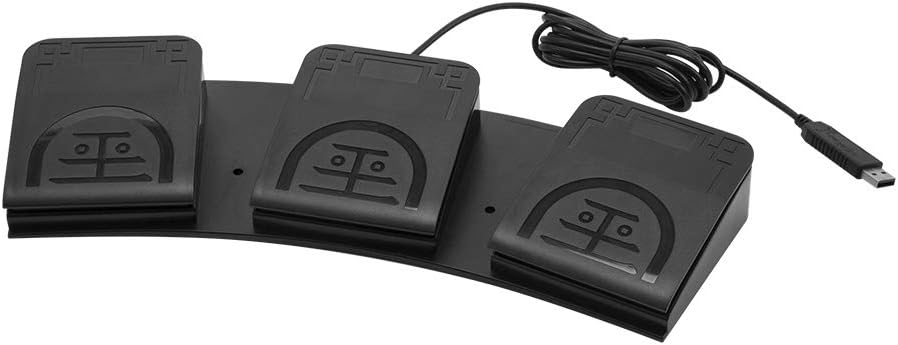
iKKEGOL Upgraded USB Triple Foot Pedal
4.4Editor score
Quiet optical switch technology
Programmable HID device functionality
Non-slip rubber floor protection
This comprehensive guide compares the top foot pedals for transcriptionists to help professionals choose the best hardware for efficient dictation workflows.
Transcription professionals rely on reliable hardware to maintain speed and accuracy during long work sessions. A quality foot pedal allows hands-free control over audio playback, ensuring focus remains on typing rather than mouse navigation or keyboard shortcuts.
We evaluated ten leading models based on durability, ergonomic design, software compatibility, and user feedback. Each product was assessed for its ability to integrate seamlessly with popular transcription software and withstand daily professional use without frustration.
This guide presents detailed insights into each pedal's strengths and limitations to inform your purchasing decision. Keep in mind that product availability and pricing may fluctuate over time, so verify current details before finalizing your order.
4.4Editor score

4.5Editor score

4.1Editor score
The following table provides a side-by-side overview of key specifications for each model to help you quickly identify features that match your specific transcription software and hardware requirements.


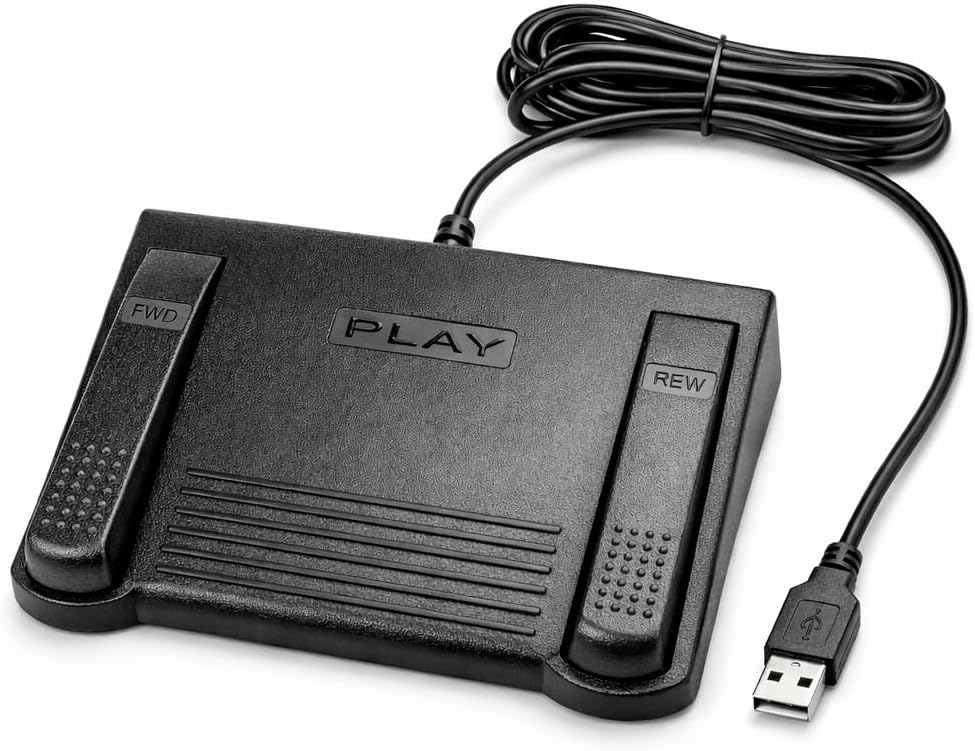


This model stands out as a top choice for transcriptionists who prioritize durability and straightforward functionality. With a high rating from verified users, it delivers consistent performance over thousands of hours of use. The design focuses on reducing foot strain during long shifts.
We may earn a commission when you buy through this link, at no additional cost to you.
The ultra-heavy-duty micro switches ensure that every press registers accurately without requiring excessive force. This precision is critical when transcribing fast-paced audio where timing matters. The wide central pedal allows quick transitions between play and skip functions without looking down.
While it lacks advanced programmability found in premium models, this simplicity is often a benefit for users who prefer stability over configuration options. Some users may find the design basic compared to modern peripherals, but the core functionality remains unmatched in its price class.
Ideal for professionals seeking a reliable workhorse pedal that integrates well with major transcription platforms. The combination of build quality and ergonomic focus makes it a safe investment for daily transcription workflows requiring minimal interruption.
Heavy-duty components are engineered to withstand millions of press cycles, ensuring the pedal lasts through years of professional use without mechanical failure.
The sloping layout and wide surface area reduce foot fatigue by allowing natural positioning and smooth transitions between different control functions.
We may earn a commission when you buy through this link, at no additional cost to you.
This pedal offers a compelling balance of features for users who value wireless convenience without sacrificing performance. The rechargeable battery enables hours of uninterrupted use, making it suitable for mobile transcription work. Users appreciate its reliability across various platforms.
We may earn a commission when you buy through this link, at no additional cost to you.
The mechanical stop feature prevents accidental activation of the center pedal when stepping on side controls, which enhances accuracy during rapid transcription. This thoughtful design detail reduces errors that could otherwise slow down workflow efficiency. The durable construction supports long-term daily usage.
While the battery needs periodic recharging, the extended runtime minimizes downtime significantly. Some users note the weight is slightly heavier than simpler models, but the trade-off provides stability on the desk. It remains a strong contender for those seeking flexibility.
Best suited for transcriptionists who need mobility or prefer fewer cable constraints in their workspace. The combination of battery power and precision controls makes it a versatile tool for modern digital transcription environments.
Rechargeable battery technology removes the need for constant USB tethering, allowing placement optimization for comfort and accessibility during work.
Accidental trigger prevention mechanisms ensure intentional commands only, reducing transcription errors and increasing overall output accuracy for professionals.
We may earn a commission when you buy through this link, at no additional cost to you.
Designed for professional environments, this unit offers extensive control options through its four-pedal layout. The inclusion of toe touch control allows for nuanced operations without lifting the foot entirely. Many users report improved speed due to the added flexibility.
We may earn a commission when you buy through this link, at no additional cost to you.
The increased width of the center pedal minimizes accidental presses of adjacent controls, which is vital during high-volume transcription sessions. The swing mechanism encourages natural heel movement to reduce strain over time. This ergonomic focus supports long-term physical health.
While the price is higher than standard options, the advanced features justify the cost for serious professionals. There may be a learning curve for those transitioning from simpler three-pedal models, but muscle memory develops quickly with consistent practice and usage.
Ideal for legal or medical transcriptionists who require granular control over audio playback. The combination of toe and heel mechanics provides a unique advantage that can significantly enhance efficiency in complex workflows.
The swing foot design reduces physical strain by allowing movement from the heel rather than requiring full foot lifts for control changes.
Four pedal zones enable simultaneous access to more functions, reducing the need for manual keyboard shortcuts during active transcription sessions.
We may earn a commission when you buy through this link, at no additional cost to you.
This model holds a perfect rating due to its reliability with specific transcription software that supports its unique button layout. The inclusion of a dedicated record button offers utility that many standard pedals lack for audio capture workflows. Users praise its consistent performance.
We may earn a commission when you buy through this link, at no additional cost to you.
The buttons are clearly labeled for distinct functions like Next Job and Record, reducing confusion during intense work sessions. Large buttons make it easier to press accurately even when fatigued, enhancing overall workflow efficiency. The USB connection ensures stable data transfer.
However, compatibility is restricted to certain computer software designed for this specific foot control, which may limit versatility. The price reflects its specialized nature, so buyers should verify software support before purchasing to ensure it meets their specific workflow needs.
Best for professionals using specific software suites that support this hardware's unique configuration. The flawless user satisfaction score indicates a high level of trust in its operational stability and functional design for daily use.
Labeled buttons prevent functional confusion during transcription, allowing operators to rely on muscle memory for quick and accurate command execution.
The dedicated record button provides direct access to recording functions, streamlining the workflow for users who capture dictation files directly.
We may earn a commission when you buy through this link, at no additional cost to you.
Ideal for users with limited desk space, this model offers a low profile design that fits easily under most workstations. The non-slip surface area ensures the pedal stays in place during active use. Users highlight its consistent performance and ease of setup.
We may earn a commission when you buy through this link, at no additional cost to you.
The compact build does not compromise on usability, as the surface remains large enough for comfortable foot positioning. It integrates seamlessly with most major software platforms without requiring complex configuration. This simplicity makes it accessible for beginners and veterans alike.
While it lacks advanced programmability, it excels at core playback functions. Some users may want more buttons for complex macros, but for standard transcribing it remains highly efficient. The build quality supports daily professional demands without issues.
Best for transcriptionists needing a reliable pedal that minimizes physical footprint without sacrificing comfort or performance. The high rating reflects its ability to deliver consistent results in professional environments requiring long-term reliability.
The low profile design maximizes desk utility by occupying minimal floor space while maintaining sufficient surface area for comfortable operation.
Non-slip surfaces prevent shifting during use, ensuring consistent pedal positioning and reducing accidental missteps that could interrupt transcription.
We may earn a commission when you buy through this link, at no additional cost to you.
This pedal is engineered exclusively for Express Scribe users, ensuring seamless integration without configuration. The true plug-and-play setup means you can start transcribing immediately after connection. Users appreciate the specialized hardware support for this popular software suite.
We may earn a commission when you buy through this link, at no additional cost to you.
The oversized pedal design reduces fatigue by allowing easy movement between playback controls. It is built with an internal board specifically tuned for Express Scribe signals, which enhances reliability during long sessions. This specialization provides a smooth experience for regular users.
However, compatibility is strictly limited to Express Scribe, making it unsuitable for other programs like Case Catalyst. Users who switch software frequently may find this restriction limiting. The warranty offers some peace of mind for hardware longevity concerns.
Ideal for professionals committed to the Express Scribe ecosystem who want optimized control without setup friction. The hardware ensures precise command execution that general-purpose pedals might not replicate with the same level of efficiency.
Exclusive hardware tuning ensures maximum compatibility and responsiveness with Express Scribe, reducing latency and improving workflow efficiency significantly.
Oversized pedals allow relaxed foot movement, reducing physical fatigue during extended transcription sessions and promoting ergonomic work habits.
We may earn a commission when you buy through this link, at no additional cost to you.
This pedal focuses on ergonomics to support long transcription sessions without strain. The contoured layout is designed to minimize foot movement and physical effort. Users report that it integrates well with major transcription software platforms seamlessly.
We may earn a commission when you buy through this link, at no additional cost to you.
It supports hands-free audio control to keep typing flow uninterrupted, which is essential for efficiency. The professional-grade performance targets medical and legal sectors where reliability is paramount. Most users find the setup straightforward and intuitive.
Feedback is mixed regarding long-term durability and switch sensitivity, suggesting potential variability in quality. Some users prefer more customizable options for their specific workflows. The ergonomic benefits remain a key selling point for those prioritizing comfort over features.
Best for users who prioritize physical comfort and broad compatibility over advanced customization. It serves well as a standard tool for general transcription needs across different professional environments where hands-free operation is critical.
The contoured layout minimizes strain on the foot and ankle, supporting healthier work habits during prolonged daily transcription sessions.
Hands-free control ensures that typing flow remains uninterrupted by manual audio adjustments, significantly boosting productivity during complex transcriptions.
We may earn a commission when you buy through this link, at no additional cost to you.
This pedal stands out for its programmable nature, allowing users to assign specific keyboard or mouse commands to foot actions. The optical switches operate quietly, making it suitable for shared environments. Users appreciate the flexibility to customize controls.
We may earn a commission when you buy through this link, at no additional cost to you.
The wide pedal design provides ample surface area for natural foot placement, reducing fatigue during long use. It supports various applications beyond transcription, including media control and factory testing. The build handles significant weight without instability issues.
While versatile, it requires software installation to configure functions which may deter users wanting plug-and-play simplicity. General-purpose labeling means you might need to test mappings for specific transcription software. However, the customization offers long-term adaptability.
Ideal for users who want a customizable pedal that can evolve with their needs across multiple applications. The quiet operation and cost-effective pricing make it a strong contender for those seeking value without sacrificing functionality.
Optical switches minimize noise during use, making this pedal suitable for quiet offices or shared workspaces where audio feedback is disruptive.
Programmable keys allow users to tailor the pedal to specific tasks, adapting to unique software requirements or personal workflow preferences.
We may earn a commission when you buy through this link, at no additional cost to you.
Known for its customizable features, this pedal allows you to configure the four buttons to suit your specific needs. The user-friendly wizard makes setup straightforward for most users. The slim ergonomic design helps minimize physical strain during prolonged work.
We may earn a commission when you buy through this link, at no additional cost to you.
The anti-slip bottom surface ensures the unit remains stable during vigorous use. It fits seamlessly under most desks due to its low profile. Users note that the brand reliability supports professional daily usage demands without unexpected failures.
While configuration adds flexibility, it may introduce a learning curve for those accustomed to fixed layouts. Some users find the slim design reduces pedal space slightly. However, the balance of customizability and ergonomics remains strong.
Best for professionals needing adaptable controls that align with unique transcription software requirements. The reliability and ergonomic focus make it a strong choice for daily tasks requiring both efficiency and comfort.
Four configurable pedals allow tailored command assignment to match individual software preferences and enhance transcription efficiency.
The low-profile structure optimizes desk usage without sacrificing ergonomic comfort, fitting well into organized professional workspaces.
We may earn a commission when you buy through this link, at no additional cost to you.
This mechanical switch model provides clear tactile feedback for every press, helping users confirm actions physically. The spring-loaded lever system ensures smooth actuation and long-term durability. Users praise its power for customizing complex macros.
We may earn a commission when you buy through this link, at no additional cost to you.
It supports a wide range of systems including Windows and macOS for programming purposes. The ElfKey software allows detailed control over each pedal's function. This makes it suitable for diverse workflows beyond standard transcription needs.
The mechanical nature might produce audible clicks that could be distracting in quiet settings. Software configuration is mandatory for advanced use, which adds a setup step. However, the feedback and customization make it valuable for power users.
Ideal for professionals who prefer mechanical feedback and advanced customization for complex transcription workflows. The robust build and versatile support make it a strong option for demanding tasks requiring precise macro execution.
Mechanical switches provide physical confirmation of every press, reducing uncertainty and improving speed during high-pressure transcription tasks.
Dedicated ElfKey software allows detailed configuration of pedal commands, enabling complex macro execution and precise workflow control.
We may earn a commission when you buy through this link, at no additional cost to you.
Selecting the right foot pedal involves weighing factors such as compatibility, ergonomics, and durability against your daily workflow demands.
Ensure the pedal supports your primary transcription software to avoid configuration issues. Most models work with general programs, but some require specific drivers or exclusivity. Check vendor documentation before purchasing to confirm seamless integration.
Verify that the pedal works with your chosen platform without requiring additional third-party plugins.
Look for pedals with wide surfaces and sloping layouts to reduce foot strain during long shifts. Comfort features prevent fatigue and support healthy work habits over years. Consider pedals with anti-slip surfaces for stability during use.
Prioritize pedals that allow natural foot positioning to minimize repetitive stress risks.
Professional environments demand hardware that withstands thousands of presses daily. Heavy-duty switches and reinforced casings ensure the pedal lasts longer under constant use. Reviews often highlight build quality as a critical factor for long-term satisfaction.
Choose models with proven track records for reliability in high-volume transcription settings.
Most pedals offer three functions, but some provide four or more for advanced control. Consider if you need extra keys for macros or specific recording functions. More pedals can improve speed but may require more space.
Select a pedal count that balances functionality with your available workspace.
Some models allow you to map keys to specific software commands for tailored workflows. Programmable pedals add flexibility but may require software configuration. Decide if you need fixed or adaptable controls based on your usage.
Evaluate whether customizable features justify the setup time for your specific tasks.
USB connections are standard, but some models offer rechargeable batteries for mobility. Consider if you need portability or prefer a wired setup for reliability. Ensure your computer has the necessary ports for the connection.
Match the connection type to your workspace constraints and mobility requirements.
Connect the pedal to your computer via USB and install any required software drivers. Most models are plug-and-play, but specific software may need configuration to recognize the controls.
Adjust the pedal position under your desk to ensure your foot rests comfortably without stretching. Proper positioning reduces strain and improves accuracy during transcription sessions.
Clean the surface regularly with a dry cloth to remove dust and debris. Avoid using liquids directly on the switches to protect internal components.
Many models support both Windows and Mac systems through standard USB HID protocols. However, verify specific software compatibility as some transcription apps may require drivers only available for Windows. Check product details for OS support before purchasing.
Most basic pedals work as plug-and-play USB devices without drivers. Advanced programmable models may require software to map keys, which is usually downloadable from the manufacturer. Always check if your workflow needs specific configurations.
General-purpose pedals often work across multiple platforms, but some models are optimized for specific software. If you switch programs frequently, choose a flexible pedal that supports universal commands. Customizable models offer the best adaptability.
Regular cleaning with a dry cloth keeps the surface free of dust. Check periodically for any loose screws or switches that may need tightening. Proper placement on a non-slip surface prevents shifting and wear over time.
Most pedals are symmetrical or adjustable enough for left-foot operation, though ergonomics vary. Try positioning the pedal to your left if preferred. Some models allow key remapping to suit dominant foot usage patterns.
Quality pedals often last several years with daily use due to durable micro switches. Lifespan depends on usage intensity and maintenance habits. Look for warranties and heavy-duty construction to ensure longevity.
This guide highlights ten top models ranging from reliable workhorses to customizable options. Whether you prioritize ergonomics, software integration, or affordability, there is a suitable choice among these picks for every professional.
Prioritize comfort and compatibility when selecting your hardware to ensure a seamless workflow. Consider your specific software needs and physical requirements before committing to a model.
Always verify current availability and pricing as product details may change over time. Use the provided links to check the latest information for each recommended pedal.