
ARCTIC P9 PWM PST
4.5Editor score
Wide RPM range support
High static pressure design
Includes cable splitter
This guide compares the top 92mm case fans for quiet cooling, high static pressure, and PWM control to help you choose the right fan for your build.
Finding the right airflow source is critical for maintaining optimal temperatures in compact systems. A quality 92mm case fan balances noise and performance effectively to ensure stability.
We evaluated ten highly rated models based on bearing technology, acoustic output, and airflow metrics. Each product offers distinct advantages for specific use cases like NAS or SFF builds.
Every entry details key specs and real-world performance traits to simplify your decision. Prices fluctuate frequently so verify current listings before finalizing your purchase today.
4.5Editor score

4.8Editor score

4.8Editor score
This table provides a side-by-side view of the key specifications and performance metrics for every fan reviewed in this guide.


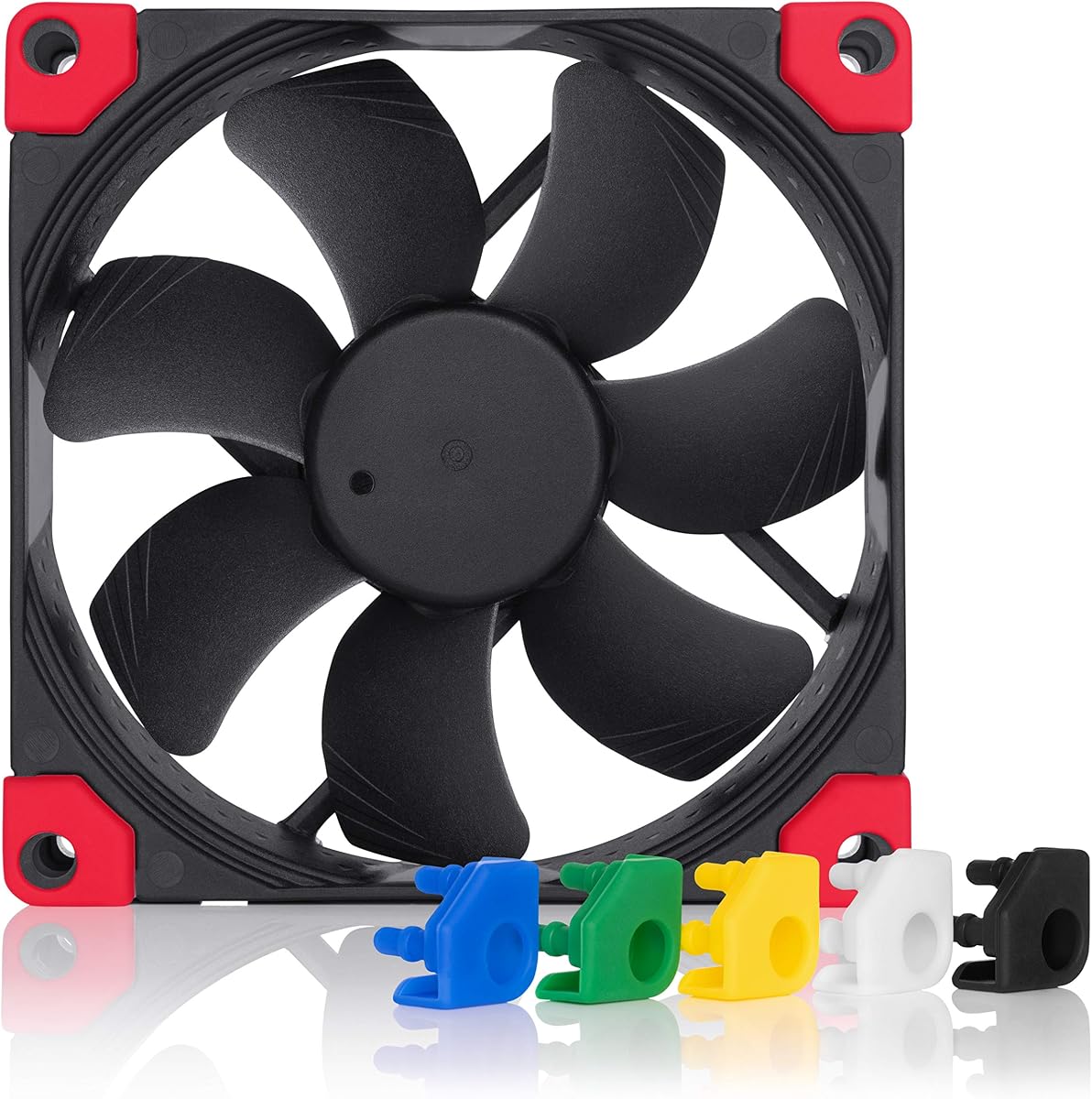


The Noctua NF-A9 PWM stands out as a top performer in the compact fan category. It earns a high 4.8 rating due to its balanced approach to noise and airflow.
We may earn a commission when you buy through this link, at no additional cost to you.
Its Flow Acceleration Channels and Acoustic Optimisation frame deliver efficient cooling without excessive noise. The included low noise adaptor lets users fine-tune speeds for silence.
While it costs more than budget rivals, the durability and sound profile justify the expense for quiet builds. The 22.8 dB(A) rating ensures it stays unobtrusive.
Ideal for HTPC or NAS users seeking reliable cooling. The included accessories make installation straightforward and the performance is consistent.
The frame design reduces air turbulence and noise for a smoother listening experience.
Automatic speed adjustments maintain temperature efficiency without manual intervention.
We may earn a commission when you buy through this link, at no additional cost to you.
This ARCTIC P9 model offers impressive performance at a low cost. With a 4.5 rating, it proves that budget does not always mean poor quality.
We may earn a commission when you buy through this link, at no additional cost to you.
The fan features a wide RPM range allowing full control via motherboard headers. The included splitter simplifies connecting multiple fans to one header.
While not as whisper quiet as premium options, it keeps noise levels acceptable for most users. The static pressure is strong enough for radiators or heat sinks.
A solid pick for users needing to replace multiple cheap fans. The value proposition is unbeatable for casual builders or small form factor cases.
Below 5 percent PWM the fan stops completely to ensure silence when cooling demands are low.
The blade structure pushes air through resistance effectively for radiators or radiators.
We may earn a commission when you buy through this link, at no additional cost to you.
The Noctua NF-A9x14 HS-PWM is designed for tight clearances where standard fans fail. Its slim 14mm profile makes it ideal for low profile CPU coolers.
We may earn a commission when you buy through this link, at no additional cost to you.
Despite the thin frame, it maintains high RPM and efficient cooling. The chromax.black.swap edition offers aesthetic customization with multiple pad colors.
It is a premium choice for users needing to save space without losing thermal performance. The semi-passive operation at zero PWM adds to versatility.
Perfect for ITX builds or cases with restricted height. The build quality matches Noctua standards while providing unique customization options.
The 14mm thickness allows installation in slots where 25mm fans cannot fit.
Adhesive pads let you match the fan to any build color scheme easily.
We may earn a commission when you buy through this link, at no additional cost to you.
This version of the Noctua NF-A9x14 PWM provides a compact solution for tight spaces. It retains the high quality and performance of the standard series.
We may earn a commission when you buy through this link, at no additional cost to you.
The SSO2 bearing ensures longevity and quiet operation. PWM control allows dynamic adjustment based on thermal demands.
Users seeking a slim 25mm standard fan benefit from this option. It fits perfectly in cases with limited depth restrictions.
Recommended for HTPC users or builders needing slim clearance. The performance is top tier even in a thinner profile.
This bearing type offers improved stability and reduced friction for long life.
Automatic speed control ensures efficient cooling without constant manual intervention.
We may earn a commission when you buy through this link, at no additional cost to you.
The Thermalright TL-P9 delivers strong performance at a competitive price. It offers a high rating of 4.7 from satisfied users seeking budget quality.
We may earn a commission when you buy through this link, at no additional cost to you.
Its S-FDB bearings help reduce friction and noise significantly. The 7-blade design maximizes airflow for cooling small components effectively.
While not as refined as Noctua, it provides excellent value for most users. The silicone feet on corners help reduce vibration and noise transfer.
Best for users needing a reliable replacement fan quickly. The performance metrics are solid for both CPU and case cooling.
Silicon feet and pads reduce vibration to ensure a quieter system overall.
The bearing design ensures durability and smooth operation over extended periods.
We may earn a commission when you buy through this link, at no additional cost to you.
This ARCTIC model focuses on simplicity and low noise output. It operates at a fixed 1900 RPM but can be adjusted via voltage if needed.
We may earn a commission when you buy through this link, at no additional cost to you.
The high static pressure allows it to work well even on heat sinks or radiators. Its bearing technology reduces friction to maintain quiet operation.
It is a straightforward solution for users who do not need complex speed controls. The fixed speed ensures consistent performance without configuration.
Ideal for passive systems needing consistent low noise. The price is excellent for basic cooling requirements.
Although fixed RPM, voltage can be adjusted for slower speeds if required.
The design prioritizes silence making it ideal for office or home PCs.
We may earn a commission when you buy through this link, at no additional cost to you.
The Noctua NF-A9 chromax.Black.swap brings style to standard cooling. It offers the same performance as the brown version but in all black.
We may earn a commission when you buy through this link, at no additional cost to you.
Users can swap the anti-vibration pads to match their build colors. This flexibility enhances the visual appeal of compact systems significantly.
Noise levels remain low and airflow is excellent. The PWM interface allows precise speed control for thermal management.
Perfect for black themed builds where aesthetics matter. It combines function and form seamlessly for enthusiasts.
The swappable pads let you change fan details to match case colors.
Build quality remains consistent with Noctua standards for reliability.
We may earn a commission when you buy through this link, at no additional cost to you.
This TL-9015B fan is an ultra-slim option designed for tight spaces. It achieves a 5.0 rating for its ability to move air quietly.
We may earn a commission when you buy through this link, at no additional cost to you.
The 15mm depth allows it to fit where thicker fans fail. Despite the thin size it offers high RPM for strong cooling performance.
Vibration damping pads help reduce noise transfer. The PWM control allows it to adapt to temperature changes automatically.
Best for restricted builds requiring thin fans. It balances high performance with low cost effectively.
The 15mm thickness provides clearance for tight CPU coolers.
Up to 2700 RPM ensures effective cooling despite the thin frame.
We may earn a commission when you buy through this link, at no additional cost to you.
The Noctua NF-A9 FLX uses a 3-pin design for older systems. It offers three fixed speeds via adaptors to suit different needs.
We may earn a commission when you buy through this link, at no additional cost to you.
With adaptors you can choose between 1600, 1250, or 1050 RPM. The lowest setting is nearly silent for passive builds.
It is ideal for users who prefer manual control over automatic PWM. The build quality ensures it lasts for years.
Recommended for older cases or power supplies. It balances quietness with performance effectively for niche needs.
Three speed settings allow simple manual tuning via adaptors.
Compatible with older headers that lack PWM support.
We may earn a commission when you buy through this link, at no additional cost to you.
The ARCTIC P9 Max offers extreme RPM capabilities for high airflow. It reaches 4300 RPM which is high for a 92mm fan.
We may earn a commission when you buy through this link, at no additional cost to you.
Static pressure is optimized to push air through dense components. The fluid dynamic bearing supports long life and smooth operation.
At max speed noise increases but the cooling is exceptional. Users can stop the fan completely via 0dB mode when idle.
Ideal for high density radiators needing fast cooling. It pushes airflow limits at a reasonable price.
This bearing type ensures long service life and low friction noise.
Up to 4300 RPM provides brute force cooling for demanding setups.
We may earn a commission when you buy through this link, at no additional cost to you.
Selecting a 92mm fan involves balancing size, noise, and performance metrics to match your case constraints.
Standard 92mm fans are often 25mm thick but some cases need 15mm or 14mm. Check your clearance before buying to avoid fit issues.
Always measure your available space to ensure the fan fits without blocking cables or other components.
Bearings affect noise and lifespan. Fluid Dynamic bearings reduce friction for quieter operation compared to sleeve bearings.
Opt for Fluid Dynamic or SSO2 bearings for longevity in high rotation scenarios.
PWM fans allow automatic speed control via 4-pin headers. 3-pin fans offer fixed speeds and work with older boards.
Choose PWM if you want the motherboard to manage speeds dynamically.
Static pressure is crucial for pushing air through radiators or heat sinks. Airflow is better for unobstructed case ventilation.
Prioritize high static pressure if installing the fan on a heatsink.
Look for dB(A) ratings. Lower values indicate quieter operation especially important for office or HTPC builds.
Select fans with low decibel ratings if silence is a priority.
Rubber or silicone pads reduce vibration transfer to the case. This prevents rattling noise at higher speeds.
Ensure the fan includes anti-vibration mounts for best results.
Some fans include splitters to connect multiple fans to one header. This simplifies cable routing in tight cases.
Check for included accessories to avoid buying extra cables later.
Black variants with swappable pads let you customize fan appearance to match your system build.
Consider color options if visual harmony is important for your setup.
Install the fan by aligning the direction of airflow with your case cooling strategy. Use screws or rubber mounts to secure it firmly.
Connect the fan to a PWM header on your motherboard if possible to allow automatic speed adjustments based on system temperature.
Regularly clean dust from the blades and frame to maintain performance. Use compressed air to prevent buildup that can increase noise and reduce airflow.
3-pin fans provide constant voltage for fixed speed while 4-pin PWM fans allow dynamic speed control via motherboard signals. PWM is better for temperature-based tuning.
Noise depends on RPM and bearing quality. Many high-end 92mm fans operate below 25 dB(A) which is nearly silent for most environments.
Yes if the heatsink supports 92mm mounting. Ensure the fan has high static pressure for best cooling performance through dense fins.
Using a splitter allows multiple fans to run on a single header. This is useful if your motherboard has limited fan ports.
Arrows on the fan frame show airflow direction. Ensure intake fans pull air in and exhaust fans push air out for proper cooling.
Static pressure measures the fan ability to push air through resistance. High static pressure is needed for radiators and thick filters.
The Noctua NF-A9 PWM and ARCTIC P9 PST lead the list with their balanced performance and features.
Prioritize static pressure for radiators and acoustic levels for home builds to ensure optimal system stability.
Verify current stock and pricing since availability fluctuates frequently during the buying process.