
Hearvo USB 3.0 HDMI KVM Switch
4.0Editor score
4K@60Hz resolution
Remote switching included
Plug and play setup
This guide compares the top 10 laptop with KVM support devices to help you choose the best switch for your workspace setup and productivity needs.
Finding the right laptop with KVM support can transform your workflow by allowing seamless switching between multiple computers on a single monitor setup. This comprehensive guide explores the best options available to enhance your desktop experience.
We have evaluated each product based on video resolution support, USB connectivity speeds, charging capabilities, and overall compatibility with modern laptops. Our analysis ensures you find a reliable solution for your specific technical requirements.
Each pick highlights key features and real-world performance to help you decide which KVM switch fits your budget and needs. Remember that prices and availability can change so check current listings before purchasing.
4.0Editor score

4.9Editor score
4.6Editor score
This table provides a side-by-side overview of the top rated laptop with KVM support switches to help you compare specifications and features quickly.


The AV Access KVM Switch 3 Monitors 2 Computers KVM Docking 8K@60Hz stands out as the top choice for professionals needing high-resolution triple monitor setups. Its nearly perfect user rating reflects reliability and performance that exceeds expectations for complex workflows. This device combines a KVM switch with a full docking station to reduce desk clutter significantly.
We may earn a commission when you buy through this link, at no additional cost to you.
Its standout feature is the support for 8K@60Hz on desktop PCs alongside 4K@60Hz on laptops which ensures sharp visuals for detailed design work. The shared 1Gb Ethernet connection is a game changer because it keeps both computers online while you switch control so downloads continue uninterrupted. You also get three 10Gbps USB ports for fast data transfers and a 100W PD port to charge your laptop with one cable.
While the price is higher than basic models the included features justify the cost for power users who need stability and speed. The only real trade off is that you must buy HDMI and DisplayPort cables separately which adds to the initial setup cost. This is acceptable given the high quality and versatility of the core unit.
This KVM switch is ideal for developers traders and content creators who use both a high power desktop and a portable laptop. If you need a setup that handles 8K visuals and keeps your network active on both machines this product delivers the best overall experience for laptop with KVM support needs.
Enjoy detailed visuals with support for 8K@60Hz on desktops and 4K@60Hz on laptops perfect for design and coding tasks.
The shared Ethernet port ensures both computers stay connected to the internet so background tasks never pause during switching.
We may earn a commission when you buy through this link, at no additional cost to you.
The Hearvo USB 3.0 HDMI KVM Switch offers an affordable way to manage two computers on a single monitor without sacrificing video quality. With a solid user rating it delivers reliable performance for home offices and basic work setups. This unit combines HDMI and USB switching into one compact device that fits easily on any desk.
We may earn a commission when you buy through this link, at no additional cost to you.
Its 4K@60Hz resolution support ensures clear visuals for both work and media consumption while the four USB 3.0 ports allow you to share keyboards and mice seamlessly. The included wired remote makes switching between computers convenient without reaching behind the device. You get a stable connection with plug and play functionality so no drivers are required for Windows Linux or Mac.
The main limitation is that it only supports one monitor which might restrict users who need dual screen setups. However the price point makes it a great value for those who prioritize simplicity and cost over multi monitor flexibility. This trade off is reasonable for small spaces or single user workstations.
If you are looking for a budget friendly solution to share a monitor and peripherals between two PCs this switch is a strong recommendation. It provides essential KVM functionality with enough features to handle everyday tasks efficiently without breaking the bank for laptop with KVM support users.
Plug and play design with no software needed lets you start sharing peripherals between two PCs in minutes.
The included wired remote lets you switch computers from your desk so you do not have to reach for the device.
We may earn a commission when you buy through this link, at no additional cost to you.
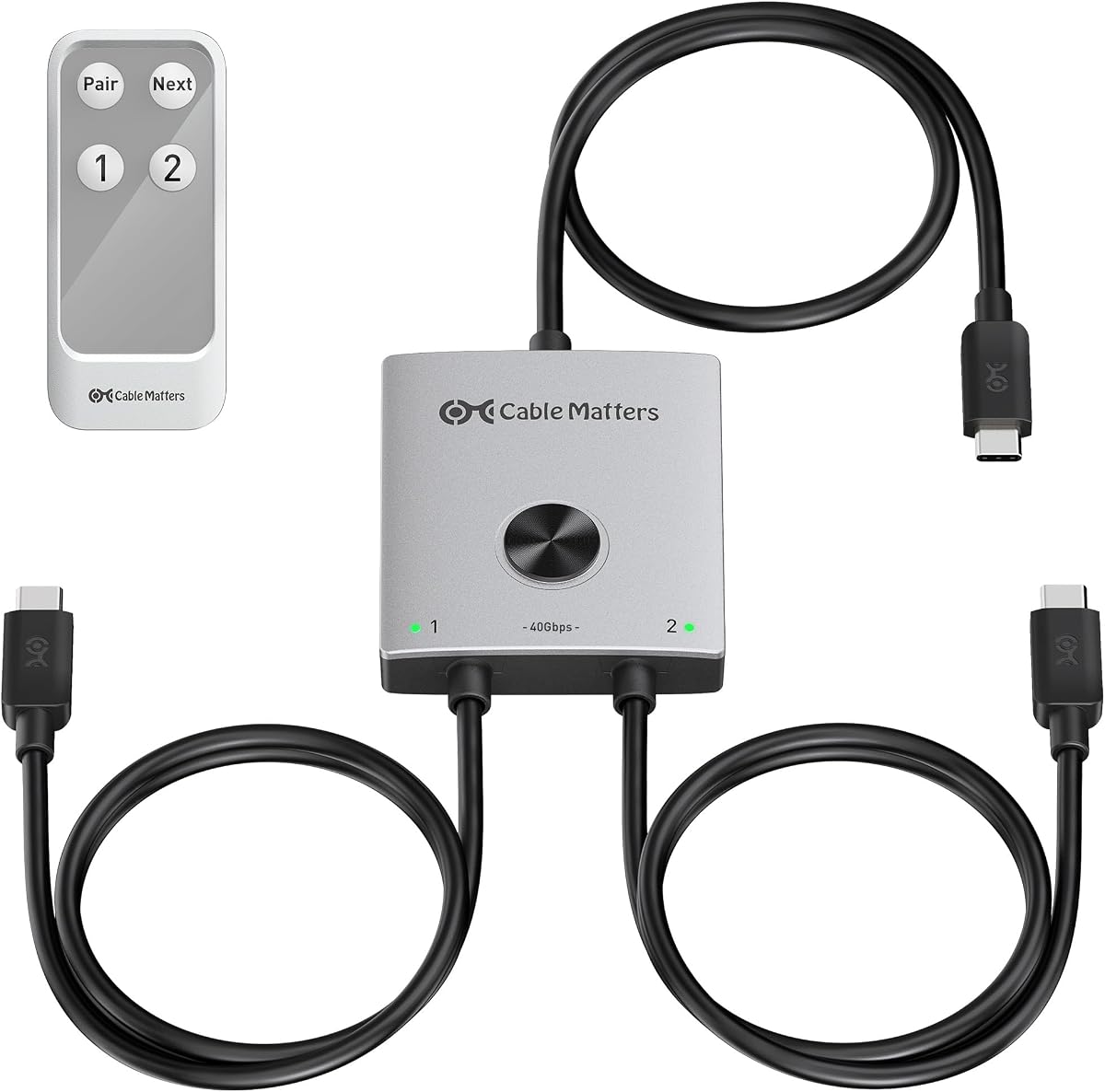
The Cable Matters 40Gbps USB C KVM Switch is a premium solution for users who need maximum speed and Thunderbolt compatibility. With a high user rating it delivers top tier performance for transferring large files and running high-resolution displays. This switch is designed to share a single docking station or monitor between two laptops with minimal lag.
We may earn a commission when you buy through this link, at no additional cost to you.
Its 40Gbps bandwidth supports 8K@60Hz video and enables ultra-fast data transfers that keep up with demanding workflows like video editing or large codebases. The 140W power delivery pass-through ensures your laptop stays fully charged even when using the most power hungry docks. The RF remote allows you to switch devices without needing a direct line of sight which adds convenience in any workspace.
This model requires a compatible docking station with a detachable host cable which may limit its use with some integrated docks. While the price is higher it justifies the cost for users who need Thunderbolt speeds and high-end display support without compromise. The included built-in cables further reduce clutter and simplify installation.
Ideal for professionals using MacBook Pros or high performance Windows laptops this switch ensures your peripherals and displays work seamlessly across devices. If you need the fastest connection speeds and premium features for your laptop with KVM support setup this product is the best premium choice available.
Connect with compatible Thunderbolt 4 docks to share displays and peripherals at up to 40Gbps speed.
Get up to 140W charging pass-through to keep your laptop powered while sharing its peripherals with another machine.
We may earn a commission when you buy through this link, at no additional cost to you.
The 2 Monitors 4 Computers KVM Switch offers a unique hybrid solution for users who need to connect multiple laptops and desktops to dual monitors. With a solid rating it handles diverse video inputs and USB peripherals smoothly for complex office environments. This switch accepts various combinations of USB-C HDMI and DisplayPort so you can mix different computer types easily.
We may earn a commission when you buy through this link, at no additional cost to you.
Its ability to support four different computers with dual 4K@60Hz displays makes it perfect for trading desks or IT departments. The 100W PD port charges your laptop while you work and the external power supply ensures stable performance with high power USB devices. An EDID dial lets you control display recognition which helps prevent window resizing when switching between machines.
Setup can be complex because desktop PCs require two video cables and a USB cable to function correctly. While this adds to the initial work the flexibility of connecting four different systems is unmatched in its price range. The extra effort pays off if you need a central hub for multiple desktops and a laptop.
For anyone managing more than two computers on a dual monitor setup this switch provides the connectivity options you need. It is a versatile choice for professional environments where multiple systems must share resources efficiently for laptop with KVM support workflows.
Connect up to four computers with mixed USB-C HDMI and DisplayPort inputs for maximum desktop flexibility.
Get dual 4K@60Hz visuals for sharp detail on two screens while switching between any of your four connected PCs.
We may earn a commission when you buy through this link, at no additional cost to you.
The USB-C KVM Switch 3 Monitors 2 Laptops allows you to expand your laptop to three external displays for a powerful workstation setup. With a strong user rating it delivers reliable triple monitor performance for users who need extra screen real estate. This docking KVM combines video switching with USB hub functionality to reduce cable clutter on your desk.
We may earn a commission when you buy through this link, at no additional cost to you.
Its MST support enables dual 4K@60Hz and one 1080P@60Hz output from a single laptop which is rare for switches at this price. The four USB 3.1 Gen2 ports offer 10Gbps data transfer for fast file movements and the 100W PD port keeps your laptop charged during work. Switching between two laptops is quick with the included wired remote or panel button.
Mac users should note that this device supports only mirror mode on macOS due to system limitations which reduces its utility for Mac-only setups. Windows laptops also need at least an 11th generation CPU to handle three external displays properly. These requirements mean you must check your hardware before purchasing to ensure compatibility.
This switch is ideal for Windows power users who need triple displays and fast USB data for productivity tasks. If you want to turn one laptop into a multi monitor workstation this KVM docking station offers the best value for laptop with KVM support setups.
Expand your workspace to three external monitors to maximize your efficiency and multitasking capability.
Enjoy 10Gbps USB transfers and 100W charging through a single dock to keep your setup clean and fast.
We may earn a commission when you buy through this link, at no additional cost to you.
The AV Access 8K KVM Switch 3 Monitors 2 Computers is a docking station that brings desktop and laptop together on a triple monitor setup. With a positive user rating it supports high resolution visuals and shared peripherals for a streamlined desk. This device lets you switch your entire workspace including network and audio with one press of a button.
We may earn a commission when you buy through this link, at no additional cost to you.
Its standout capability is supporting 8K@60Hz on the desktop side which is perfect for detailed design work or video editing. The shared Ethernet connection ensures both computers stay online while you switch so you never lose network access. You also get 10Gbps USB ports for fast storage access and an SD card reader for direct media transfer.
While it works well with Windows laptops the Mac support is limited to mirror mode only which restricts multi-monitor workflows on macOS. The price is higher than basic HDMI switches but the docking station features justify it for users who need a complete all-in-one solution. The included wired remote adds convenience to switching between systems.
This KVM docking station is perfect for professionals who need the highest resolution support and network stability across two systems. If you want to maximize your desktop PC power while keeping your laptop accessible this switch delivers high-end laptop with KVM support performance.
View stunning 8K@60Hz content on your desktop PC for professional workflows that demand every pixel of detail.
Switch your keyboard mouse audio and network connection together so both computers stay ready for immediate use.
We may earn a commission when you buy through this link, at no additional cost to you.
The AV Access KVM Switch Dock 2 Monitors 2 Laptops simplifies managing two laptops on one dual monitor setup with extensive connectivity. With a solid user rating it combines docking and KVM switching to keep your workspace organized and efficient. This device is optimized for hybrid workers who need seamless transitions between work and personal laptops.
We may earn a commission when you buy through this link, at no additional cost to you.
It features dual full-featured USB-C ports that support 4K video and 5Gbps data transfer while charging both laptops at up to 60W each. The EDID emulation allows for fast switching in just 2-3 seconds which keeps your workflow uninterrupted. You also get shared Ethernet and multiple USB ports to connect keyboards mice and storage drives easily.
Mac users face limitations as the system only supports mirrored displays which may not be enough for productivity workflows. However for Windows users the 12-in-1 connectivity covers almost every peripheral need in a single device. The included power adapter ensures stable performance without needing extra wall plugs.
This docking station is ideal for professionals who need a powerful single desk setup for two laptops. It offers the best balance of charging data speed and display support for laptop with KVM support users in a compact form.
Switch between your work and personal laptops in seconds thanks to advanced EDID emulation technology.
Charge both laptops at up to 60W each while sharing peripherals and dual displays on one desk.
We may earn a commission when you buy through this link, at no additional cost to you.
The AV Access KVM Switch 3 Monitors 2 Computers provides a triple monitor docking station with high resolution support and shared network access. With an excellent user rating it ensures that both desktop and laptop remain productive even when switching control. This device is designed for users who need multiple screens and consistent connectivity.
We may earn a commission when you buy through this link, at no additional cost to you.
Its 8K@60Hz support on desktop PCs delivers crisp visuals for detail oriented tasks while the shared Ethernet connection keeps both machines online. You get 10Gbps USB ports for fast storage transfers and a 100W PD port to charge your laptop without extra cables. The top mounted button and remote allow easy switching between computers.
The main constraint is that 8K resolution is only available on the desktop side so laptops are limited to 4K@60Hz. Additionally you must purchase video cables separately which increases the total setup cost slightly. However the performance and connectivity features still make it a top tier choice.
Ideal for professionals using a mix of desktop and laptop this switch ensures your network and peripherals stay accessible. If you need a reliable triple monitor solution with strong data and power capabilities this product is a leading option for laptop with KVM support.
Keep your downloads and cloud sync running on both computers even while you switch active control.
Move large files quickly with 10Gbps USB ports for external drives and storage devices.
We may earn a commission when you buy through this link, at no additional cost to you.
The AV Access KVM Switch Docking Station 2 Monitors 2 Laptops combines docking and switching to help you manage two laptops on a dual monitor desk. With a positive user rating it offers a wide range of ports for peripherals and fast video output. This unit is built to simplify your workspace while maintaining professional performance levels.
We may earn a commission when you buy through this link, at no additional cost to you.
Its 11-in-1 design includes USB 3.0 USB 2.0 Ethernet and audio ports so you can connect everything from printers to headsets. The 100W charging capability ensures your laptop stays powered during long work sessions and the shared Ethernet keeps both devices online. Switching between your work and personal laptop takes seconds with the included remote.
As with many USB-C docks Mac OS only supports mirror mode which limits multi-monitor setups for Apple users. Windows laptops with MST support can use dual 4K outputs though you should verify your specific laptop capabilities first. The overall build and feature set make it a strong contender for general use.
This docking station is well suited for hybrid workers who need a single hub for two laptops and multiple peripherals. It balances price and performance to offer a practical laptop with KVM support solution for daily tasks and professional use.
Connect multiple peripherals including printers and external drives with an 11-in-1 array of shared ports.
Keep your laptop charged with 100W pass-through charging while you work on a second machine.
We may earn a commission when you buy through this link, at no additional cost to you.
The Alxum 20Gbps USB C Switch offers a compact and portable solution for switching between two USB-C laptops with high-speed data. With a decent user rating it provides quick video and file transfer capabilities for users who need mobility. This switch works well with Thunderbolt 4 monitors and docks that support DP Alt Mode.
We may earn a commission when you buy through this link, at no additional cost to you.
Its 20Gbps data transfer speed enables fast file sharing and the 140W charging pass-through keeps your devices powered while you work. The 8K@30Hz display support gives you sharp visuals for presentations and detailed work. A wireless remote makes switching convenient even if the device is placed in a less accessible spot.
However it is not compatible with Dell docking stations which limits its use for some corporate setups. Also the docking pigtail must be short to ensure performance which requires careful cable management. These constraints mean you need to verify your hardware before buying.
This switch is a great choice for professionals who travel or need a small footprint KVM switch for multiple laptops. It delivers high speed data and charging in a portable package that supports laptop with KVM support workflows on the go.
Move large files quickly between laptops with 20Gbps USB-C data transfer speeds.
Carry this tool-free switch easily to switch between devices in offices or hotel rooms.
We may earn a commission when you buy through this link, at no additional cost to you.
Choosing the right KVM switch requires understanding your video needs and connectivity requirements for your laptops.
Ensure the KVM switch supports the resolution and refresh rate you need for your monitor. Many switches support 4K@60Hz or higher for clear visuals.
Look for switches that support 4K@60Hz or 8K if you need high fidelity for design work.
Check the USB ports to ensure they offer fast data transfer for your peripherals. USB 3.0 or higher is standard for good performance.
Choose USB 3.0 or 3.1 for faster data speeds and stable peripheral connections.
A KVM switch with Power Delivery can charge your laptop so you do not need an extra charger. This reduces cable clutter on your desk.
Select a model with 100W PD to keep your laptop charged while sharing peripherals.
Decide whether you need one or multiple monitors connected to your KVM switch. Dual or triple monitor setups require MST support.
Get a switch that supports your target monitor count to ensure a seamless display workflow.
Check compatibility with your laptops operating system and video ports. Windows and Mac have different multi monitor requirements.
Verify OS support and video port types to avoid display issues after purchase.
Consider how you will switch between computers such as buttons remotes or hotkeys. Some setups benefit from wired remotes.
Choose a switching method that suits your workflow for quick and reliable control changes.
Look for switches with robust materials and good reviews for long term reliability. External power adapters can improve stability.
Prioritize units with solid construction and power adapters to ensure consistent performance over time.
Compare the price against the features provided to ensure you get the best value. Higher end models offer more ports and resolutions.
Balance your budget with required features to select a switch that meets your needs.
Connect your computers to the KVM switch using the provided video and USB cables. Ensure all connections are secure for stable signal transfer between devices.
Plug your monitor and peripherals into the KVM switch outputs. Use the button or remote to switch control between your connected laptops.
Avoid overloading USB ports with high power devices unless the switch supports external power. Update firmware if available to maintain compatibility with new laptops.
Most KVM switches support laptops with HDMI or USB-C video outputs. Always check that your laptop supports the specific resolution and video standard required by the switch.
Yes but macOS often limits multi monitor support to mirroring. Some switches allow extended displays but verify compatibility before purchasing.
You can switch using a physical button on the device a wired remote or keyboard shortcuts. Each model offers different methods so check the manual.
A good KVM switch will not slow down USB 3.0 or higher speeds. Look for switches that specify 5Gbps data rates for optimal performance.
EDID emulation helps maintain consistent display settings when switching computers. This prevents windows from resizing or screens from flickering.
Some switches include cables while others require you to buy them separately. Check the package details to see what is included before ordering.
We have reviewed the top 10 laptop with KVM support devices ranging from budget HDMI switches to premium docking stations. Each offers unique strengths to match your specific workspace needs and budget constraints.
Prioritize video resolution and USB speeds based on your daily tasks to ensure you get a setup that grows with your workflow. The right switch should make your work seamless without adding complexity.
Remember to check current prices and availability before buying as details may change over time. Verify your laptop compatibility to ensure the KVM switch meets your expectations for productivity.