This guide compares the top gimbal for beginners options available in October 2026, analyzing features, stabilization, and ease of use for new creators.
As an Amazon Associate we earn from qualifying purchases. We may earn a commission when you buy through links on this page, at no additional cost to you.As an Amazon Associate we earn from qualifying purchases.Purchases through our links may earn us a commission, at no extra cost to you.
Finding the right gimbal for beginners can feel overwhelming with so many models on the market. You need smooth footage without complex setup or heavy gear weighing down your hands. This guide simplifies the process by highlighting models designed for ease of use and reliable performance.
We evaluated ten top-rated gimbals based on stabilization quality, battery life, portability, and app support. Our comparison covers budget-friendly options and premium picks suitable for smartphones and cameras. Each product offers unique features to help you capture professional-looking video with minimal effort.
Every pick in this list showcases specific strengths like long battery life or intuitive controls ideal for new users. Remember that prices fluctuate frequently so check the current listings before making a final decision. We update this guide regularly to ensure you have the latest information available.
Top 3 Picks for Best Gimbal for Beginners
Best Budget
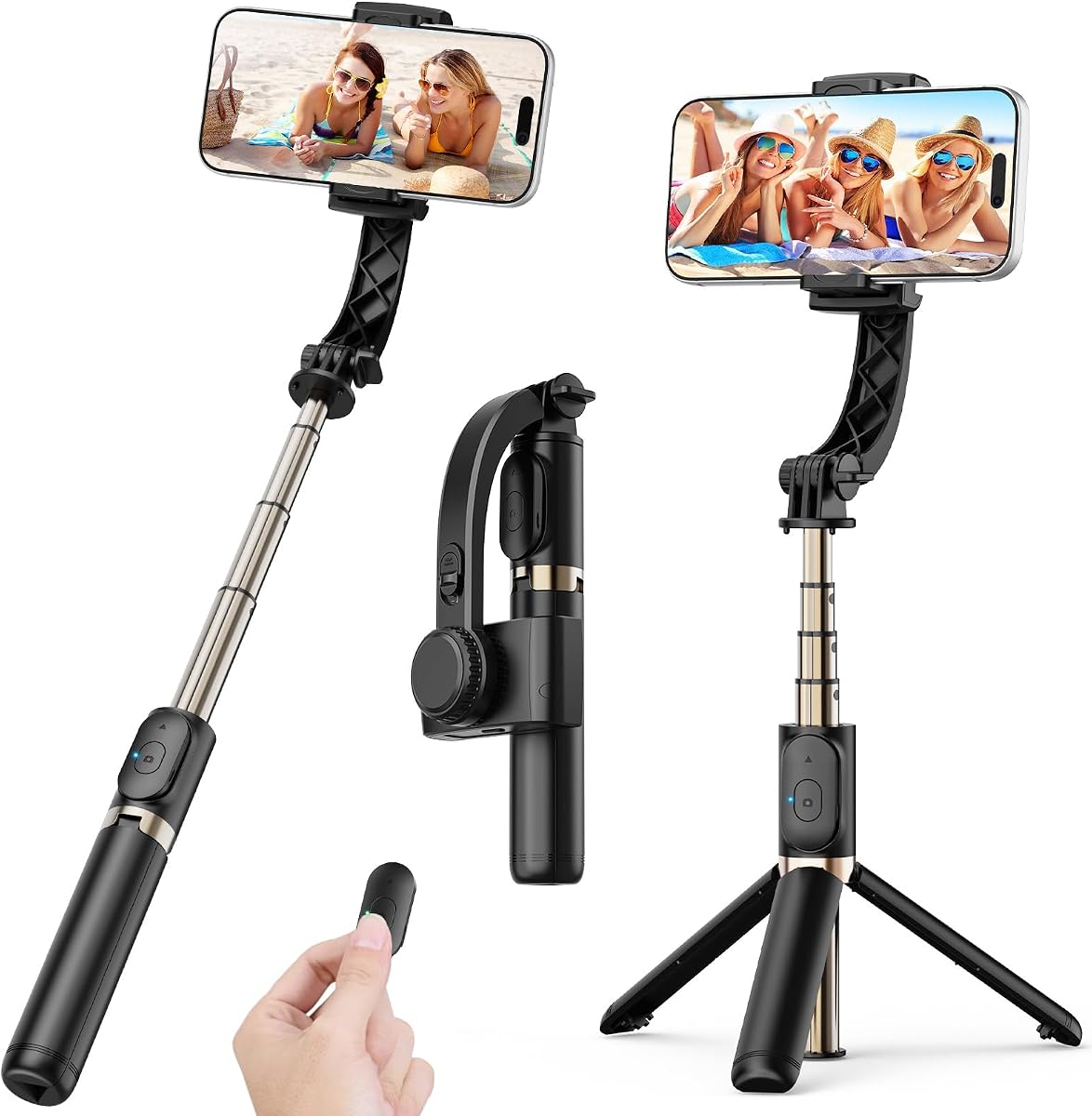
Gimbal Stabilizer for Smartphone, 1-Axis Auto Balance Handheld Gimbal, 360° Rotating Extendable Selfie Stick Tripod, Wireless Remote Control for iPhone Android Travel Vlogging TikTok YouTube
This side-by-side comparison helps you quickly identify the best gimbal for beginners based on key specifications and features. We list every model with its core capabilities to ensure you find the perfect match for your specific shooting needs.
ProductsSpecificationsEditor scorePrice
1
Editor's Choice
DJI Osmo Mobile 8 Gimbal Stabilizer for Phone, 3-Axis Stabilization
FeiyuTech Official SCORP Mini 2 Kit Gimbal,3-Axis Camera Stabilizer with AI Tracker Fill Light,1,3IN Touch Sreen, for Mirrorless Camera,Smartphone,Action Camera,with Carrying Case,Extension Rod,White
DJI Osmo Mobile 8 Gimbal Stabilizer for Phone, 3-Axis Stabilization
Native tracking with audio
Seamless 360 degree pan rotation
Built-in tripod selfie stick
10-hour battery life
The DJI Osmo Mobile 8 Gimbal Stabilizer stands out as a top choice for beginners seeking professional quality. With a rating of 4.4 stars it delivers robust 3-axis stabilization that keeps your footage smooth even during active shooting.
Pros
Advanced stabilization ensures smooth footage
Integrated lighting improves low-light quality
Easy setup for new creators
Long battery life supports all-day use
Built-in extension rod adds versatility
Cons
DJI Mimo app removed from Google Play
Premium price compared to basic options
We may earn a commission when you buy through this link, at no additional cost to you.
Its standout features include native tracking with audio and built-in lighting which elevate your production value instantly. The 360-degree pan rotation allows for creative angles while the built-in tripod and selfie stick eliminate the need for extra gear.
While the removal of the DJI Mimo app from Google Play requires downloading from their website it remains a minor hurdle. The investment is justified by the reliability and ease of use this gimbal offers to new users.
You should buy this if you want a feature-packed stabilizer that grows with your skills. It balances advanced capabilities with beginner-friendly controls making it the best overall gimbal for most creators.
Enhanced Tracking and Audio Features
The gimbal integrates audio reception and lighting directly into its design so you do not need external accessories. This integration simplifies your setup while ensuring your subject remains in focus and well-lit in various environments.
Portable and Practical Design
With a foldable form factor and built-in tripod it is easy to carry and set up anywhere. The comfortable grip reduces wrist strain allowing you to shoot for hours without discomfort during long vlogging sessions.
hohem iSteady X3 SE 3-Axis Gimbal Stabilizer for iPhone & Android, Black
Detachable remote controller
iSteady 8.0 technology
11-hour battery life
0.79 lbs weight
The hohem iSteady X3 SE is an excellent entry point for beginners on a budget. Rated at 4.2 stars it provides reliable stabilization and a wide range of features that are easy to master.
Pros
Detachable remote control for selfies
Lightweight and pocket-sized design
11-hour battery life for long shoots
Beginner-friendly controls and features
High payload capacity for large phones
Cons
May struggle with very heavy smartphones
App interface has a learning curve
We may earn a commission when you buy through this link, at no additional cost to you.
Its detachable remote controller is perfect for solo creators who need to control their camera from a distance. The advanced iSteady 8.0 technology ensures smooth footage even when moving quickly making it ideal for action shots.
The gimbal weighs only 0.79 lbs which makes it comfortable to carry during travel. Although the app offers many creative modes the interface may take some time to learn fully compared to simpler models.
Choose this if you want high performance without breaking the bank. It is specifically designed for beginners who need a reliable tool that supports both iPhone and Android devices easily.
Convenient Remote Control
The detachable magnetic remote allows you to manage shots from up to 32 feet away. This feature is particularly useful for group selfies or capturing videos without holding the gimbal in your hand.
Extended Battery Performance
With 11 hours of continuous operation you can film entire events without worrying about recharging. The quick 2-hour charge time ensures you are ready to go whenever inspiration strikes.
DJI Osmo Mobile 7 Gimbal Stabilizer for iPhone & Android, 3-Axis Gimbal
Integrated foldable design
ActiveTrack 7.0
300 grams weight
10-hour operating time
The DJI Osmo Mobile 7 Gimbal Stabilizer offers a balance of performance and portability that suits beginners well. With a 4.4 rating it ensures lossless stability for creating stunning cinema-quality content.
Pros
Ultralight at just 300 grams
Integrated foldable design for storage
ActiveTrack 7.0 for precise tracking
Comfortable grip for extended use
One-tap editing features included
Cons
App availability issues on some platforms
Basic features compared to newer models
We may earn a commission when you buy through this link, at no additional cost to you.
Weighing only 300 grams it is incredibly light and easy to handle for long periods. The integrated foldable design makes it perfect for travelers who need a compact solution without sacrificing stabilization quality.
ActiveTrack 7.0 allows the gimbal to follow subjects smoothly in various scenarios. While the app offers One-Tap Edit for quick production the removal from Google Play might be inconvenient for some users.
This gimbal is ideal if you prioritize weight and ease of carrying. It provides all the essential features a new creator needs to start producing steady professional-looking videos today.
Smart Tracking Technology
The two-lens tracking system keeps your subject in focus even during fast movements. This ensures your creative bursts remain stable and visually appealing without requiring constant manual adjustments.
Ergonomic Comfort
The anti-slip handle and ergonomic design make it comfortable to use during long shoots. You can shoot for hours without fatigue which is essential for capturing complete events or stories.
DJI Osmo Mobile 7P Gimbal Stabilizer for iPhone & Android, Native Tracking
Multifunctional Module included
Built-in extension rod
Dual-Lens tracking
10-hour operating time
The DJI Osmo Mobile 7P Gimbal Stabilizer is tailored for vloggers who need advanced tools in a compact package. Rated at 4.5 stars it combines tracking audio reception and lighting into one seamless unit.
Pros
Multifunctional Module with lighting and mic
Dual-Lens Enhanced Tracking technology
10-hour operating time for long shoots
Easy magnetic phone clamp for setup
Native tracking capabilities supported
Cons
Slightly heavier than standard models
Module adds to overall bulk
We may earn a commission when you buy through this link, at no additional cost to you.
The Multifunctional Module packs powerful features like DJI Mic 2 reception and built-in lighting. This allows you to create high-quality videos without carrying extra microphones or lights during shoots.
Its dual-lens tracking system keeps subjects in sharp focus even during fast movements. The built-in extension rod helps you capture wide group selfies and steady vlogs with creative freedom.
Buy this if you want an all-in-one solution for content creation. It simplifies your gear list while providing premium features that elevate your video quality significantly.
All-in-One Module Benefits
The module integrates tracking audio and lighting into one compact unit for ease of use. You get professional tools without the need for multiple separate devices cluttering your workspace.
Smooth Tracking for Dynamic Scenes
Dual-lens tracking ensures your subject stays in focus even with rapid movement. This is perfect for action shots or dynamic vlogging where keeping the camera steady is challenging.
Gimbal Stabilizer for Smartphone, 1-Axis Auto Balance Handheld Gimbal, 360° Rotating Extendable Selfie Stick Tripod, Wireless Remote Control for iPhone Android Travel Vlogging TikTok YouTube
1-Axis stabilization
App-free operation
31.5-inch extendable rod
450mAh battery
This Gimbal Stabilizer for Smartphone is perfect for beginners who want simplicity without complex apps. With a 4.7 rating it delivers smooth stable video footage thanks to its built-in gyroscope.
Pros
App-free operation for simplicity
Lightweight and portable design
Extends to 31.5 inches for wide shots
Tripod mode for hands-free filming
Wireless remote control included
Cons
Only one axis of stabilization
Battery life is shorter than premium options
We may earn a commission when you buy through this link, at no additional cost to you.
The app-free operation means you can start filming immediately without setup. Its lightweight design and extendable 31.5-inch rod make it easy to capture wide group shots and creative angles.
While it offers only one axis of stabilization it is sufficient for casual vlogging and social media. The tripod mode allows hands-free filming which is useful for tutorials or group photos.
Choose this if you want an affordable and easy-to-use tool. It removes the learning curve associated with complex gimbals making it ideal for absolute beginners.
Simplicity and Ease of Use
No complicated apps are required to operate this gimbal. One-button control lets you switch between modes quickly so you can focus on capturing the moment.
Versatility for Multiple Uses
The extendable rod and tripod mode support both selfie and group shots. It connects with GoPro cameras too providing flexibility for different types of content creation.
AOCHUAN Smart XE 3-Axis Gimbal Stabilizer for iPhone&Android,Foldable
0.78 pounds weight
2600mAh battery
AI Face Track 4.0
SMART 7.0 anti-shake
The AOCHUAN Smart XE Gimbal Stabilizer offers versatile features for creators who want to experiment. Rated at 4.1 stars it is compatible with a wide range of smartphones for easy setup.
Pros
Versatile compatibility with most phones
Focus wheel and zoom slide included
10 hours of continuous shooting
AI Face Track 4.0 technology
Compact and lightweight design
Cons
Lower rating compared to premium brands
App interface can be overwhelming
We may earn a commission when you buy through this link, at no additional cost to you.
The focus wheel and zoom slide allow you to adjust shots like a professional without complex skills. Its powerful brushless motors ensure smooth steady video output suitable for various shooting scenarios.
With 2600mAh battery capacity it supports all-day video creation. The AI Face Track 4.0 helps you maintain focus on subjects even in dynamic environments.
This is a good option if you want creative controls at a reasonable price. It is suitable for beginners who want to explore more advanced features without a steep learning curve.
Creative Control Features
The focus wheel and zoom slide empower you to adjust shots like a filmmaker. This adds a layer of control that is rare in budget-friendly gimbals.
All-Day Power
The large battery capacity ensures you can shoot for 10 hours on a single charge. This makes it ideal for travel or events where access to power is limited.
DJI RS 3 Mini, Camera Gimbal Stabilizer, Canon/Sony/Nikon/Fujifilm
795g weight
2 kg load capacity
1.4 touchscreen
Native vertical shooting
The DJI RS 3 Mini is a professional-grade stabilizer designed for camera users. With a 4.3 rating it offers lightweight portability without sacrificing power or stability.
Pros
Ultra-compact and lightweight design
Supports full camera and lens combos
Bluetooth shutter control for ease
1.4 inch touchscreen for intuitive use
3rd-Gen RS stabilization algorithm
Cons
Requires dedicated app for full features
Higher cost for beginner smartphone users
We may earn a commission when you buy through this link, at no additional cost to you.
Its 2 kg load capacity supports a wide range of camera and lens combinations. The Bluetooth shutter control allows you to capture photos and videos directly from the gimbal easily.
The 1.4-inch touchscreen provides an intuitive interface for adjusting settings quickly. Native vertical shooting makes it simple to create content for social media platforms without extra effort.
Choose this if you use a camera and want professional stabilization. It is perfect for creators upgrading from smartphones to more serious video gear.
Professional Load Capacity
With a 2 kg capacity it can handle powerful cameras and lenses. This flexibility allows you to use it as you grow your skills and equipment.
Intuitive Touch Interface
The touchscreen simplifies access to frequently used settings. You can adjust parameters quickly to keep your focus on the scene.
hohem iSteady Mobile Plus Phone Gimbal with Ultra-Wide-Angle Mode
Ultra-Wide-Angle mode
iSteady 7.0 stability
13H battery life
3D Fantasy rotation
The hohem iSteady Mobile Plus Gimbal Stabilizer excels with unique features like ultra-wide-angle mode. Rated at 4.2 stars it delivers cinematic-grade video with enhanced stability.
Pros
Ultra-Wide-Angle mode for broader views
Enhanced motor torque for smooth footage
13 hours of battery life
Power bank function to charge phone
Creative modes like Inception mode
Cons
Large phones may need extra balancing
App updates may be required for best performance
We may earn a commission when you buy through this link, at no additional cost to you.
Its motor torque is increased by 20% to handle large smartphones effortlessly. The 13-hour battery life ensures longer shooting times without interruptions or recharging.
You can use the gimbal as a power bank to charge your phone during long shoots. Creative modes like Inception mode add flair to your storytelling making your content stand out.
This is ideal for travel vloggers who want broader shots. It solves common motor interference issues and provides a range of modes for creative expression.
Ultra-Wide Angle Capability
Activate ultra-wide-angle mode to encompass a broader view of your surroundings. This eliminates motor interference and expands your creative horizons easily.
Creative Inception Mode
The Inception mode rotates your phone 360 degrees spontaneously for unique shots. This adds a master-like experience to your storytelling and visual appeal.
FeiyuTech Official SCORP Mini 2 Kit Gimbal,3-Axis Camera Stabilizer with AI Tracker Fill Light,1,3IN Touch Sreen, for Mirrorless Camera,Smartphone,Action Camera,with Carrying Case,Extension Rod,White
1.2 kg payload
852g weight
1.3-inch touch screen
AI tracker built-in
The FeiyuTech SCORP Mini 2 Kit Gimbal offers powerful compatibility for different camera types. With a 4.2 rating it weighs only 852g making it easy to carry.
Pros
Supports mirrorless and action cameras
Built-in AI tracker independent of app
1.3-inch touch screen for control
Includes carrying case and extension rod
Easy Bluetooth and cable control
Cons
Slightly heavier than smartphone-only models
App integration can be complex for beginners
We may earn a commission when you buy through this link, at no additional cost to you.
Its 1.2 kg payload allows you to use mirrorless cameras and smartphones interchangeably. The built-in AI tracker works independently of the app for smoother shooting.
The 1.3-inch touch screen simplifies operation at low angles. It also includes Bluetooth and cable control for easy focus adjustments and capturing photos.
Choose this if you use multiple types of cameras. It is a versatile tool for creators who want one stabilizer for various devices and scenarios.
Independent AI Tracking
The built-in AI tracker works without app connection to track faces and objects. This ensures smoother operation and reduces setup time during shoots.
Complete Kit Inclusions
The kit includes a carrying case and extension rod for added convenience. This makes it ready for travel and protects your gear effectively.
Hohem iSteady M6 Kit Gimbal Stabilizer for iPhone &Android,3-Axis Gimbal
Magnetic AI tracker
CCT/RGB fill light
OLED display
400g payload
The Hohem iSteady M6 Kit Gimbal Stabilizer brings advanced lighting and tracking to beginners. With a 4.3 rating it integrates a magnetic AI tracker and fill light.
Pros
Magnetic AI tracker for all apps
CCT/RGB fill light included
OLED display for status checks
iSteady 7.0 stabilization
Easy control wheel for adjustments
Cons
Payload limited to 400 grams
Light may be small for large scenes
We may earn a commission when you buy through this link, at no additional cost to you.
Its iSteady 7.0 stabilization ensures shake-free creations whether you walk or run. The OLED display helps you check battery and status quickly during shoots.
The CCT/RGB fill light offers different temperature options to suit your scene. The control wheel allows precise roll rotation and light adjustments easily.
This is ideal for creators who need lighting on the go. It simplifies your setup by combining multiple tools into one portable unit.
Lighting Control
The built-in CCT/RGB fill light offers various color temperatures for your shots. This allows you to adjust lighting to match your environment seamlessly.
OLED Status Display
The OLED display shows key information like battery and Bluetooth status. This ensures you are always aware of your gimbal's performance.
We may earn a commission when you buy through this link, at no additional cost to you.
Buying Guide – How to Choose the Best Gimbal for Beginners
Selecting the right gimbal requires understanding your needs and the available features. This section covers the key factors to consider before making a purchase.
Stabilization Technology
Look for gimbals with 3-axis stabilization to ensure smooth footage. Advanced algorithms like iSteady 8.0 or ActiveTrack 7.0 help maintain stability even during fast movements.
Prioritize models that offer robust tracking and smooth movement for professional results.
Battery Life
Choose a gimbal with at least 10 hours of battery life for all-day use. This ensures you do not miss important shots due to power issues.
Adequate battery capacity is essential for travel and long events.
Payload Capacity
Ensure the gimbal supports the weight of your smartphone or camera. Models with higher payload capacity can handle larger devices with accessories.
Check the maximum weight limit to avoid motor strain or instability.
Portability
Foldable and lightweight designs are crucial for beginners who travel frequently. Gimbals under one pound are easier to carry for long periods.
Opt for compact options that fit easily in your bag without taking up space.
Ease of Use
Beginner-friendly gimbals often feature simple controls and intuitive apps. Look for models with built-in tripods or remote controls to simplify setup.
Avoid overly complex systems that require extensive calibration or learning.
App Support
Check if the gimbal app is available on your preferred platform. Some models require downloading from the manufacturer's website due to store restrictions.
A reliable app ensures you can access advanced features like tracking and editing.
Compatibility
Verify that the gimbal works with your specific smartphone or camera model. Some models support only certain devices or have limitations with heavy cases.
Universal compatibility ensures you can use the gimbal across different devices.
Price and Value
Balance your budget with the features you need. Entry-level gimbals offer basic stabilization while premium models include advanced lighting and tracking.
Invest in a model that meets your current needs without unnecessary extras.
How to Use and Care for Your Gimbal for Beginners
To start using your gimbal begin by balancing your device on the mount. Ensure the center of gravity is aligned with the motors to prevent jitter during shots.
Familiarize yourself with the app features like tracking and editing tools. Practice using the controls to switch between portrait and landscape modes for social media content.
Store your gimbal in a dry and cool place to protect the motors. Charge the battery regularly and avoid exposing the device to extreme temperatures or water.
Frequently Asked Questions
Do I need a gimbal if I have a smartphone with stabilization?
Yes even phones with built-in stabilization benefit from a gimbal for smoother footage. A gimbal adds an extra layer of stability essential for running or moving shots.
Are all gimbals compatible with iPhone and Android?
Most modern gimbals support both iPhone and Android devices. However check specific payload and size requirements to ensure your phone fits securely.
How do I balance a gimbal correctly?
Adjust the mounting screws until your phone stays level without tilting. Follow the manufacturer's instructions for specific alignment steps.
Can I use a gimbal for photography?
Yes gimbals help capture steady photos especially in low light. They reduce camera shake during long exposures for sharper images.
What is the typical battery life of a gimbal?
Most beginner gimbals offer between 10 and 13 hours of continuous use. This allows all-day filming without needing frequent recharges.
Is it hard to learn how to use a gimbal?
Not if you choose a beginner-friendly model with simple controls. Practice a few times and refer to the app tutorials to improve quickly.
Can I use a gimbal with a phone case?
Yes but check the payload limit to ensure it supports the added weight. Some cases may interfere with the balance or magnetic clamps.
Do gimbals come with tripods?
Many models include built-in tripods or extendable rods for hands-free use. This feature is common in budget and mid-range options.
Final Thoughts on Choosing the Best Gimbal for Beginners
The DJI Osmo Mobile 8 and hohem iSteady X3 SE stand out as top choices for beginners. They offer a balance of features performance and ease of use to suit various needs.
Focus on stabilization quality battery life and ease of use when making your decision. These factors determine how smoothly your videos will look and how much you enjoy using the device.
Remember to check the current prices and availability before purchasing. This guide is updated regularly to reflect the latest models and options for creators.