
Ostrich Charger Compatible with Dell Laptop Computer 65W 45W Round Tip Power Adapter
4.5Editor score
65W 45W Output
Round Tip Connector
Safety Tested Standards
This guide compares the top battery backup solutions for Dell laptops to help you choose reliable power protection for your device.
Finding a reliable battery backup for your Dell laptop ensures uninterrupted work during power outages or when away from outlets. Whether you need a UPS or a portable charger, the right choice keeps you productive.
We evaluated ten products based on compatibility, capacity, safety features, and user reviews. This list includes UPS units, power banks, and chargers designed specifically for Dell systems.
Each pick highlights key specs and real-world performance. Note that prices change frequently so verify current offers before purchasing to ensure you get the best value today.
4.5Editor score

4.4Editor score

4.3Editor score
The following table compares key specs across all ten products to help you quickly find the right power solution for your Dell laptop setup.




The CyberPower EC850LCD Ecologic UPS offers robust power protection with twelve outlets and a clear LCD panel. Rated highly by users it ensures safe operation for Dell laptops and connected devices during fluctuations.
We may earn a commission when you buy through this link, at no additional cost to you.
Its multifunction LCD displays battery conditions while ECO mode reduces power to peripherals when idle. This intelligent design lowers costs and extends battery life. The 100000 equipment guarantee adds significant peace of mind for home or office setups.
Trade-offs include weight and lack of portability. It is designed for stationary use rather than travel. These limitations are acceptable for users prioritizing maximum outlet coverage and reliability at a fixed desk.
Buy this if you need comprehensive surge protection and backup for multiple devices. It remains a top choice for reliable power management in environments where outages occur frequently.
With twelve outlets and surge protection this unit safeguards your entire laptop setup from power spikes.
ECO mode automatically shuts off unused peripherals reducing energy consumption and extending battery runtime.
We may earn a commission when you buy through this link, at no additional cost to you.
This Ostrich charger offers a cost effective solution for Dell laptops needing 65W or 45W power. It matches official specifications and includes safety mechanisms to protect against overloads and shorts.
We may earn a commission when you buy through this link, at no additional cost to you.
Rated highly for compatibility it works with Inspiron and XPS series. The package includes a converter cable for varied connector sizes. Lifetime warranty support provides assurance beyond typical replacement periods.
Some users note it is a third party product. While tested by US labs reliability varies. For budget conscious buyers this remains a dependable replacement for original chargers.
Select this for affordable daily charging needs. It is ideal for users seeking a spare charger without spending on official Dell parts.
Priced significantly lower than OEM options it delivers equivalent performance for standard Dell laptops.
Independent labs verify electrical safety standards ensuring safe operation for your devices.
We may earn a commission when you buy through this link, at no additional cost to you.
The UGREEN 25000mAh power bank delivers up to 145W charging for high performance laptops like Dell XPS. Its massive capacity allows multiple full charges making it ideal for travel.
We may earn a commission when you buy through this link, at no additional cost to you.
Digital display shows remaining power at a glance. Bi-directional fast charging ensures quick replenishment. This device supports multiple devices simultaneously via USB C ports.
Weight and price are trade-offs for this capacity. It is heavier than standard banks and costs more. However performance justifies the cost for professionals needing reliable power.
Choose this for travel or remote work. It is the best choice for users prioritizing power capacity and speed over portability.
145W PD charging delivers enough power for most modern laptops including high performance models.
25000mAh capacity enables multiple full laptop recharges on a single cycle for extended use.
We may earn a commission when you buy through this link, at no additional cost to you.
Omni 20C+ combines a 100W laptop charger with a USB hub. It supports pass-through charging and includes wireless charging for phones. This makes it versatile for multi device setups.
We may earn a commission when you buy through this link, at no additional cost to you.
The USB hub mode enables file transfer alongside charging. It handles most USB C laptops efficiently. This design reduces the need for additional hubs.
Wall charger is not included. Users must source their own. This adds minor cost and planning. Still features are unique for travel productivity.
Buy this if you need both charging and connectivity. It suits professionals carrying laptops and peripheral devices.
Combines power bank with USB hub to reduce cable clutter during travel.
Integrated wireless pad keeps your phone charged while using laptop USB C power.
We may earn a commission when you buy through this link, at no additional cost to you.
This original Dell adapter ensures exact compatibility with supported Latitude and XPS models. It delivers stable 65W power via USB-C for reliable charging.
We may earn a commission when you buy through this link, at no additional cost to you.
Using original equipment reduces risk of compatibility issues. It includes standard safety mechanisms. The short cord fits neatly in bags.
Cord length may limit desk use. Users may need extensions. Despite this performance remains reliable for daily charging.
Select for original device requirements. Best for those needing guaranteed specs.
Genuine Dell adapter ensures no compatibility warnings with your device.
Built with original safety standards for safe operation on Dell laptops.
We may earn a commission when you buy through this link, at no additional cost to you.
This Dell optical drive adds DVD RW capabilities via USB. It draws power from the laptop eliminating the need for external power sources. It supports media playback and burning.
We may earn a commission when you buy through this link, at no additional cost to you.
Plug and play functionality ensures easy setup. It includes CyberLink software. The slim profile fits in laptop bags easily.
Note this is an optical drive not a battery backup. It is useful for media tasks but does not supply power.
Choose for optical needs. Ideal for legacy media access.
USB bus power removes extra cables for portable optical access.
Includes software for easy media burning and playback tasks.
We may earn a commission when you buy through this link, at no additional cost to you.
This charger is designed for a broad range of Inspiron laptops. It provides stable 65W output and includes a long cord for flexible use. It meets safety certifications.
We may earn a commission when you buy through this link, at no additional cost to you.
Long cord reduces strain. Fits common Inspiron connectors. Certified for safety and reliability.
Limited to Inspiron series. No advanced features like USB charging.
Buy for Inspiron replacement. Good value for basic needs.
Optimized for Dell Inspiron models with standard 4.5mm connectors.
Eight foot cord reaches outlets at desks without extra extensions.
We may earn a commission when you buy through this link, at no additional cost to you.
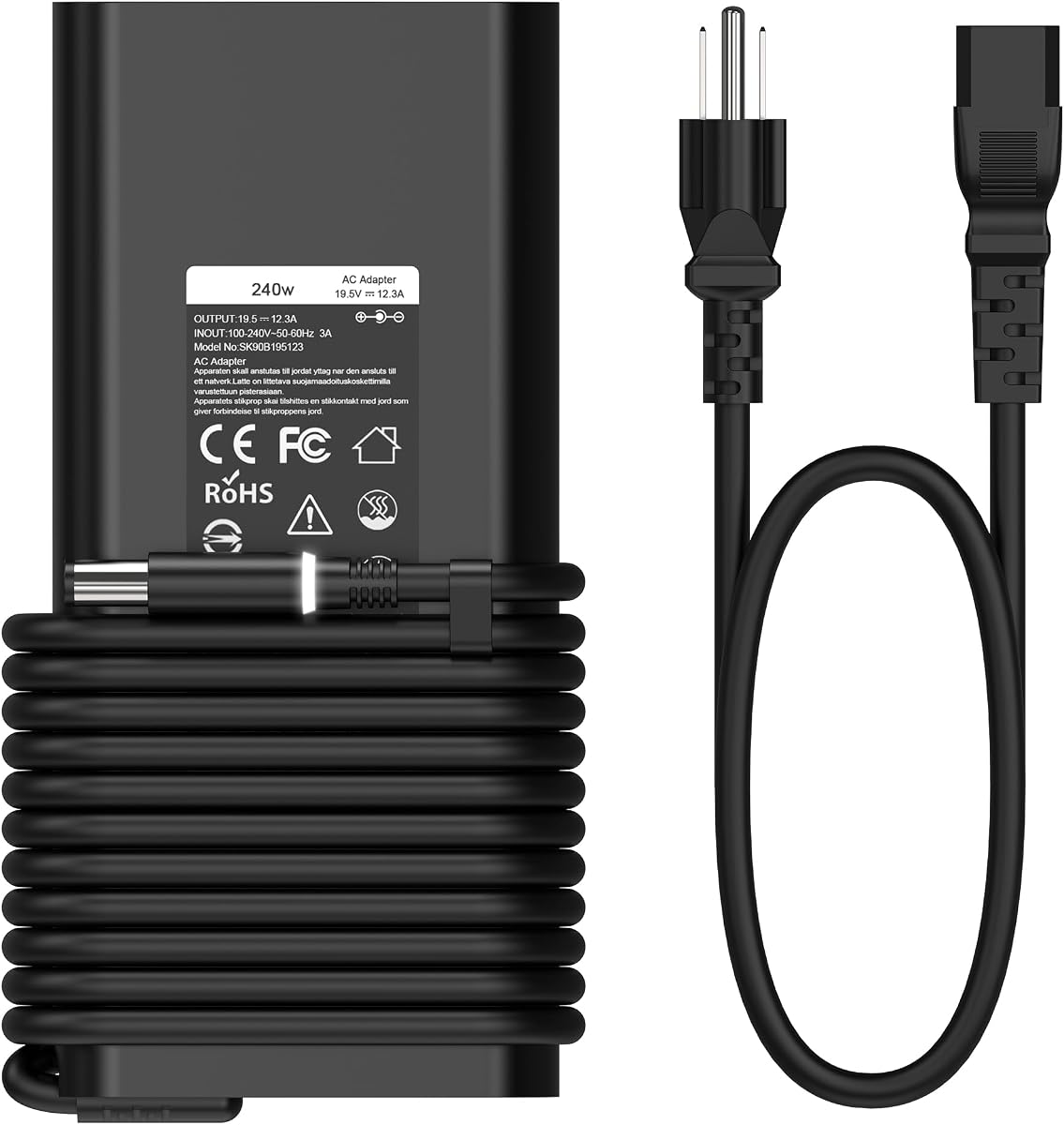
This charger provides up to 240W for high performance Alienware and Precision laptops. It ensures stable power for gaming and rendering. Slim design aids portability.
We may earn a commission when you buy through this link, at no additional cost to you.
Supports models requiring high power. Keeps system stable under load. Warranty included for peace of mind.
Size is substantial. Heavier than 65W models. Still necessary for high-end systems.
Select for Alienware users. Best for gaming and rendering.
Delivers 240W to sustain performance in demanding gaming and workloads.
Slimmer form factor aids travel despite high power capabilities.
We may earn a commission when you buy through this link, at no additional cost to you.
This 330W charger delivers massive power for flagship Alienware systems. It prevents thermal throttling during intense gaming. Highly rated for reliability and performance.
We may earn a commission when you buy through this link, at no additional cost to you.
Backward compatible with lower wattage devices. Provides headroom for peak loads. Reduces thermal stress on adapter.
Cost is high. Not needed for standard laptops. Overkill for casual users.
Choose for flagship gaming. Best for top-tier Alienware.
Ensures full GPU and CPU performance without thermal throttling during gaming.
Delivers consistent voltage under high load for smooth operation.
We may earn a commission when you buy through this link, at no additional cost to you.
This kit includes 15 DC tip adapters to pair with USB-C PD sources. It supports 100W charging and fits many laptop brands. Ideal for travelers.
We may earn a commission when you buy through this link, at no additional cost to you.
Smart chip adjusts current safely. One cable for multiple devices. Simplifies packing for multi brand setups.
Requires compatible 20V PD source. Setup may confuse. Still convenient for mixed fleets.
Buy for versatility. Best for multi-device travel.
Fifteen connectors allow one cable to work with diverse laptop models.
E-mark chip ensures safe 100W delivery to supported devices.
We may earn a commission when you buy through this link, at no additional cost to you.
Selecting the right power solution depends on your laptop model, power needs, and whether you need stationarity or mobility.
Ensure the backup or charger matches your laptop's required wattage. Laptops like Alienware may need 240W or more while standard Inspiron works with 65W.
Always verify wattage matches or exceeds your device requirements to prevent under-powering.
Check the connector size and shape. Dell uses 4.5×3.0mm, 7.4×5.0mm, or USB-C. Using the wrong tip can damage your port.
Select a product with the exact connector or adapter tip required by your specific model.
For portable power banks, capacity measured in mAh determines runtime. 25000mAh offers more charges than 20000mAh for laptops.
Prioritize capacity if you need long uninterrupted usage during travel or outages.
Look for safety certifications and protections like overvoltage and short circuit. Trusted brands test for thermal safety and electrical stability.
Avoid cheap uncertified chargers that could harm your device or pose risks.
Consider weight and size. High-wattage adapters are heavier. Power banks vary from pocket size to laptop-sized units.
Pick a portable option if you frequently travel or work remotely.
Check warranty periods. Some products offer lifetime warranties while others offer 12 months. Support availability is key for troubleshooting.
Choose products with clear support channels for long-term reliability.
Compare costs against features. Original chargers may be pricier but ensure compatibility. Third-party options offer value if verified.
Balance budget with reliability needs based on usage frequency.
Fast charging via PD or QC reduces downtime. Some power banks recharge in two hours while others take longer.
Prioritize speed if quick turnaround is critical for your workflow.
When using a portable power bank, connect your laptop using the appropriate USB-C cable. Ensure the bank is charged before travel to avoid unexpected shutdowns.
For UPS units, place them in ventilated areas to prevent overheating. Regularly test the battery by unplugging to ensure it holds charge.
Keep connectors clean and dry. Store adapters in protective cases to prevent physical damage that could affect power delivery.
Yes, a 65W charger is generally safe for a 45W laptop since the laptop draws only what it needs. Ensure the connector tip matches your device port.
Not strictly but original adapters guarantee compatibility. Third-party chargers work if they match specifications and include safety features.
Portable power banks typically offer one to two full laptop charges. UPS units may provide minutes to hours depending on the load and battery size.
The UGREEN 145W power bank is top for high wattage needs. It supports full charging speeds for most USB-C Dell models.
UPS units offer surge protection and continuous power for desktop setups. Power banks suit portable needs where mobility is key.
Look for intermittent charging or warnings. Physical damage or overheating indicates replacement is needed for safety.
The CyberPower EC850LCD offers robust stationary protection while the UGREEN power bank leads for portability. Choosing depends on your needs and setup.
Prioritize output wattage and connector type first. Safety certifications and support also play a major role in long-term reliability.
Prices change frequently so verify current offers before purchasing to ensure you get the best value today for your Dell laptop.