
Excel/Word/Power Point/Windows Mouse pad
4.7Editor score
Waterproof top layer
Reinforced stitched edges
Multi software shortcuts
Finding the right workspace accessory can transform your daily workflow. An Excel cheat sheet desk pad combines a protective surface with essential shortcut references to streamline your tasks efficiently.
We evaluated ten top-rated options based on durability, size, and print clarity. Each product offers unique features designed to boost productivity and protect your desk from wear and tear.
Our detailed reviews highlight key strengths and potential trade-offs for every selection. Keep in mind that prices fluctuate frequently, so verify current details before making your final purchase decision.
4.7Editor score

4.9Editor score

4.6Editor score
As an Amazon Associate we earn from qualifying purchases.
This side-by-side comparison highlights the core specifications of every reviewed model. Consider size, surface material, and included software shortcuts to find the best fit for your specific needs.


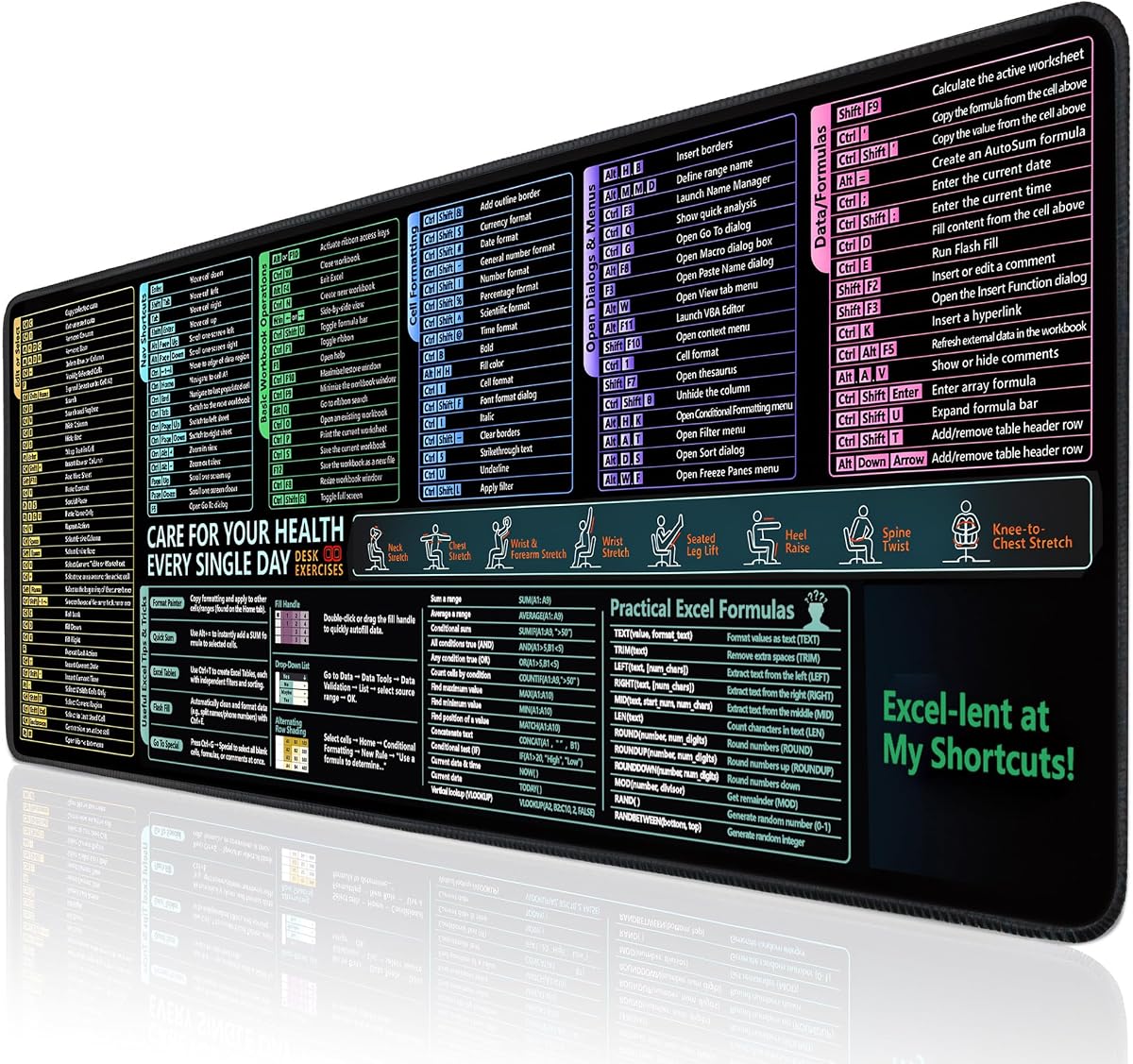


This top-rated pad features color-coded hotkeys and formula guides. With a 4.9 rating, it stands out for its sharp thermal-transfer printing and ergonomic wrist support.
We may earn a commission when you buy through this link, at no additional cost to you.
The surface resists stains and water while maintaining smooth mouse tracking. Stitched edges prevent fraying, ensuring the pad stays flat and functional over time.
While the price is higher than budget options, the durability justifies the cost. The built-in stretch diagrams offer a unique wellness feature found in few competitors.
Ideal for daily professionals seeking long-term desk protection. This pad combines utility with comfort to enhance your spreadsheet workflow effectively.
Built-in diagrams help relieve strain from long hours at the desk.
Advanced thermal transfer ensures shortcuts stay legible after months of use.
We may earn a commission when you buy through this link, at no additional cost to you.
This budget-friendly mat covers Excel, Word, PowerPoint, and Windows shortcuts. It balances cost with practical utility for users needing quick reference across multiple apps.
We may earn a commission when you buy through this link, at no additional cost to you.
The waterproof top layer protects against spills while keeping the surface easy to clean. Reinforced edges add durability for daily office or home use.
Though not the largest on the market, it fits most setups comfortably. The high-quality print ensures shortcuts remain clear even with regular cleaning.
Perfect for students or casual users watching their budget. It delivers essential functionality without compromising on basic quality standards.
Delivers essential multi-software shortcuts at a competitive low price.
Waterproof fabric resists coffee and ink stains effectively.
We may earn a commission when you buy through this link, at no additional cost to you.
This XL mat features a sleek leather surface and anti-slip rubber base. It offers a premium look suitable for professional environments and executive desks.
We may earn a commission when you buy through this link, at no additional cost to you.
The large dimensions accommodate full keyboards and monitors comfortably. Natural rubber grips prevent slipping, ensuring stability during intense work sessions.
While the cost is higher, the durability and aesthetics justify the investment. The spill-repellent finish adds extra protection against accidental liquid damage.
Ideal for executives or design professionals seeking quality. This pad combines functionality with a sophisticated appearance to elevate your workspace.
Leather surface adds a professional look to any office setup.
Generous space fits large keyboards and monitors with ease.
We may earn a commission when you buy through this link, at no additional cost to you.
This XL gaming mousepad doubles as an Excel reference tool. Its micro-weave fabric ensures precise tracking while protecting your desk from wear.
We may earn a commission when you buy through this link, at no additional cost to you.
UV-resistant inks maintain vibrant colors over time. The stitched edges provide durability against daily movement and friction.
The design adds a playful touch to any workspace. While primarily focused on Excel, it serves gamers well too.
Great for dual-purpose users. This pad delivers comfort and accuracy for both spreadsheet tasks and gaming sessions.
Fabric surface supports fast and accurate mouse tracking.
Vivid colors stay bright due to durable UV-resistant inks.
We may earn a commission when you buy through this link, at no additional cost to you.
This pad compiles nine categories of commonly used tips and functions. It includes FN key meanings to assist beginners navigating spreadsheets.
We may earn a commission when you buy through this link, at no additional cost to you.
Inkjet technology provides bright graphics without unpleasant odors. The double seam technique ensures a longer service life for daily use.
The waterproof surface is easy to clean and maintain. While it lacks multi-software support, the Excel focus is deep and practical.
Ideal for students mastering Excel fundamentals. It offers structured guidance to accelerate learning and improve efficiency.
Nine categorized modules simplify complex Excel concepts.
Advanced printing avoids traditional chemical smells during unboxing.
We may earn a commission when you buy through this link, at no additional cost to you.
This desk pad compiles twelve types of common skills in Excel and Word. It includes FN key meanings for broader computer usage.
We may earn a commission when you buy through this link, at no additional cost to you.
Inkjet technology ensures graphics are bright and clear. The waterproof surface and double seam technology enhance durability.
Its compact size is suitable for most standard desks. The design prioritizes utility and ease of maintenance.
Perfect for users needing quick reference for both apps. This pad supports daily tasks efficiently without overwhelming the workspace.
Includes tips for both Excel and Word users.
Waterproof fabric and double seams extend product life.
We may earn a commission when you buy through this link, at no additional cost to you.
This pad features a 7-zone cheat sheet layout with thermal transfer printing. It offers clear color details for navigation and data sections.
We may earn a commission when you buy through this link, at no additional cost to you.
Precision-stitched edges keep the mat flat without curling. The buttery-smooth rubber base ensures stable tracking for accurate cursor movement.
While primarily a gaming mousepad, the Excel zones add utility. The design emphasizes performance and stability for gamers.
Great for multi-functional desk setups. It balances spreadsheet reference with high-quality gaming performance.
Stitched edges prevent curling and fraying over time.
Non-slip base ensures the pad stays securely in place.
We may earn a commission when you buy through this link, at no additional cost to you.
This office desk mat keeps spreadsheet shortcuts directly on your desk. Its water-resistant surface wipes clean from coffee or dust.
We may earn a commission when you buy through this link, at no additional cost to you.
Reinforced stitching prevents fraying during heavy use. The rubber backing keeps the mat stable during daily tasks.
The standard size fits well on most office desks. Its clean design complements professional environments effectively.
Ideal for corporate offices and study areas. It offers practical utility without unnecessary extras.
Designed specifically for efficient office and study workflows.
Surface can be wiped down quickly and easily.
We may earn a commission when you buy through this link, at no additional cost to you.
This XL mat features a comfortable lycra surface for smooth glide. Its large size accommodates keyboards and gaming accessories seamlessly.
We may earn a commission when you buy through this link, at no additional cost to you.
Stable rubber base prevents bunching during use. The durable edges are finished to prevent deformation over time.
Unique washability ensures the mat stays fresh. It balances practicality with comfort for long work sessions.
Ideal for designers and gamers. This mat offers comfort and ease of maintenance.
Lycra surface offers a soft and comfortable feel.
Machine washable for easy cleaning and freshness.
We may earn a commission when you buy through this link, at no additional cost to you.
This compact pad fits easily in laptop bags. It offers essential shortcuts for Excel, Word, PowerPoint, and Windows.
We may earn a commission when you buy through this link, at no additional cost to you.
Finely-textured surface ensures smooth mouse movement. Water-resistant fabric and stitched edges provide durability for travel.
The small size suits users with limited desk space. It prioritizes portability and convenience over full workspace coverage.
Perfect for travelers or remote workers. This pad provides quick reference wherever you go.
Compact design fits into any standard laptop bag.
Designed for students and professionals who travel frequently.
We may earn a commission when you buy through this link, at no additional cost to you.
Selecting the right pad involves considering size, material, and functionality to match your workflow needs.
Measure your desk to ensure the pad fits comfortably. Large XL options accommodate keyboards and mice, while smaller ones prioritize portability.
Choose dimensions that leave enough room for other peripherals without cluttering your desk.
Fabric surfaces offer comfort for wrist support, while leather adds a premium aesthetic. Smooth surfaces enhance mouse tracking speed.
Pick a texture that balances typing comfort with mouse precision for your style.
Thermal transfer or UV-resistant printing ensures shortcuts stay legible. Avoid low-quality prints that fade after cleaning.
Invest in high-quality printing for long-term clarity and visibility.
Spills are common on desks, so waterproof surfaces are essential. Wipeable materials prevent stains and extend lifespan.
Always check for waterproof ratings before purchasing for daily use.
Rubber bases prevent the pad from shifting during typing or gaming. A non-slip base ensures stability.
Verify the base material provides a strong grip on your desk surface.
Stitched edges prevent fraying and curling over time. This durability feature is crucial for longevity.
Look for double-seam technology for maximum edge strength.
Some pads cover multiple apps like Word and PowerPoint. Ensure the shortcuts match your primary software needs.
Select a guide that includes the specific functions you use most often.
Prices vary based on size and materials. Determine if premium features justify the higher cost.
Set a budget range and prioritize features that matter most for your work.
Place the pad flat on a clean surface to prevent slipping. Align it so the shortcuts are visible and within reach.
Wipe spills immediately with a damp cloth to avoid staining. Use gentle cleaners to protect the printed surface.
Air dry completely before rolling to prevent moisture damage. Store flat or roll gently to avoid creasing the print.
Yes, most offer smooth surfaces optimized for gaming. Check specifications for micro-weave or leather finishes designed for precise tracking.
Most are symmetrical and suitable for both hands. Check the layout to ensure shortcuts are accessible regardless of mouse side.
Wipe gently with a damp cloth and mild soap. Avoid abrasive scrubbers to prevent fading or damaging the surface.
No, these are desk pads only. Keyboard covers are sold separately by various manufacturers.
Yes, most can be rolled gently. Avoid tight rolls to prevent permanent creasing or curling edges.
Most cover standard shortcuts compatible with recent versions. Verify included keys before purchasing if using specialized software.
Our reviews highlight top picks balancing quality, functionality, and value. Whether you choose a budget option or a premium XL mat, the right pad improves productivity.
Prioritize durability, size, and water resistance when comparing models. A high-quality mat protects your desk while boosting efficiency.
Remember that prices fluctuate regularly. Always check current pricing and availability before finalizing your purchase decision today.