
LGA 1155 Motherboard H61
5.0Editor score
Supports 2nd and 3rd Gen CPUs
Includes M.2 SSD Interface
Dual-channel DDR3 Memory Slots
This guide compares the top Lga 1155 Motherboard options for performance, compatibility, and value to help you choose the right legacy platform hardware.
Choosing the right Lga 1155 Motherboard can be challenging given the variety of chipsets and form factors available in the current market. Whether you are building a budget gaming rig or restoring an older workstation, compatibility with Intel second and third generation processors is crucial for system stability.
We have analyzed ten distinct models ranging from budget-friendly H61 options to high-performance Z77 boards. Each product was evaluated based on its chipset capabilities, memory support, expansion slots, and connectivity features to ensure you get the most value for your investment.
Every selection in this list highlights specific strengths such as overclocking potential, legacy support, or modern interface additions like M.2 slots. Please note that availability and pricing for these legacy components can fluctuate frequently, so always verify current stock before purchasing.
5.0Editor score

4.3Editor score
4.2Editor score
The following table provides a side-by-side comparison of all ten selected motherboards. This overview helps you quickly identify key differences in chipset, memory capacity, and expansion options to narrow down your final choice.


This H61 motherboard offers an incredibly affordable entry point into the LGA 1155 platform. With a perfect user rating, it demonstrates surprising reliability for basic tasks and light gaming. It supports both second and third-generation Intel Core processors making it versatile for older builds.
We may earn a commission when you buy through this link, at no additional cost to you.
The standout feature is the inclusion of an M.2 interface which is rare at this price point. You can connect modern NVMe SSDs for faster boot times alongside legacy SATA drives. The dual-channel DDR3 support ensures you can run memory efficiently up to 16GB total capacity.
While it lacks some premium features found on higher-end boards, the trade-off is acceptable given the cost. You will need to source your own battery and manual which adds a small step to setup. However, driver support via standard tools makes installation manageable.
For budget builders or office upgrades, this board provides the essential functionality needed without unnecessary extras. It is ideal for users who need a functional system for browsing and productivity. The HDMI support for integrated graphics makes it a complete solution for simple displays.
The M.2 slot allows you to use NVMe drives which significantly improves load times compared to traditional SATA SSDs.
Support for Xeon E3 v2 processors means you can use powerful server-grade CPUs for professional workloads on a budget.
We may earn a commission when you buy through this link, at no additional cost to you.
This MACHINIST board is designed for compact builds with its Flex-ATX form factor. It maintains the core H61 features while offering a smaller footprint for mini cases. It is a solid choice for users looking to save space without sacrificing CPU power.
We may earn a commission when you buy through this link, at no additional cost to you.
Like the first option it includes an M.2 slot for NVMe SSDs which is a significant advantage. The 100M LAN is a limitation for modern internet speeds but sufficient for basic web browsing. The board supports a wide range of processors including Pentium and Celeron.
The main drawback is the limited networking speed which may bottleneck large file transfers over a network. Additionally the lack of included documentation requires you to download files online. This adds a step to setup but does not impact long-term stability.
If you need a small form factor PC this board delivers the necessary components in a compact package. It is suitable for home theater PCs or office workstations where space is limited. Just ensure your network needs are met with the onboard LAN.
The Flex-ATX design allows this board to fit into smaller cases that cannot accommodate standard ATX motherboards.
The M.2 interface provides a path to upgrade your storage speed without needing to replace the entire system.
We may earn a commission when you buy through this link, at no additional cost to you.
The Gigabyte Z77-DS3H is a classic choice for enthusiasts who need overclocking capabilities. As a Z77 board it unlocks the full potential of K-series processors for performance gains. It is highly rated for reliability and build quality over many years.
We may earn a commission when you buy through this link, at no additional cost to you.
It supports RAID configurations which allows you to combine drives for speed or redundancy. This is useful for data storage setups where you need more than just a single drive. The Gigabit LAN ensures fast local network transfers which is essential for file sharing.
While it lacks the modern M.2 slots found on newer boards you can still use fast SATA drives effectively. The age of the board means finding stock might be difficult but the performance remains relevant for its era. It is a dependable platform for high-end legacy builds.
If you prioritize CPU performance and stability over modern connectivity this board is a strong candidate. It handles demanding tasks well and supports multiple graphics cards for specific workloads. Just be aware of the hardware age when planning your build.
The Z77 chipset allows you to push your Intel CPU beyond stock speeds for higher frame rates and computing power.
RAID support lets you mirror drives for data safety or stripe them for faster read and write speeds.
We may earn a commission when you buy through this link, at no additional cost to you.
This ASUS Z77 board is packed with management features that make it stand out. The Fan Xpert 2 allows precise control over fan speeds which keeps the system quiet and cool. It also includes TPM header support for enhanced security data protection.
We may earn a commission when you buy through this link, at no additional cost to you.
One of the most useful features is the USB BIOS Flashback which lets you update firmware without a CPU installed. This is incredibly helpful for troubleshooting compatibility issues on older boards. The power control features help in efficiency and stability during high loads.
It does lack native M.2 support which limits SSD speeds compared to modern options. WiFi functionality requires a separate card although it supports remote control features. The build quality is robust and it is designed to handle heavy usage reliably.
For users who want detailed control over their system environment this board is a top choice. It is great for enthusiasts who like to tweak settings for optimal performance. The ease of BIOS updating ensures longevity of your investment.
USB BIOS Flashback allows you to recover or update the BIOS using a USB stick even if the system fails to boot.
The TPM header provides a dedicated interface for security modules protecting your data and system integrity.
We may earn a commission when you buy through this link, at no additional cost to you.
This ATX H61 board brings essential gaming features to a budget price point. It supports standard ATX cases making it easy to find compatible chassis. The 3 phase power supply with solid state capacitors ensures reliable power delivery to components.
We may earn a commission when you buy through this link, at no additional cost to you.
The inclusion of M.2 NVMe support is a significant plus for an H61 chipset board. You can use fast storage without spending much money. It has multiple USB and SATA ports which provides flexibility for connecting peripherals and drives.
The LAN speed is 100Mbps which might feel slow for modern gigabit networks. However for local usage or basic internet tasks it is sufficient. The board is designed to be a functional base for a system that relies on external graphics.
This model is ideal for builders who want a standard case size without paying premium prices. It works well with dedicated GPUs and offers decent storage speed options. It is a practical choice for entry-level gaming setups.
The ATX form factor means this board fits into most standard PC cases without requiring special adapters.
Solid state capacitors are used to ensure long life and stability under varying power conditions.
We may earn a commission when you buy through this link, at no additional cost to you.
The H77 chipset on this board offers a good balance between performance and features. It supports non-K processors with locked boot but provides excellent stability. The DIGI+ VRM power design ensures efficient energy use which reduces heat.
We may earn a commission when you buy through this link, at no additional cost to you.
USB 3.0 Boost allows you to optimize transfer speeds for different device types. This can improve file transfer performance instantly. The GPU Boost feature automatically detects installed cards to enhance display output quality.
This board is a solid middle ground for those who want better features than H61 without Z77 costs. It is reliable and well designed for daily computing tasks. The Fan Xpert tool helps keep noise levels low during operation.
If you need a stable and efficient board for a home PC this is a strong recommendation. It handles multimedia well and supports modern connectivity standards like USB 3.0. It is a safe choice for general users who prioritize reliability.
DIGI+ VRM technology manages power delivery digitally for better efficiency and system stability.
USB Boost modes allow you to select the best performance settings for your connected storage devices.
We may earn a commission when you buy through this link, at no additional cost to you.
This version of the H77 board offers expanded connectivity compared to the LE variant. It supports up to 32GB of RAM which is beneficial for multitasking and memory-intensive applications. The RAID support allows you to organize storage drives effectively.
We may earn a commission when you buy through this link, at no additional cost to you.
It includes multiple PCIe slots which gives you room to add expansion cards like capture cards or WiFi adapters. The USB 3.0 and SATA 6Gb/s ports ensure your drives run at full speed. This makes it a versatile board for creative work.
While it comes at a higher cost the added features justify the price for power users. It is particularly useful if you plan to use multiple graphics cards or specialized hardware. The build quality remains high consistent with ASUS standards.
For users needing more RAM and slot options this board provides the necessary headroom. It is a smart choice for workstations that need to handle heavy loads. Just ensure you check the pricing before committing as it is higher than base models.
Support for 32GB RAM allows you to run virtual machines and heavy applications smoothly.
Multiple PCIe slots give you flexibility to add extra cards for specialized tasks.
We may earn a commission when you buy through this link, at no additional cost to you.
This Z77 board is designed for users who want to utilize multiple graphics cards. It features two full size PCIe X16 slots allowing for SLI or Crossfire configurations. The full Z77 chipset allows for overclocking of unlocked CPUs.
We may earn a commission when you buy through this link, at no additional cost to you.
It supports 32GB of RAM which is plenty for high-performance gaming and editing. The stable VRM ensures that power is delivered efficiently during load spikes. This reliability is key when running multiple components at high power.
The main consideration is the age of the platform which might mean older drivers or parts. However for a retro build or specific legacy application this board is excellent. It provides a powerful base for a legacy high-end gaming system.
If you need dual GPU support this is one of the few options still available. It is a strong choice for enthusiasts who want maximum performance from the 1155 socket. Ensure you have the CPU and GPU to match its capabilities.
Dual PCIe X16 slots let you install two graphics cards for combined rendering power.
Z77 chipset features allow you to boost your CPU clock speeds for extra performance.
We may earn a commission when you buy through this link, at no additional cost to you.
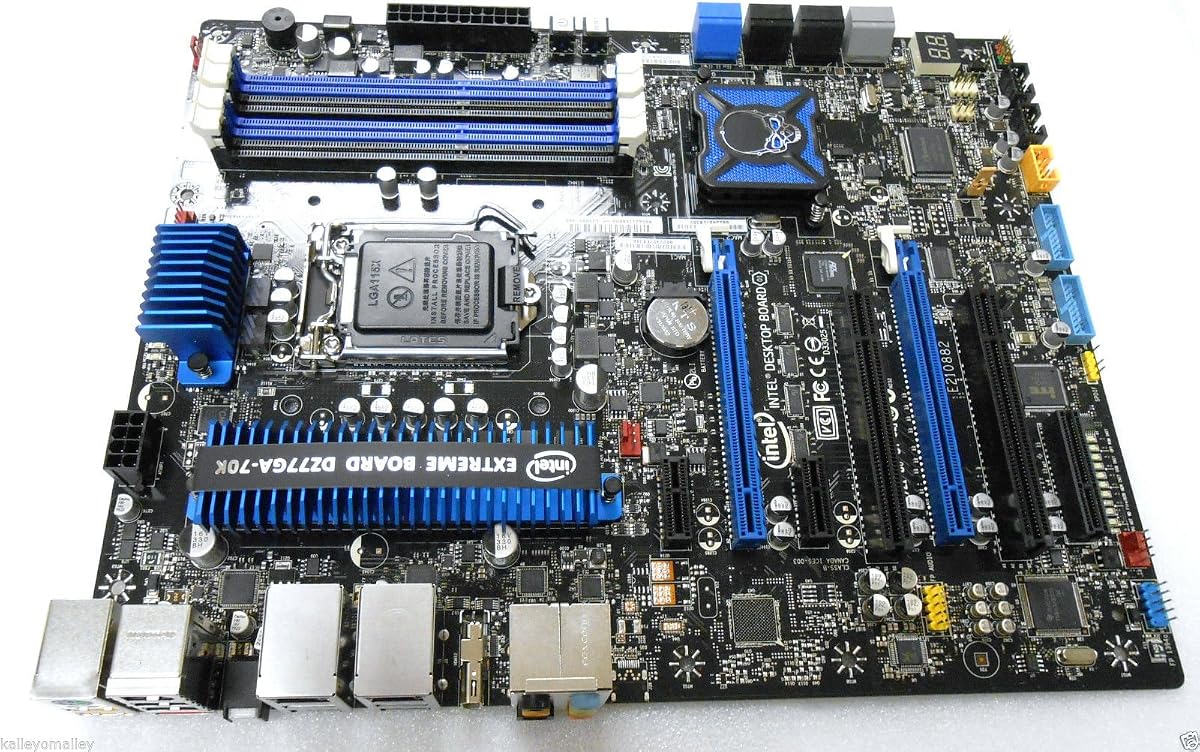
Intel boards are known for reliability and this Z77 model is no exception. It includes two Gigabit LAN ports which is rare and useful for network redundancy. The board also supports Firewire and eSATA for legacy device connections.
We may earn a commission when you buy through this link, at no additional cost to you.
The audio quality is enhanced with Realtek HD audio which supports immersive sound. This is great for home theater setups. It also has USB 3.0 for fast data transfer. The overall design is premium and durable.
It is priced higher than others but the features justify it for specific needs. The dual LAN ports are excellent for server or NAS use cases. If you need reliable connectivity this board delivers high performance.
This is the best option for users who need network robustness. It is a premium choice that supports legacy ports that are hard to find elsewhere. Just ensure your budget can accommodate the higher price point.
Dual LAN ports allow you to link two networks for failover or dedicated traffic streams.
Firewire and eSATA connections let you keep using older hardware without adapters.
We may earn a commission when you buy through this link, at no additional cost to you.
This B75 board is tailored for business environments with a focus on stability. The EPU energy saving feature helps reduce power consumption during operation. It uses a UEFI BIOS which is more intuitive for modern users.
We may earn a commission when you buy through this link, at no additional cost to you.
GPU Boost optimizes graphics performance automatically which is helpful for display tasks. The board is designed for longevity and efficient power management. It supports up to 32GB of RAM which is great for multi-tasking.
While it is less common than H77 or Z77 it offers solid performance for office use. It is a smart choice for bulk office setups where power efficiency is a goal. The BIOS interface makes setup straightforward.
If you need a workhorse board for daily office tasks this is a strong contender. It prioritizes efficiency and stability over flashy features. Ensure you verify availability as it is less frequently stocked.
EPU technology adjusts power use dynamically to save energy without hurting performance.
UEFI BIOS offers a graphical interface that is easier to navigate than legacy text BIOS.
We may earn a commission when you buy through this link, at no additional cost to you.
Choosing the right motherboard requires understanding chipset limitations and your specific needs. Here are the critical factors to consider before purchasing a legacy board.
The chipset determines which features you can access such as overclocking and RAID. H61 is basic while Z77 allows full CPU overclocking. Ensure the chipset matches your performance goals.
Check if the board supports your specific processor generation. Some boards support Xeon E3 processors which offer great value. Always verify the CPU list before buying.
Look for DDR3 slots and maximum RAM capacity. Most boards support up to 16GB or 32GB. Ensure it meets your multitasking needs.
Modern boards add M.2 slots which significantly boost speed. If you plan to use NVMe SSDs check for M.2 support. Otherwise SATA 6Gb/s is standard.
Check PCIe slots for GPU and network cards. Z77 boards often have dual slots for multi-GPU setups. Ensure enough space for your components.
Verify the number of USB and LAN ports. Some older boards lack USB 3.0 or Gigabit LAN. Ensure it matches your peripherals.
Ensure the board size matches your case. ATX is standard but Flex-ATX is available for smaller builds. Check case dimensions before buying.
Check HDMI or VGA support if using integrated graphics. Many boards include HDMI but you need a CPU with iGPU. This saves on a graphics card.
Install the motherboard on the case standoff screws to prevent short circuits. Use a Phillips screwdriver to secure all mounting points firmly.
Connect the 24-pin power and CPU power cables first to ensure stable power delivery before installing other components.
Clean the board with compressed air occasionally to remove dust buildup. Ensure the area is dry to avoid static damage.
No. LGA 1155 motherboards only support DDR3 memory. You must use DDR3 modules for compatibility with this platform.
Yes. Some newer H61 boards include an M.2 slot. Check the specific model specs to confirm if M.2 NVMe is supported.
It is decent for older titles on a budget. Modern gaming requires newer platforms but it works for casual play.
Only if your CPU lacks integrated graphics. Check for F or Xeon suffixes which lack video. Integrated CPUs support HDMI output.
Officially no. Windows 11 requires newer TPM standards. However Windows 10 runs perfectly and is supported on these boards.
Not on H61 or H77 boards. Only Z77 boards support overclocking. Ensure you pick the right chipset for CPU adjustments.
We reviewed ten boards ranging from budget H61 models to premium Z77 options. Your choice depends on storage needs and overclocking requirements.
Prioritize boards with M.2 slots if you want faster storage. For reliability stick to reputable brands like ASUS or Gigabyte.
Always check current prices and stock availability as legacy parts fluctuate. This platform remains a solid option for specific builds today.