
Thermaltake View 380 TG
4.7Editor score
Affordable dual chamber case
Pre installed ARGB fans
Hidden connector support
Discover the top dual system PC cases for 2026. We compare airflow, cooling, and features to help you choose the perfect chassis for your high performance
Dual system PC cases offer unique versatility for enthusiasts who need multiple computing environments in one chassis. These specialized enclosures support parallel operations or advanced thermal separation for demanding workloads.
We evaluated ten top models based on cooling potential, build quality, and feature sets. Our comparison highlights key differences in airflow design, fan support, and customization options for varied user needs.
Each pick showcases specific strengths from budget friendly to premium options. Prices and availability change frequently so verify current details before purchasing to ensure you get the best value today.
4.7Editor score

4.7Editor score

4.3Editor score
This side by side comparison highlights the key specifications and features of each top rated dual system PC case. Use this data to find the model that best fits your specific build requirements and budget.


The NZXT H9 Flow RGB+ stands out as the top choice for modern builders needing dual chamber benefits. It holds a 4.7 rating from verified users who appreciate its thermal performance and sleek look.
We may earn a commission when you buy through this link, at no additional cost to you.
Its optimized airflow ensures efficient cooling for high performance builds. The ten fan capacity allows extensive customization for custom liquid cooling or high airflow setups.
While it lacks some included fans, the value is justified by the premium materials and panoramic view. The design minimizes cable clutter with dedicated routing channels.
This case is ideal for enthusiasts wanting a clean aesthetic without sacrificing performance. It balances style and function better than most competitors in its class.
The dual chamber design separates the PSU and drives from main components reducing heat recirculation effectively.
Back connect ready compatibility ensures a cable free look with compatible ASUS and MSI motherboards.
We may earn a commission when you buy through this link, at no additional cost to you.
The Thermaltake View 380 TG offers exceptional value for budget conscious builders. With a high 4.7 rating it proves you do not need to spend a fortune for a solid dual chamber case.
We may earn a commission when you buy through this link, at no additional cost to you.
Its dual chamber design separates components effectively reducing heat buildup. The included hydraulic bearing ARGB fans provide decent lighting and cooling straight out of the box.
Though it lacks advanced cable management features, the pillarless glass panel creates a stunning view. The design supports modern hidden connector motherboards for a cleaner aesthetic.
This case is perfect for entry level builds or secondary systems. It delivers reliable performance and a premium look at a fraction of the cost of competitors.
Getting a dual chamber case with included ARGB fans at this price is rare in the market.
Support for hidden connector motherboards helps reduce visible cables significantly in the main chamber.
We may earn a commission when you buy through this link, at no additional cost to you.
The ASUS ROG Strix Helios II is the ultimate choice for high end enthusiasts wanting a showcase build. It holds a 4.3 rating reflecting its high quality materials and premium feature set.
We may earn a commission when you buy through this link, at no additional cost to you.
Designed for EATX motherboards it accommodates large graphics cards up to 450mm. The diamond grille front and dual tempered glass provide a stunning visual impact.
The advanced I/O panel offers extensive connectivity including USB 20Gbps Type C ports. Tidy cable management features ensure the build looks professional inside and out.
Investing in this case ensures long term compatibility and durability. It is ideal for builders who want maximum flexibility and a premium unboxing experience.
Support for large GPUs and EATX boards ensures you can upgrade hardware without changing your chassis.
The aluminum and glass construction provides a premium feel and excellent protection for expensive components.
We may earn a commission when you buy through this link, at no additional cost to you.
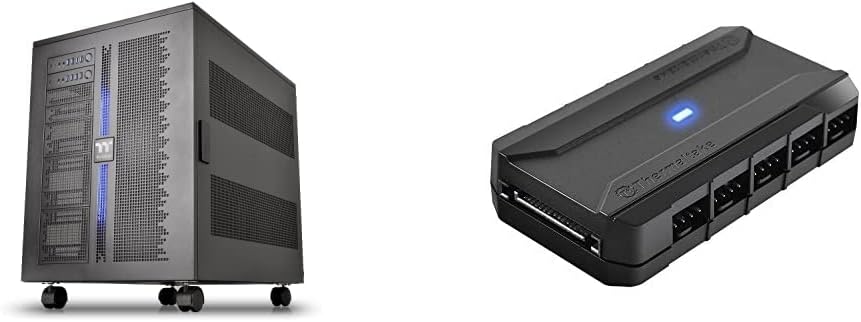
The Thermaltake Core W200 is unique in supporting two full separate systems in one chassis. This feature makes it a favorite among power users who need parallel computing in a compact footprint.
We may earn a commission when you buy through this link, at no additional cost to you.
It offers incredible cooling potential with support for huge radiators. The modular design allows for easy breakdown and maintenance of complex custom liquid cooling loops.
The Commander FP hub simplifies cable management for up to ten PWM fans. This ensures optimal airflow control across both systems efficiently.
This case is best for specialized workstation builds or extreme enthusiasts. It provides a level of versatility that no other standard case can match.
Install two motherboards and power supplies back to back for maximum computing power in one box.
Support for dual 600mm radiators allows for silent high performance custom water cooling setups.
We may earn a commission when you buy through this link, at no additional cost to you.
The ASUS TUF Gaming GT502 delivers reliable dual chamber benefits with a robust build quality. Its 4.6 rating reflects strong performance in cooling and ease of use for gamers.
We may earn a commission when you buy through this link, at no additional cost to you.
The dual chamber design separates the PSU from the main components improving thermal efficiency. Panoramic glass panels offer a great view of your internal hardware.
It comes with a vertical GPU mount which is a rare inclusion at this price. Tool free side panels make it easy to access components quickly.
This case is ideal for gamers who want a mix of durability and style. It balances features well for high end gaming builds without excessive cost.
Separate cooling zones for CPU and GPU prevent heat interference and improve overall system stability.
Press button side panels allow quick access for cleaning or upgrades without needing screwdrivers.
We may earn a commission when you buy through this link, at no additional cost to you.
The Cooler Master HAF II 500 is designed for maximum airflow and cooling performance. It holds a 4.8 rating from users who need serious cooling power for high heat components.
We may earn a commission when you buy through this link, at no additional cost to you.
Its oversized Mighty40 cooling system uses massive fans to move air efficiently. The low resistance design ensures air flows through the case without obstruction.
A dual mode GPU holder supports heavy cards or multiple GPUs. The MasterRail system offers flexible mounting for fans and radiators.
This case is perfect for heavy duty gaming or rendering machines. It prioritizes performance over aesthetics making it a functional powerhouse.
The 220mm intake fans provide massive air volume keeping your GPU and CPU running cool.
Adjustable cable and GPU mounts allow for custom routing and stable hardware placement.
We may earn a commission when you buy through this link, at no additional cost to you.
The HAVN HS 420 introduces a hybrid approach to dual chamber designs. It holds a 4.6 rating for its balanced airflow and clean visual presentation inside the case.
We may earn a commission when you buy through this link, at no additional cost to you.
Its hybrid structure directs cool air directly to the GPU. The SimpliCable system ensures all wires are hidden and routed neatly.
The curved glass panel offers a panoramic view with minimal distortion. It also supports VESA mounts for portable displays inside the chassis.
This case is ideal for builders who want modern aesthetics and efficient cooling. It stands out for its unique design and attention to detail.
Cool air from bottom intake targets the GPU directly improving thermal performance significantly.
The seamless curved glass panel provides a stunning view without seams or visual distortion.
We may earn a commission when you buy through this link, at no additional cost to you.
The Antec Flux Pro offers a unique material mix and high value for full tower cases. It holds a 4.7 rating for its cooling potential and build quality.
We may earn a commission when you buy through this link, at no additional cost to you.
It supports two large radiators simultaneously for extreme custom cooling. The six included fans ensure good airflow right out of the box.
The iShift mount allows flexible PSU placement. Its removable brackets make maintenance and installation easier.
This case is great for users wanting premium features at a reasonable price. It delivers excellent cooling and aesthetics without breaking the bank.
Support for two radiators at once allows for advanced multi loop water cooling systems.
Metal glass and wood create a unique high quality texture for a premium look.
We may earn a commission when you buy through this link, at no additional cost to you.
The NZXT H6 RGB+ brings dual chamber benefits to a smaller footprint. It holds a 4.4 rating for its modern look and efficient design.
We may earn a commission when you buy through this link, at no additional cost to you.
Its compact size saves desk space without compromising airflow. The seamless curved glass creates a beautiful panoramic view.
High airflow mesh ensures heat escapes quickly. The integrated GPU bracket keeps cards stable without extra parts.
This case is perfect for small home office or office builds. It balances size and performance well for modern components.
Separates power and cables while keeping a small footprint ideal for desks.
The curved glass and mesh design looks clean and modern on any desk.
We may earn a commission when you buy through this link, at no additional cost to you.
The Thermaltake Capo X is designed for users who need two independent mATX systems in one case. It holds a perfect 5.0 rating for its unique functionality and build quality.
We may earn a commission when you buy through this link, at no additional cost to you.
Each system has its own I/O panel making management easy. The detachable GPU braces ensure both graphics cards stay stable during operation.
Support for thirteen 120mm fans provides ample cooling power. Its hidden connector support keeps cables tidy.
This case is best for professionals needing parallel computing power. It offers versatility and functionality unmatched by other consumer cases.
Run two separate operating systems or tasks without extra hardware or footprint.
Each system has its own power reset and USB controls for independent management.
We may earn a commission when you buy through this link, at no additional cost to you.
Choosing a dual system PC case requires careful consideration of cooling needs space constraints and specific features. Here are the key factors to evaluate before purchasing.
Decide if you need a dual chamber case for thermal separation or a true dual system case for parallel computing. Dual chambers improve airflow for single systems. Parallel operation cases house two independent setups.
Check if the case supports two motherboards or just one with separate PSU zones.
Look for cases with high fan counts and large radiator support. Dual systems or high performance builds generate significant heat requiring robust airflow.
Ensure the case fits your planned radiator size like 360mm or 420mm.
Verify support for your motherboard size such as ATX EATX or mATX. Some dual system cases only support smaller ATX boards.
Choose a case that matches your current and future hardware needs.
Measure your GPU length to ensure it fits within the case. Some cases support ultra long cards up to 450mm while others are more compact.
Check for anti sag brackets or vertical GPU mounts for stability.
Dual systems create complex cable routing. Look for deep channels tie down points and removable panels.
Hidden connector support helps achieve a cleaner look with less visible wiring.
Consider materials like tempered glass metal or wood for aesthetics. Durability is key for heavy components.
Choose a design that fits your room style and desk space.
Dual system cases range from budget to premium. Evaluate if extra features like included fans justify the cost.
Prioritize cases that offer the best balance of features and price.
Check for USB ports audio jacks and RGB controls. Dual systems need separate I/O for each component.
Ensure enough USB C and USB A ports for your peripherals.
Install components following the manufacturer manual carefully. Use provided standoffs and screws to secure hardware properly.
Route cables through the designated channels to maintain airflow. Use zip ties or velcro straps to bundle excess wiring.
Clean dust filters regularly to prevent overheating. Check fans for dust buildup and replace if they fail over time.
A dual system PC case is designed to house either two separate computing systems or one main system with a dedicated chamber for PSU and drives. It improves thermal performance and organization compared to standard cases.
Some models support EATX boards while others are limited to ATX or mATX. Always check the motherboard compatibility specs in the product description before buying.
Yes, dual chamber cases separate heat generating components from the PSU. This improves airflow and reduces heat recirculation inside the main build area.
Many cases support multiple GPUs. Ensure the chassis provides enough width and clearance for your card thickness and length.
Prices range from $80 to $500 depending on features. Budget models offer basic design while premium ones include extra cooling or premium materials.
Many modern cases include support for hidden connector motherboards. This allows you to connect cables directly to the board for a cleaner look.
Remove the tempered glass panels and dust filters. Use compressed air to clear dust from fans and radiators regularly.
Yes, most support high capacity radiators and reservoirs. Verify the clearance for your specific water cooling kit before purchasing.
We highlighted ten top cases ranging from budget friendly to premium choices. Each offers unique benefits for cooling and aesthetics.
Prioritize cooling capacity and motherboard compatibility when making your choice. Ensure the case fits your specific hardware requirements.
Verify current prices and availability before purchasing to secure the best deal available today.