
Amazon Basics Stereo 2.0 Speakers
4.4Editor score
USB Powered Convenience
In-line Volume Control
3.5mm Aux Input
This guide compares the best MacBook external speakers setup options for improved audio quality, featuring wired and wireless models tailored to Mac users.
Finding the right MacBook external speakers setup can transform your daily computing experience significantly. Whether you are working, gaming, or watching movies, quality audio matters for immersion and clarity.
We evaluated ten top-rated speakers based on compatibility with macOS, sound quality, connectivity options, and design. Our list covers everything from budget-friendly USB options to premium studio monitors.
Each pick highlights key features and pros to help you decide quickly. Note that product availability and pricing may change over time, so check current listings before purchasing.
4.4Editor score

4.4Editor score
4.5Editor score
Below is a side-by-side comparison of all ten speakers reviewed in this guide, highlighting their key specifications and unique selling points.




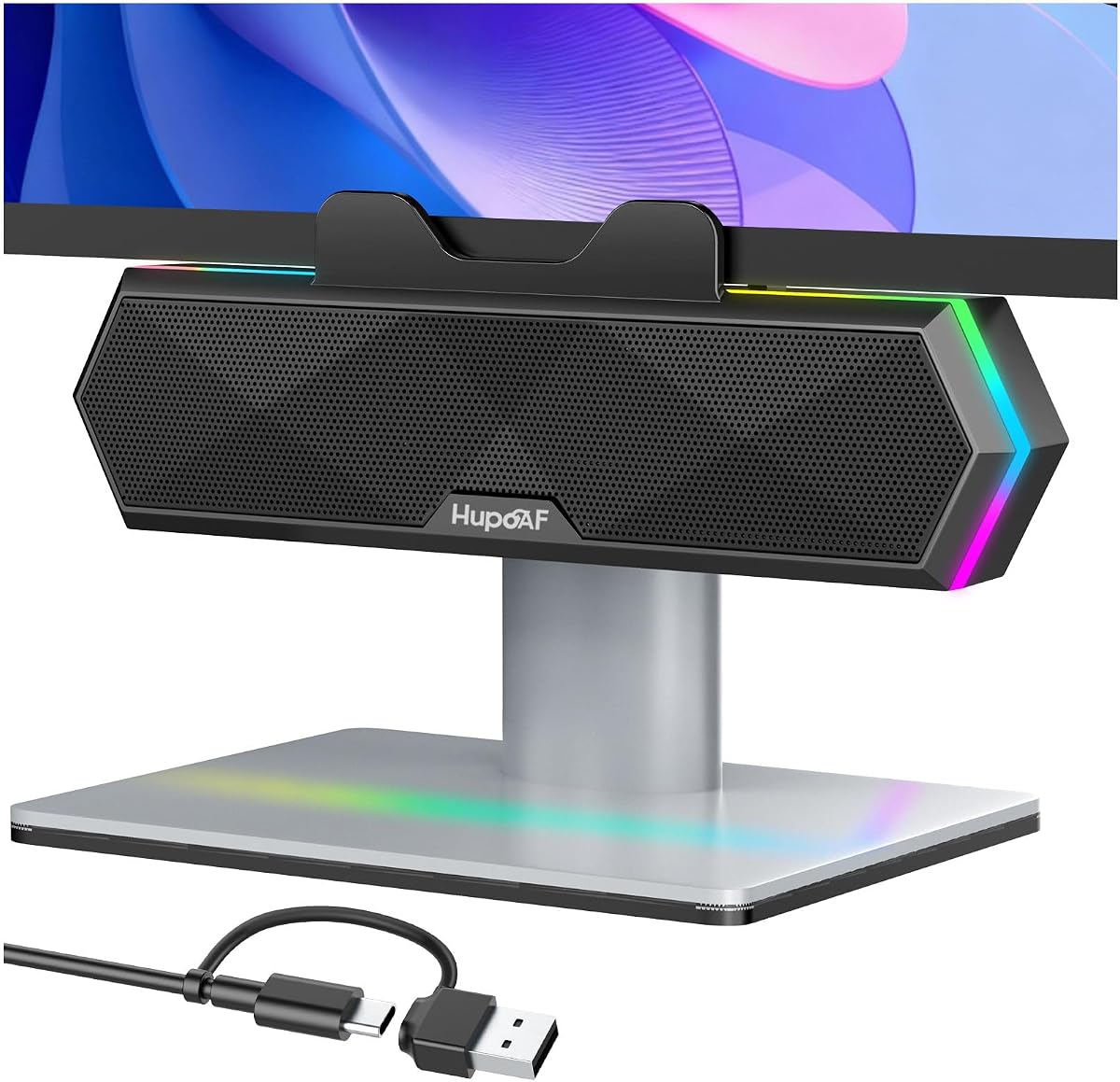
This USB plug-in soundbar offers a unique clip-on design that saves valuable desk space. With a rating of 4.2 stars, it appeals to users seeking simplicity and loud sound without extra drivers. The adaptive channel switching ensures stereo separation remains correct regardless of monitor mounting position.
We may earn a commission when you buy through this link, at no additional cost to you.
It delivers loud sound and deep bass through dual ultra-magnetic drivers and passive radiators. The built-in USB-C adapter ensures compatibility with modern MacBooks and laptops that lack traditional USB ports. Touch buttons allow for quick volume and mute adjustments directly on the device.
One trade-off is the lack of wireless connectivity, which limits multi-device setups. Additionally, it is not compatible with TVs or projectors, focusing strictly on computer use. However, these constraints are acceptable for users prioritizing desk space and easy plug-and-play functionality.
This speaker is ideal for Mac users who want a tidy workspace and reliable audio. It works seamlessly with macOS and ChromeOS systems. For anyone looking to upgrade from built-in laptop speakers without clutter, this is a solid choice.
The clip-on mount attaches to monitor edges, freeing up desk space for keyboards or other peripherals.
The G-sensor detects orientation, ensuring left and right channels remain correct whether clamped top or bottom.
We may earn a commission when you buy through this link, at no additional cost to you.
These Amazon Basics speakers are a classic choice for budget-conscious Mac users. Rated at 4.4 stars, they deliver decent stereo sound without requiring a separate power outlet. Their simplicity makes them perfect for students or office environments where cost and ease of use are paramount.
We may earn a commission when you buy through this link, at no additional cost to you.
They draw power from the USB port and offer a 3.5mm aux input for flexibility. The in-line volume control provides convenient access without reaching for system settings. A bottom radiator helps produce a springy bass sound that is rare at this price point.
The sound quality is functional but lacks the depth of higher-end models. There is no Bluetooth support, meaning you must rely on physical cables for connectivity. However, for basic tasks like video calls or casual listening, these limitations are minor.
This set is best for those needing a no-fuss upgrade from laptop speakers. It works well with any device featuring a USB port and aux jack. For tight budgets, these speakers offer reliable performance and straightforward setup.
Power and audio connect via USB and 3.5mm jack, avoiding complex configuration steps.
A dedicated volume knob allows quick adjustments without navigating software menus.
We may earn a commission when you buy through this link, at no additional cost to you.
The Logitech Z207 stands out for its versatile connectivity options, including Bluetooth and wired inputs. With a 4.4 rating, it offers a smooth user experience for switching between devices. This makes it an excellent choice for Mac users who also use phones or tablets.
We may earn a commission when you buy through this link, at no additional cost to you.
Logitech Easy-Switch technology allows seamless switching between audio devices by simply pausing one and playing on another. Each speaker has an active driver and a passive radiator for rich full-range audio. The headphone jack on the speaker offers quick private listening.
The main limitation is Bluetooth 4.2, which is older than modern standards. Additionally, power options vary by region, sometimes requiring batteries. Despite this, the convenience of wireless pairing makes it a strong contender for modern setups.
This speaker is perfect for users who want flexibility without messy cables. It supports any Bluetooth-enabled device and standard 3.5mm inputs. If wireless convenience is a priority, this model delivers reliable performance and ease of use.
Connect to Mac via 3.5mm or Bluetooth, and switch easily to a phone or tablet.
Passive radiators extend bass response, delivering fuller sound than standard desktop speakers.
We may earn a commission when you buy through this link, at no additional cost to you.
The Creative Pebble V3 is designed for modern MacBooks with USB-C ports. Rated at 4.4 stars, it offers 50% louder audio than its predecessor with richer bass. Its minimalist design and elevated drivers ensure sound is directed straight to your ears.
We may earn a commission when you buy through this link, at no additional cost to you.
It supports Bluetooth 5.0 for wireless streaming and includes a gain switch for amplified audio. Clear Dialog audio processing enhances spoken words without affecting background effects. This makes it ideal for video conferences and streaming content.
Users might find the lack of an included AUX cable inconvenient if switching to analog devices. Also, amplified audio requires a high-wattage USB port. However, the clutter-free setup and modern features generally outweigh these issues.
This speaker is perfect for users who want a clean desk and powerful sound. It works with USB-C ports and Bluetooth devices seamlessly. For Mac users seeking a stylish upgrade, the Pebble V3 is a highly recommended option.
A single USB-C cable provides power and audio, reducing cable clutter on your desk.
Built-in audio processing isolates speech for better intelligibility during calls and videos.
We may earn a commission when you buy through this link, at no additional cost to you.
The Edifier M60 delivers high-resolution audio with a total output power of 66W RMS. Rated at 4.5 stars, it is a premium choice for audiophiles on Mac users demanding fidelity. Its Hi-Res Audio certification ensures lossless transmission via both wired and wireless connections.
We may earn a commission when you buy through this link, at no additional cost to you.
It features Bluetooth 5.3 with LDAC codec support for up to 990 kbps transmission. The touch panel offers intuitive control with automatic backlight activation. Aluminum stands are bundled, directing sound to ear level to reduce distortion.
The main trade-off is the higher cost compared to standard speakers. Additionally, the design might be too large for very small desks. However, for serious listening and professional work, these features provide unmatched value.
This speaker is ideal for users who prioritize sound quality above all. It works great with Macs for music production and video editing. If you want a near-studio experience at home, the M60 is the top pick.
Hi-Res Audio certification guarantees detailed sound reproduction for critical listening sessions.
LDAC Bluetooth support offers higher bandwidth than standard codecs, preserving audio detail.
We may earn a commission when you buy through this link, at no additional cost to you.
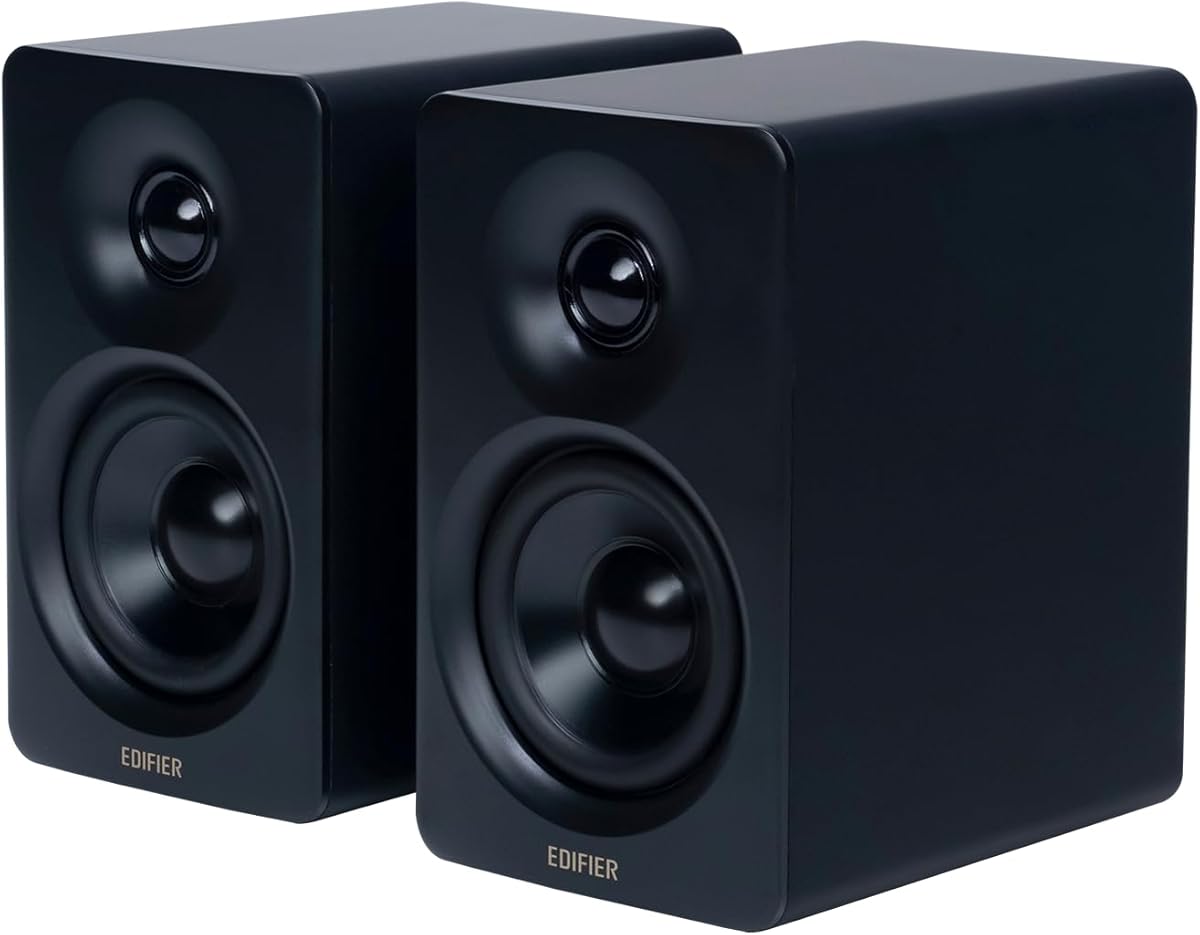
The Edifier MR3 is a Hi-Res Audio certified studio monitor designed for accurate sound reproduction. Rated at 4.5 stars, it is perfect for music creation, video editing, or critical listening. Its flat frequency response ensures what you hear is close to the original source.
We may earn a commission when you buy through this link, at no additional cost to you.
It offers rich connectivity including Balanced TRS, RCA, and AUX inputs alongside Bluetooth multi-point connection. The EDIFIER ConneX app allows deep EQ control and mode switching. The MDF cabinet reduces resonance, making it ideal for professional tasks.
These speakers may require more setup than standard plug-and-play options. They are larger and might dominate a compact workspace. However, users needing precision will find the extra effort worthwhile.
This model is best for creatives who need reliable monitoring. It works seamlessly with Mac systems for editing and music production. If accuracy is your goal, the MR3 provides professional quality at an accessible price.
52Hz to 40kHz range delivers precise audio for mixing and mastering tasks.
The companion app provides detailed EQ adjustments to tailor sound to your taste.
We may earn a commission when you buy through this link, at no additional cost to you.
This Upgraded USB Speaker works flawlessly with macOS and other OS systems without installing drivers. With a 4.2 rating, it is praised for its ease of use and loud stereo sound. It draws both power and audio through a single USB cable.
We may earn a commission when you buy through this link, at no additional cost to you.
Dual 3W high-excursion drivers and a passive radiator provide enhanced bass and dynamic range. It is compatible with various brands and laptops, making it versatile. The single cable approach keeps your desk clutter-free and organized.
The build materials are basic plastic, which may not feel premium. Sound is good for the price but lacks depth compared to larger units. However, for casual use, its simplicity is a major advantage.
This speaker is perfect for quick upgrades without technical hassle. It works instantly on MacBooks and desktops. If you value convenience and straightforward setup, this is a reliable option.
Plug into USB and select the device in system settings; no software installation is required.
High-excursion drivers ensure greater range and less distortion at higher volumes.
We may earn a commission when you buy through this link, at no additional cost to you.
The FUNLOGY Speaker features a 30-degree tilt design to optimize sound delivery to your ears. Rated at 4.2 stars, it is a compact powerhouse with 14W output. Its Japanese quality design ensures a stylish matte finish and reliable performance.
We may earn a commission when you buy through this link, at no additional cost to you.
Gold-plated AUX inputs minimize noise, and a physical volume dial adds tactile control. It is designed for minimal signal noise and consistent sound. The compact size allows placement on crowded desks without taking too much space.
It lacks Bluetooth connectivity, so wireless streaming is not possible. Bass punch is moderate compared to larger units with radiators. However, for clarity and aesthetics, it performs well.
This speaker is ideal for users who want style and clarity. It works great for MacBooks and monitors. If you value design and direct audio delivery, this is a solid choice.
Upward-facing layout directs audio to ear level for immersive listening experiences.
Premium components ensure clear sound even during computer startup or shutdown.
We may earn a commission when you buy through this link, at no additional cost to you.
The Dell Speakerphone SP3022 is a soundbar designed for business and conference calls. Rated at 4.2 stars, it supports Microsoft Teams and Zoom certifications for professional use. Full duplex audio allows multiple speakers to be heard clearly.
We may earn a commission when you buy through this link, at no additional cost to you.
LED indicators show call status and volume levels clearly. A dedicated Teams button provides quick access to meetings. It connects via USB-A or USB-C to laptops or monitors seamlessly.
It is primarily built for voice calls rather than high-fidelity music. Bass response is modest, suitable for speech. However, for home office work, it excels in its niche.
This device is ideal for remote workers needing reliable call quality. It works perfectly with MacBooks for business meetings. If you spend time in meetings, this speakerphone is a smart investment.
AI noise cancellation filters background noise for clearer communication during meetings.
LED lights display call and mute status, reducing confusion during busy workdays.
We may earn a commission when you buy through this link, at no additional cost to you.
This RGB clip-on monitor speaker adds visual flair and good audio to your setup. Rated at 4.6 stars, it features six dynamic lighting modes that match gaming or work moods. The clip-on design saves desk space and keeps audio close to you.
We may earn a commission when you buy through this link, at no additional cost to you.
It delivers sparkling highs and deep bass through dual ultra-magnetic drivers. Multifunction controls allow adjustment of volume and lighting directly on the speaker. It supports universal USB plug-and-play across systems.
While lights can be turned off, some users may find them distracting. Mounting requires a specific monitor thickness range. However, the blend of style and sound makes it a favorite.
This speaker is perfect for gamers and creative users who value aesthetics. It works with MacBooks and desktop monitors. If you want a setup that looks cool and sounds good, this is an excellent choice.
Six RGB modes allow you to personalize lighting to match your desktop theme.
Despite small size, passive radiators ensure resonant bass for immersive audio.
We may earn a commission when you buy through this link, at no additional cost to you.
Selecting the right external speakers for your MacBook involves balancing connectivity, sound quality, and design. Use this guide to find the perfect match for your needs.
MacBooks mostly use USB-C or 3.5mm jacks for audio. Ensure your speakers support these ports or include adapters. Bluetooth is great for wireless freedom but adds latency.
Choose wired speakers for zero latency and reliable power. Bluetooth models offer flexibility but may need charging.
Look for passive radiators and dedicated tweeters for better bass and clarity. RMS power ratings indicate sustained output; higher watts mean louder audio.
Prioritize speakers with balanced mids and highs for clear dialogue. Bass should be punchy but not overpowering.
Desk space varies, so consider compact models or clip-on designs that save room. Monitor speakers reduce cable clutter and position audio at ear level.
Choose sleek designs that match your MacBook aesthetics. Aluminum finishes often look more premium.
USB-powered speakers draw energy from your Mac, simplifying setups. AC adapters provide more power but require an outlet.
If you need high volume, AC power is better. For portability, USB power is ideal.
Look for features like touch controls, EQ apps, or multi-device pairing. Some models offer RGB lighting or touch panels.
Select features that enhance usability without unnecessary clutter. Touch controls are handy but not essential.
Ensure speakers work with macOS without driver issues. Most modern speakers are plug-and-play on Mac.
Check for specific mentions of ChromeOS or Linux if you use multiple systems. Compatibility ensures smooth setup.
Prices range from budget models to premium audiophile setups. Determine how much you are willing to spend for quality.
Invest in higher-wattage speakers if you listen often. Budget models work well for casual use.
For music or editing, seek Hi-Res Audio certification and flat response. Professional monitors provide accurate sound reproduction.
Casual listeners can opt for consumer models. Prioritize accuracy if you edit content.
Connect speakers to your MacBook using USB-C, USB-A with adapter, or 3.5mm jack. Select the speakers as your audio output in System Settings.
Avoid placing speakers directly on uneven surfaces to prevent rattling. Use provided stands or desk mats for stability.
Clean speakers with a dry cloth to avoid dust buildup. Keep liquids away to protect internal electronics.
Yes, most USB speakers are compatible with MacBook Pro models. If your MacBook has only USB-C ports, look for speakers with USB-C or included adapters. Most modern speakers support macOS plug-and-play functionality.
You can use Bluetooth speakers with any MacBook that supports Bluetooth. Pair them via System Settings for wireless audio. Note that wired connections may offer lower latency and consistent quality.
Most external speakers do not require drivers on Mac. They work plug-and-play via USB or audio jacks. If issues arise, check system audio settings to select the correct output device.
Studio monitors like the Edifier MR3 are best for music production. They offer flat frequency response and Hi-Res Audio certification. This accuracy helps you hear details while editing or mixing.
Many clip-on speakers use non-slip rubber clamps to prevent scratching. Ensure the clamp fits your monitor thickness properly. Check product details for protective features to avoid damage.
Check that speakers are powered and connected securely. Ensure your Mac recognizes them in Sound settings. Try unplugging and replugging to reset the connection. Restarting your Mac may also resolve driver conflicts.
This guide highlighted ten top speakers suited for MacBook setups. From budget USB options to premium Hi-Res monitors, there is something for every user.
Prioritize connectivity and sound quality based on your needs. Wired options offer reliability, while Bluetooth adds convenience.
Remember to check current pricing and availability before buying. Selecting the right speakers will enhance your MacBook experience significantly.