
USB Microphone 360 Degree Adjustable
4.4Editor score
360 degree gooseneck design
Noise canceling technology built-in
Plug and play setup
This guide compares the best dictation microphone for computer users including USB models for transcription speech recognition and professional recording tasks
Finding the right dictation microphone for computer use is essential for professionals who rely on voice-to-text software daily. Whether you are a lawyer transcribing notes or a writer dictating drafts clarity and reliability matter most for efficient workflows.
We analyzed top rated models based on audio quality ease of use and compatibility with popular speech recognition software. This list covers a wide range of budgets and needs from affordable plug-and-play options to premium dedicated devices.
Each pick highlights key strengths weaknesses and ideal use cases to help you choose confidently. Remember that prices and availability can change so check the latest details before making your final purchase decision.
4.4Editor score

4.6Editor score

4.2Editor score
Here is a side-by-side look at all ten top rated dictation microphones for computer use showing their key specs and main features for easy comparison.




The Logitech Blue Yeti stands out as a top choice for dictation and general audio recording with its exceptional clarity and versatility. It holds a 4.6 star rating from thousands of users who praise its professional sound quality and robust build.
We may earn a commission when you buy through this link, at no additional cost to you.
Its custom three-capsule array supports four distinct pickup patterns including cardioid omni bidirectional and stereo which allows you to tailor the mic to your specific voice setup. Onboard controls for gain pattern selection and instant mute provide immediate adjustment without touching software.
While the Yeti is slightly larger and heavier than simple gooseneck mics its superior audio fidelity makes it worth the extra desk footprint for serious dictation tasks. The included stand is sturdy and the pivot design ensures you can position it precisely for optimal voice capture.
If you want a microphone that excels at speech recognition while also handling music or streaming the Blue Yeti is the ideal investment. It offers the best balance of professional features ease of use and sound quality for computer dictation today.
Switch between patterns to isolate your voice or capture room audio depending on your recording environment and needs.
Use the headphone jack to listen to your voice in real time without delay to ensure consistent recording levels.
We may earn a commission when you buy through this link, at no additional cost to you.
This USB gooseneck microphone delivers solid performance for everyday dictation tasks at a very accessible price. It features a 360-degree adjustable neck that lets you position the mic exactly where you need it for best voice capture.
We may earn a commission when you buy through this link, at no additional cost to you.
Intelligent noise-canceling technology helps reduce background sounds and echo so your speech is clear for Dragon or other recognition software. A one-click mute button with LED indicator ensures you know exactly when you are live without guessing.
The mic is made of metal and ABS with a heavy-duty stand that keeps it stable on most desks. While it lacks the premium feel of expensive models it does the job well for casual and frequent dictation users on a budget.
For anyone needing a reliable plug-and-play mic without breaking the bank this model is an excellent choice. It is compatible with Windows and macOS and requires no drivers making it easy to start dictating immediately.
The bendable gooseneck lets you point the mic directly at your mouth for consistent volume and clarity.
Built-in tech filters out common office sounds to keep your transcripts clean and accurate.
We may earn a commission when you buy through this link, at no additional cost to you.
The Philips SpeechMike Premium is a dedicated dictation device designed for professionals who need maximum speed and accuracy. It uses a free-floating decoupled microphone capsule that isolates voice from handling noise for clean recordings.
We may earn a commission when you buy through this link, at no additional cost to you.
Built-in motion sensors let you control playback or navigation with simple hand gestures reducing reliance on the mouse. Configurable function keys can be mapped to your workflow so common commands are just a button press away.
Its optimized grille and pop filter ensure crystal clear sound even during extended dictation sessions. The build is robust and comfortable for long use though it comes at a premium price compared to standard USB mics.
This mic is ideal for legal medical or executive users who dictate frequently and want a tool tailored to their workflow. It delivers professional results and workflow efficiency that general purpose mics cannot match.
Wave your hand to pause or skip sections without touching the device during fast-paced dictation.
The isolated capsule minimizes desk vibrations so only your voice is recorded clearly.
We may earn a commission when you buy through this link, at no additional cost to you.
The FIFINE Mini Gooseneck is a compact and flexible microphone that fits neatly on small desks while delivering clear voice audio. It is designed for dictation streaming and voice tasks with a flexible neck that stays in place once set.
We may earn a commission when you buy through this link, at no additional cost to you.
A sturdy metal base with anti-slip rubber pads ensures the mic does not slide around during use. The 6.5ft USB cable offers enough length for most setups and the included windscreen helps reduce plosive sounds for smoother speech.
This mic is plug and play on PC and laptops requiring no drivers for quick start. It works well with speech recognition software like Dragon and supports common apps for video conferencing and online training.
For users with limited desk space who need a reliable dictation tool this is a strong affordable option. It balances portability with durability and provides clear sound for daily computer voice tasks.
The tiny profile leaves room for your keyboard and notes while still capturing voice accurately.
Metal tubing around the mic element adds durability for long-term use on busy desks.
We may earn a commission when you buy through this link, at no additional cost to you.
The TONOR G11 is built to capture voice from multiple directions making it suitable for small group meetings or dictation in a shared space. It uses an omnidirectional condenser pattern to pick up subtle sounds from all sides clearly.
We may earn a commission when you buy through this link, at no additional cost to you.
With a pickup distance of 11.5 feet participants can hear each other without raising their voices during remote calls. A convenient mute button with a blue indicator light helps you manage privacy quickly during live discussions.
This mic is compatible with both Windows and macOS and connects via USB with no driver setup. It is well designed for court reports seminars and business negotiations where multiple speakers may take turns talking.
If you need a mic that handles more than just your voice this model offers great flexibility. Its sturdy construction and clear transmission make it a solid pick for professional conference or mixed voice recording.
The 360-degree pickup ensures everyone in a small group is captured without repositioning.
A nylon shielded cable reduces interference for clean audio during long recording sessions.
We may earn a commission when you buy through this link, at no additional cost to you.
The ZealSound K66 delivers studio-quality sound with hands-on controls that let you adjust levels without touching software. Its cardioid pattern focuses on your voice while reducing unwanted background noise for clean dictation audio.
We may earn a commission when you buy through this link, at no additional cost to you.
A dedicated noise reduction mode can be enabled by pressing the mute button to suppress fan clicks and keyboard sounds. Zero-latency monitoring through a headphone jack lets you hear your voice in real time with adjustable volume control.
The mic includes an echo knob for adding depth or keeping sound natural depending on your task. Its solid metal construction and weighted base provide stability and vibration resistance during long use.
For users who want physical knobs for fine-tuning sound this mic offers great value. It supports multiple platforms and is easy to set up for PC dictation streaming and voice-over work.
Add natural depth to your voice or keep it dry for strict transcription accuracy.
Instant mute with LED feedback prevents accidental audio from being sent during calls.
We may earn a commission when you buy through this link, at no additional cost to you.
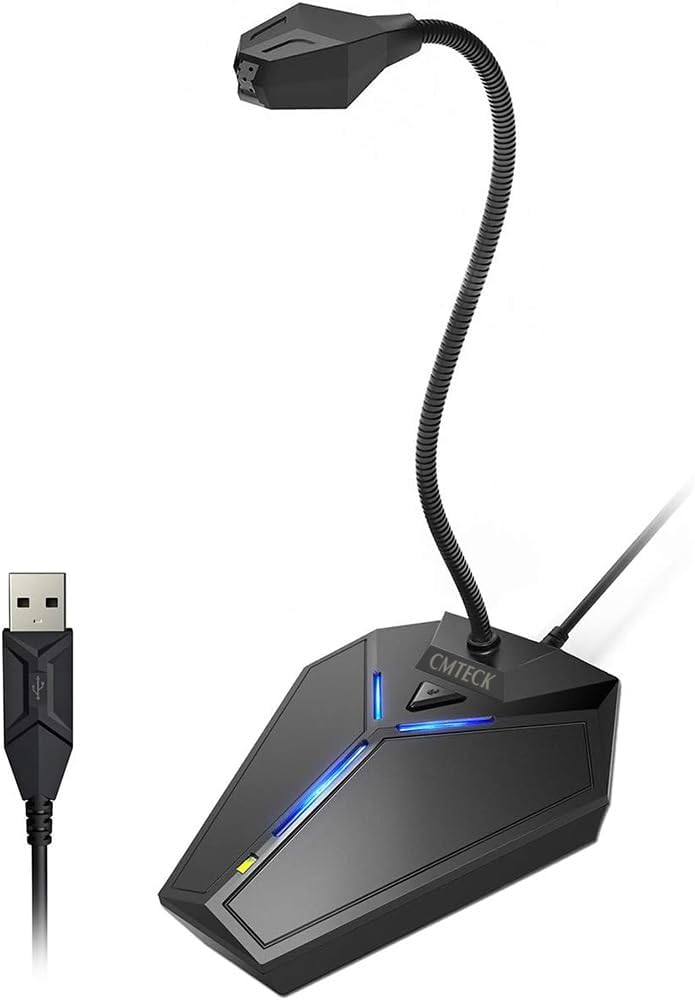
This CMTECK USB mic uses a smart chip to suppress background noise ensuring your voice comes through clearly. It is a solid budget choice for Zoom meetings online classes and voice dictation where clarity is key.
We may earn a commission when you buy through this link, at no additional cost to you.
A metal gooseneck tube allows you to adjust the mic to your preferred angle for optimal capture. The unique blue LED light can be toggled on or off for a visual touch without affecting performance.
True plug-and-play compatibility means no drivers are needed on Windows macOS or PS4. A built-in mute button with green or red LED status indicators keeps you informed about your mic state at all times.
For users seeking a simple affordable microphone that works reliably for dictation this is a great fit. It provides studio-quality audio for everyday computer tasks without complexity or high cost.
No external hardware needed to process audio making setup instant on most devices.
Metal tubing resists bending over time so positioning stays consistent during use.
We may earn a commission when you buy through this link, at no additional cost to you.
The Nuance PowerMic III combines a microphone with full PC mouse control allowing you to dictate and navigate without switching hands. Its ergonomic thumb controls make speech recognition functions easy to access quickly.
We may earn a commission when you buy through this link, at no additional cost to you.
Unidirectional design with noise cancellation ensures high accuracy even in noisy environments. A 9-foot cord gives flexibility in placement so you can position the mic for best sound capture without moving your chair.
This device works with Dragon Legal and Professional versions but not Dragon Home. It eliminates the need for soundcard enabled PCs with simple USB plug and play installation for quick setup.
For heavy Dragon users this mic streamlines workflow by reducing reliance on the keyboard and mouse. It is a premium tool designed to boost productivity for professionals who dictate extensively.
Use mic buttons to scroll click or select text while dictating for smoother workflow.
Thumb controls are positioned to minimize hand movement and fatigue during long sessions.
We may earn a commission when you buy through this link, at no additional cost to you.
The Philips SpeechMike III Pro is designed for high volume dictation with noise-canceling technology that delivers accurate recognition results. Its advanced speaker design provides crystal-clear playback so you can review audio on the device.
We may earn a commission when you buy through this link, at no additional cost to you.
Push button operation simplifies control letting you manage recording and playback without software. The mic is Energy Star compliant so it saves energy during long use which is beneficial for daily professional workflows.
Built for Dragon NaturallySpeaking this mic offers a dedicated solution for transcription tasks. It is a professional device meant for users who need reliability and accuracy more than a simple USB mic.
If you process many documents daily this model provides the tools to speed up your process. Its combination of control and audio quality makes it a top pick for dedicated dictation professionals.
Listen to recorded text without opening separate software for faster review.
Noise-canceling filters ensure your words are captured precisely for fewer edits.
We may earn a commission when you buy through this link, at no additional cost to you.
The Olympus RecMic II is a wired USB microphone with a trackball mouse designed for efficient dictation and control. Its push button model supports Dragon preset button assignment on Windows for streamlined operation.
We may earn a commission when you buy through this link, at no additional cost to you.
Smooth UV coating and silent keys minimize annoying contact noise during recording. Two microphone systems help ensure clear capture even in noisy environments where background sound might interfere.
This mic offers a comfortable experience for users who prefer a trackball over a standard mouse. It is built for professional use and integrates well with speech recognition workflows.
If you want a device that combines dictation and navigation this is a strong option. Its design focuses on reducing noise and improving workflow efficiency for daily use.
Navigate documents easily without leaving the mic for faster document control.
Quiet keys ensure your dictation audio stays free from typing or clicking sounds.
We may earn a commission when you buy through this link, at no additional cost to you.
Selecting the right microphone involves evaluating audio quality setup needs and budget to match your workflow requirements.
Pickup pattern determines how the mic captures sound from different directions. Omnidirectional mics capture from all sides while cardioid focuses on front only.
Choose cardioid for single voice dictation to reduce background noise.
USB is the most common connection for computer microphones and offers plug-and-play simplicity. Avoid analog mics requiring extra hardware.
USB ensures easy setup and broad compatibility with most systems.
Built-in noise cancellation helps filter out background sounds like fans or traffic. This improves recognition accuracy significantly.
Prioritize mics with noise tech if your environment is noisy.
Ergonomic design reduces hand strain during long sessions. Look for adjustable necks or lightweight bodies.
Comfortable mics ensure you can use them all day without fatigue.
Physical mute buttons with LED indicators prevent accidental recording. Software mute options are also useful.
Ensure mute status is easy to check during use.
Check that the mic works with your operating system and speech software. Most USB mics support Windows and macOS.
Verify driver-free operation before purchase.
A longer cable allows flexible positioning without stretching. Aim for 6ft or more.
Longer cables give more freedom in mic placement.
Sturdy materials like metal casings extend lifespan. Plastic may wear out faster.
Look for strong builds to ensure long-term reliability.
Position the microphone close to your mouth but not too close to avoid distortion and plosives.
Test audio levels in your software settings to ensure consistent volume before recording.
Clean the grille regularly with a soft cloth to remove dust and maintain sound quality.
Most USB mics work plug and play without drivers. Check the product page for compatibility details.
Cardioid pattern focuses on your voice and reduces background noise which helps recognition software.
Yes but dedicated mics usually offer better sound clarity and comfort for long sessions.
Use a mic with noise-canceling tech and position it away from noisy devices or fans.
Six feet or longer gives flexibility to position the mic optimally on your desk.
Many affordable USB mics work well with Dragon if they have clear audio and stable connection.
The Logitech Blue Yeti Philips SpeechMike and FIFINE K050 offer top performance across different budgets and needs.
Prioritize noise control comfort and compatibility to match your daily workflow requirements.
Always check current pricing and stock levels before purchasing to get the best deal today.