
Mouse Jiggler Mover Wiggler Undetectable Shaker USB Port for Computer Laptop
4.7Editor score
Undetectable Mouse Recognition
Drive Free Operation
Compact Portable Design
This guide compares the top 10 laptop jiggler devices to help you choose the best mouse mover for keeping your PC active during remote work and gaming sessions.
Keeping your computer active during long work sessions can be challenging when you need to step away briefly. A laptop jiggler helps prevent your screen from sleeping or showing away status in communication apps like Teams and Zoom.
We have evaluated ten leading devices based on their reliability, ease of use, and ability to mimic natural mouse movement without software. Each product offers unique features designed to suit different workspace needs and preferences.
Each pick highlights specific strengths and ideal use cases to help you find the right fit for your setup. Please note that availability and pricing can change frequently, so verify details before purchasing online.
4.7Editor score

4.7Editor score

4.1Editor score
The following table provides a side by side view of key specifications for each of the ten laptop jiggler options reviewed in this guide.


The TECH8 USA Undetectable Mouse Mover Jiggler stands out with its 3D hologram disc and ambient glow ring design, earning a solid 4.7 rating from users who value both function and style. It is engineered to prevent your computer from going to sleep or showing away status during meetings on platforms like Teams and Zoom.
We may earn a commission when you buy through this link, at no additional cost to you.
This device simulates natural mouse movement with intermittent pauses and offers three motion levels to choose from. It includes a built-in auto shut-off timer that can be set between one to two hours, ensuring your system stays active only when needed without requiring any software downloads or IT permissions.
While it is priced higher than some competitors, the unique design and Austin-based support add significant value for users seeking a premium experience. The large disc supports a wide range of mouse sizes, though it does require a bit more desk space compared to compact USB sticks.
If you want a laptop jiggler that looks great on your desk and delivers reliable performance, this is a top choice. It is ideal for professionals who want to keep their status green without cluttering their setup with visible tech or complicated software.
The ambient glow ring and hologram disc make this device visually appealing while ensuring your computer remains active during critical work periods.
With plug-and-play operation and no software needed, you can start using it immediately after placing your mouse on the disc and powering it on.
We may earn a commission when you buy through this link, at no additional cost to you.
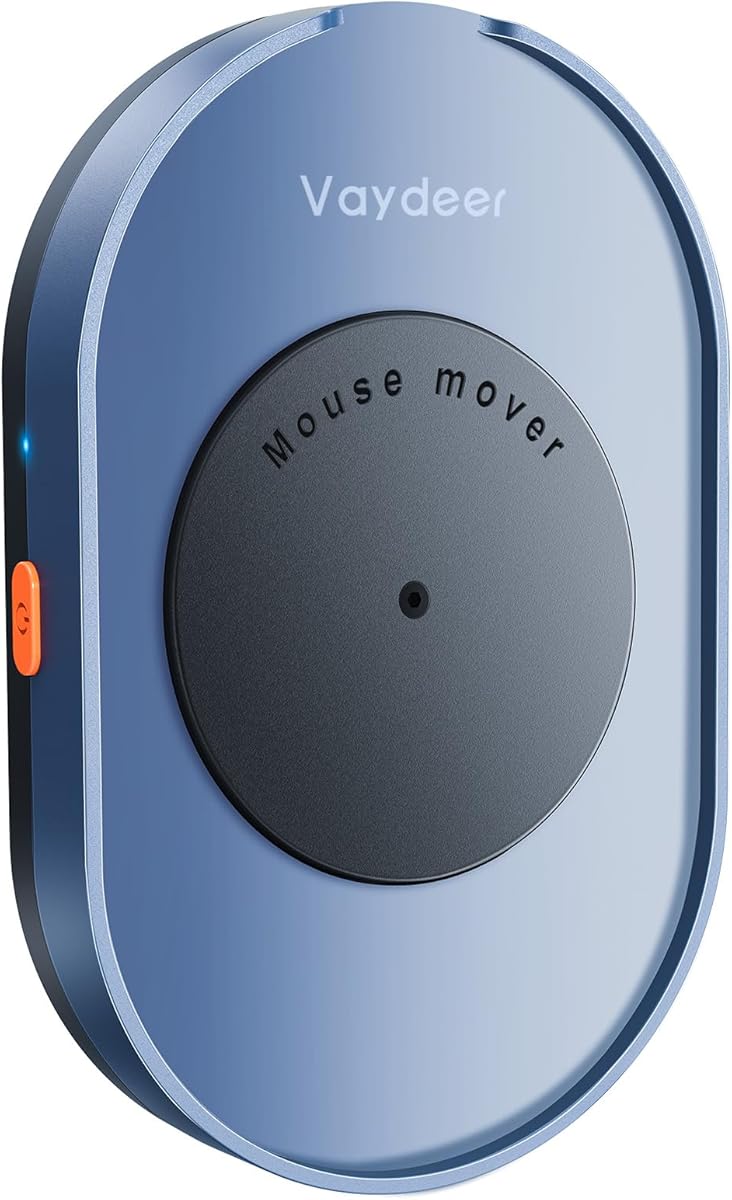
The Vaydeer Undetectable Mouse Jiggler M4 has achieved a 4.5 rating largely due to its ultra-silent motor that produces sound lower than 45dB. This makes it an excellent choice for quiet office environments where noise can be a distraction to you or colleagues around you.
We may earn a commission when you buy through this link, at no additional cost to you.
It is ISO certified for security and does not need to be plugged directly into your computer to operate, as it can run on an external power adapter. The ON/OFF switch allows you to control it easily without unplugging, though you must ensure the mouse sensor area aligns with the spinning wheel for it to work.
The device simulates physical mouse movement that is not detectable by hardware scans or IT systems. Its design focuses on safety and trustworthiness, making it a great gift for colleagues who spend long hours at their computers and need to stay productive.
Consider this model if silence and security are your top priorities. The flexible power options mean you can place it anywhere on your desk without worrying about port availability, but be mindful of keeping the cable tidy for a clean workspace.
With noise levels under 45dB, this device ensures your work environment remains peaceful while keeping your computer active during meetings or downloads.
The ISO/IEC27001:2013 certification provides peace of mind regarding data security and device trustworthiness within corporate IT policies.
We may earn a commission when you buy through this link, at no additional cost to you.
The WFB Mouse Jiggler Undetectable 2 Pack offers excellent value with two units included in one purchase, maintaining a strong 4.5 rating among budget-conscious users. It simulates movement by shaking the mouse slightly, keeping your PC awake without showing obvious signs of activity.
We may earn a commission when you buy through this link, at no additional cost to you.
This device is recognized by your computer as a standard 2.4G mouse, which means it does not require any software installation. It moves the cursor only 1-2 pixels, allowing you to edit documents or watch movies without noticing the jiggle effect while your system stays active.
It is compatible with Windows, Mac OS, and Android systems, making it versatile for different setups. While it lacks advanced features like timers or adjustable speeds, its simplicity and low cost make it a reliable choice for remote workers who need a straightforward solution.
Choose this bundle if you need multiple units for different locations or want to save money without sacrificing core functionality. It is a practical option for keeping your status online during long meetings or overnight game downloads without complex setup.
Getting two units in one package allows you to keep one at home and one at the office for consistent coverage across different workspaces.
The minimal 1-2 pixel movement ensures your cursor stays active without interfering with your ability to work or watch media on your screen.
We may earn a commission when you buy through this link, at no additional cost to you.
The AUEDROT Mouse Jiggler Undetectable USB-C is designed for modern laptops with USB-C ports, earning a 4.3 rating for its straightforward functionality. It features two distinct modes: slight jiggle that moves the pointer 1-2 pixels and random movement for varied activity.
We may earn a commission when you buy through this link, at no additional cost to you.
You can control the device with a switch button that allows short presses to toggle modes and a long press to turn it off. It is recognized as a USB Composite Device which builds trust with system administrators who might flag unknown peripherals.
This device is fully plug-and-play and works on Windows, Mac, and Android systems. It keeps your computer active for online reading or gaming without interfering with your regular mouse use, making it suitable for various daily tasks.
If your laptop lacks traditional USB-A ports, this is a practical solution that avoids the need for dongles. Its compact form and simple controls make it easy to integrate into a minimalist setup for keeping your system awake efficiently.
The USB-C connector ensures compatibility with newer laptops without requiring additional adapters or dongles for basic setup.
Switching between slight and random modes gives you control over how active your cursor appears during different work sessions.
We may earn a commission when you buy through this link, at no additional cost to you.
The Yonktoo Mouse Jiggler Undetectable features an ultra-slim design that fits neatly into home offices without taking up much space, rated at 4.2 stars. It uses a physical platform to rotate your optical mouse continuously and keep your computer awake during long tasks.
We may earn a commission when you buy through this link, at no additional cost to you.
It connects via a 4.9-foot cable which provides flexibility in positioning the device where it works best on your desk. The auto start feature means it begins working immediately upon connection, and a built-in button lets you pause or resume movement without unplugging.
The low-noise motor runs quietly in the background, ensuring it does not disturb your workflow or meetings. This hardware-based design works independently without installing any software, making it simple to use for various operating systems and mouse types.
This option is ideal if you have limited desk space and need a quiet solution that keeps your mouse active. The longer cable helps route connections neatly around monitors and laptops for a cleaner desk layout while maintaining functionality.
The slim profile ensures the device does not clutter your workspace while still providing the necessary rotation to keep your mouse active.
A nearly five-foot cable allows you to place the mover in a convenient spot without being restricted by port locations on your laptop.
We may earn a commission when you buy through this link, at no additional cost to you.
The Meatanty Mouse Mover Undetectable features an adjustable interval timer with a visual LED display, earning a 4.5 rating for its customization. It allows you to set the time between movements from 5 to 60 seconds to match your specific needs or workflow patterns.
We may earn a commission when you buy through this link, at no additional cost to you.
This device uses a pure physics principle to simulate real random mouse movement which is hard to distinguish from human action. The motor is silent, emitting less than 20 dB of sound, and the edge protection design ensures your mouse stays on the turntable without falling off.
It is driver-free and can be powered by an external adapter or USB port making it compatible with Windows, Mac, and Linux systems. The visual display helps you confirm the settings easily and ensures you know exactly how the device is configured at any time.
Choose this if you want precise control over movement frequency and visual confirmation of settings. It is a robust option for those who need a reliable mechanical solution that does not rely on software or network connections to function.
You can adjust the movement frequency in 5-second increments to tailor the device to your specific work patterns or company monitoring policies.
The edge protection design prevents your mouse from sliding off unexpectedly, ensuring continuous operation without manual adjustments.
We may earn a commission when you buy through this link, at no additional cost to you.
This USB Mouse Mover features a sturdy aluminum alloy body that offers a premium feel compared to plastic models, reflected in its 4.4 rating. It includes two jiggle modes and a switch button that allows you to toggle modes with a short press and turn off with a long press.
We may earn a commission when you buy through this link, at no additional cost to you.
The device is recognized as a USB Composite Device which adds a layer of security and trust when connecting to company computers. It works with Windows, Mac, and Android systems without any software installation making it suitable for a variety of devices and setups.
It keeps your computer active for reading games or remote connection tasks and comes with a USB-C adapter for broader compatibility. The metal construction ensures durability over time though it may be slightly heavier than other options on the market.
If you value durability and build quality in your tech accessories, this is a strong contender. The included adapter adds convenience and the metal body ensures the device can withstand daily use in a busy office or home environment.
The aluminum alloy body provides a sturdy and sleek finish that resists wear better than standard plastic alternatives.
The switch button allows quick mode changes and power management without needing to unplug the device from your computer port.
We may earn a commission when you buy through this link, at no additional cost to you.
The TECKNET Mouse Jiggler features three smart movement modes and a color LED indicator which contributes to its 4.6 rating. Mode 1 moves the pointer one pixel every three seconds, Mode 2 moves it in a fixed rectangle, and Mode 3 performs variable-speed random movement.
We may earn a commission when you buy through this link, at no additional cost to you.
A color LED gives visual feedback so you know which mode is active without needing to check your screen. The device is recognized as a standard mouse which keeps it undetectable by IT software ensuring safe use at work or home without flags.
It is compact and portable making it easy to slip into a laptop bag for use anywhere. The 18-month warranty offers reliable support and the plug-and-play nature ensures no drivers are needed to start using it right away.
Select this model if you want more flexibility in movement patterns and clear visual status indicators. The compact size makes it a great travel companion for remote workers who need to keep their devices active across different locations.
Having three distinct modes allows you to customize cursor movement patterns based on the specific requirements of your work or gaming sessions.
The LED indicator provides discreet feedback so you can verify the active mode without drawing attention to your workspace setup.
We may earn a commission when you buy through this link, at no additional cost to you.
The Mouse Jiggler Mover Wiggler Undetectable Shaker is praised for its plug-and-play simplicity earning a 4.7 rating among users who want minimal setup. It is recognized by your computer as a regular mouse avoiding the need for drivers or software installation.
We may earn a commission when you buy through this link, at no additional cost to you.
Its tiny size makes it easy to carry and use anywhere meetings game tasks or online classes without taking up much desk space. The wide compatibility supports Windows Mac and Linux systems making it a versatile choice for most users and devices.
This device is ideal for keeping your system awake during long work sessions or downloads without extra operation. It ensures your cursor moves automatically once plugged in so you can focus on your tasks without worrying about sleep mode interrupting your workflow.
Consider this device if you need a reliable tool with a 12-month warranty and straightforward operation. It is a practical and affordable solution for maintaining active status during remote work or gaming sessions on various operating systems.
The plug-and-play design means you do not need to install anything or configure settings to start using the device effectively.
The tiny form factor ensures you can take this with you in a laptop bag for active status support wherever you go.
We may earn a commission when you buy through this link, at no additional cost to you.
The Trackpad Mouse Jiggler Device is unique for its cordless design earning a 4.1 rating for its convenience and freedom from wires. It simulates realistic fingertip movement across your laptop touchpad without needing any USB connection or software to operate.
We may earn a commission when you buy through this link, at no additional cost to you.
Powered by an AA battery that can last up to six months it offers long-lasting operation without frequent replacements. The silent motor ensures your work environment remains quiet while keeping your computer active which is perfect for remote work or office use.
While it is more expensive than USB options the freedom from cables makes it a premium choice for users who want a clutter-free workspace. You may need to adjust your touchpad settings for best results but the cordless convenience outweighs this small setup step.
This is an ideal option if you want a sleek and portable device that does not occupy any USB ports. It keeps your touchpad active for screen awake time without interfering with other devices or requiring power cables for operation.
The completely cordless design eliminates clutter on your desk and allows placement anywhere without worrying about cable length or power ports.
With up to six months of battery life you do not need to worry about frequent power changes for consistent daily use.
We may earn a commission when you buy through this link, at no additional cost to you.
Choosing the right laptop jiggler depends on your specific workspace needs and how you prefer to keep your computer active.
Devices come in USB plug-and-play options and cordless models. USB options are generally more affordable and easy to connect, while cordless models provide flexibility but require battery management.
Choose USB for simplicity and cordless for a clutter-free workspace.
Some devices use a rotating platform for your optical mouse while others simulate movement digitally. Mechanical options are physical and do not require software, whereas digital USB models may be easier to hide.
Mechanical movers are robust while digital simulators offer compact designs.
If you work in a quiet office, look for models with silent motors. Some devices produce noise that can be distracting, so checking decibel ratings or reviews on sound is important.
Prioritize silent motors if noise is a concern for your environment.
Most modern jiggler devices do not require software installation. Drivers should be avoided to maintain security compliance, especially in corporate environments where IT policies are strict.
Always choose driver-free or plug-and-play devices for best compatibility.
Look for models with physical switches or buttons to turn the device on and off easily. Some devices allow mode changes via a button while others require manual power cycling.
Easy access switches improve convenience when you need to start or stop movement.
Materials like metal or durable plastic impact the lifespan of the device. A sturdy build ensures the device lasts longer and feels more premium on your desk.
Invest in higher quality materials for better durability and aesthetics.
If you travel frequently, a compact and portable design is essential. Consider the size and weight of the device relative to your laptop bag capacity.
Compact sizes are better for travelers who need on-the-go solutions.
Prices vary significantly based on features and build quality. Ensure the product comes with a solid warranty policy to protect your investment against defects.
Compare warranty terms to ensure support is available if issues arise.
First place the device on a flat surface near your computer and connect it via USB if applicable. Ensure your mouse is positioned correctly on the platform or that the digital simulator is recognized by your system.
Second turn on the device using the switch or button provided. Verify that the cursor moves slightly on your screen to confirm the device is functioning properly before leaving your desk.
Third remember to turn off the device when not in use to save power and prevent unnecessary wear. Keep the device clean and free of dust to ensure smooth operation over time.
Most high-quality devices are designed to be undetectable as they mimic standard mouse behavior. However, results can vary depending on strict monitoring policies used by your employer or security software.
No, the products listed operate without drivers or software installation. They are plug-and-play and recognized as standard peripherals by your operating system for immediate use.
Most models work with optical mice but some specialized units are designed for touchpads. Check the product description to ensure compatibility with your specific input method.
These devices are generally safe as they only simulate physical mouse movements. Always review your company policies to ensure compliance with any guidelines regarding hardware usage.
Quality varies by brand and usage frequency. Many devices offer multi-year durability with proper care and are backed by warranties to protect against early failure.
Yes, they keep your system active during long game downloads or sessions. Just ensure you pause or disable them during actual gameplay to avoid accidental input.
You can use them if they do not conflict with each other. However, one device is usually enough to keep your system active across most standard applications.
Look for models with slight movement modes that shift the cursor only a few pixels. This prevents it from interfering with your active tasks while keeping the system awake.
We have reviewed ten top options ranging from cordless premium models to simple budget bundles. Each device offers a unique way to keep your computer active during work sessions without complex setups.
Prioritize features that matter most to you such as silent operation or portability based on your daily needs. Choosing the right model will help maintain your online status efficiently and comfortably.
Remember to check current availability and warranty terms before purchasing as details can change. Selecting a reliable device ensures smooth operation and support when you need it most.