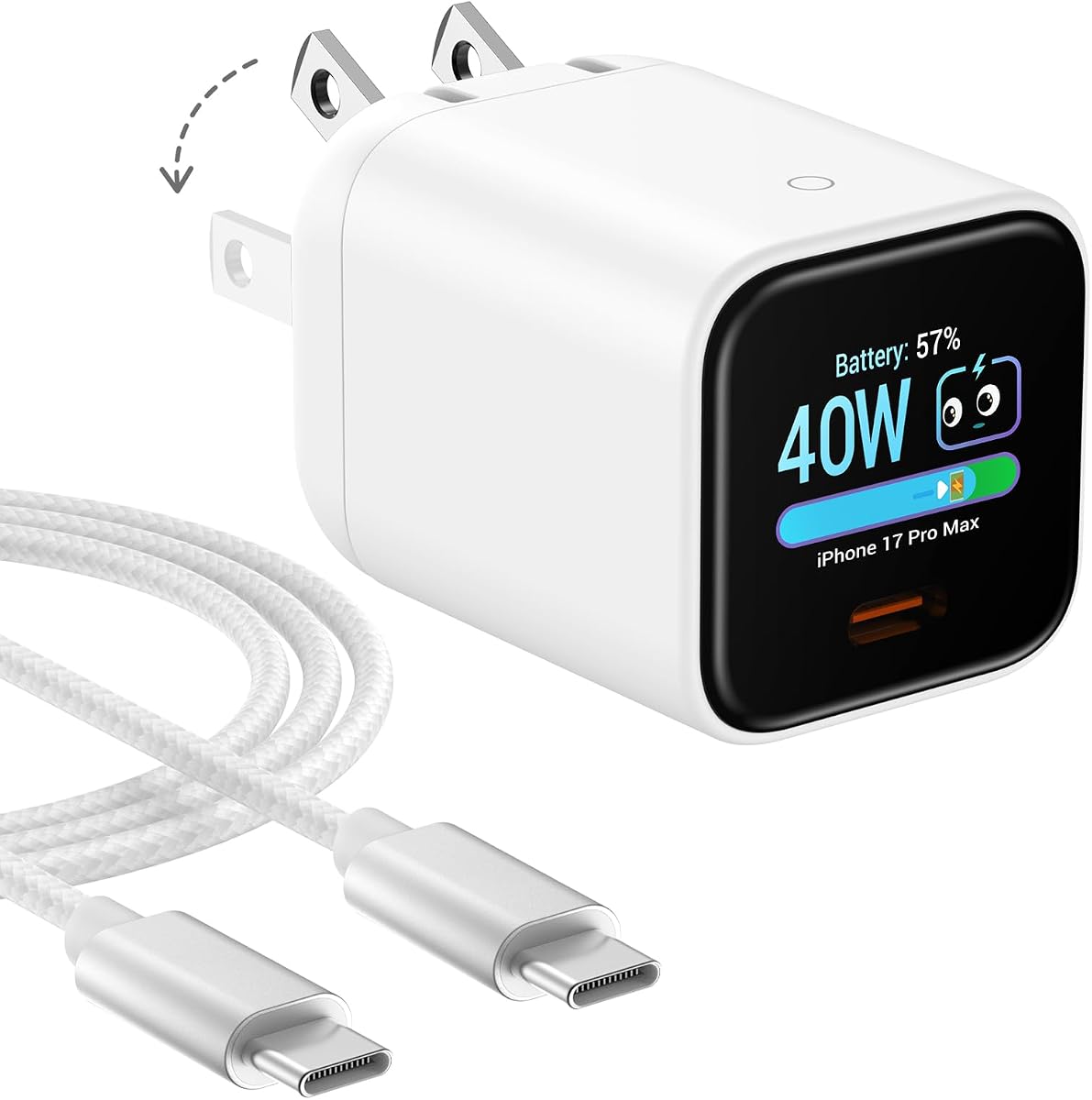
Smart Charging Butler–45W GaN Display Fast Charger with 6.6ft C-to-C Cable
4.5Editor score
AI-powered battery care mode
Real-time temperature monitoring
Compact pocket-sized design
Compare the best Gan Charger with Display models for fast charging. This guide reviews top 10 power adapters with screens, displays, and smart monitoring for
Finding the right power solution means looking at modern GaN technology. These chargers offer fast speeds while staying compact. A built-in display adds clarity about power usage and temperature, keeping you informed during every charge cycle.
We compared ten top models using real-world performance data. Each pick offers unique port layouts, wattage levels, and smart screen features. Our analysis highlights safety certifications, port distribution, and travel-friendly designs for various daily needs.
Each review shows key strengths and honest trade-offs for every model. You will see detailed specs, pros, cons, and ideal use cases. Prices change frequently, so check current listings before buying to ensure you get the best deal available today.
4.5Editor score

4.7Editor score

4.6Editor score
This side-by-side comparison highlights key differences across all ten selected chargers. Use this table to quickly find the right wattage, port count, and display feature for your specific device setup.



The UGREEN Nexode Pro Charger stands out as the top pick for versatile power needs. With a 4.7 rating, users praise its robust 160W output and smart display that shows real-time stats clearly.
We may earn a commission when you buy through this link, at no additional cost to you.
Its standout feature is the rotatable touch panel displaying per-port power and temperature. This transparency helps prevent overheating. Five ports allow charging a laptop, phone, tablet, and accessories simultaneously without extra bricks.
The animated emoticon adds a playful touch but might feel less professional in offices. The larger size compared to single-port options is also a minor trade-off for the extra versatility it provides.
Buy this if you need a desktop hub that handles high-wattage laptops while keeping devices organized. Its balance of power, safety, and smart features makes it the best overall choice for most users.
The screen shows exact wattage per port and internal temperature in real time, giving you full control over your charging environment.
Foldable AC prongs reduce bulk significantly, making this powerful unit easy to pack despite its high 160W capacity and 5-port design.
We may earn a commission when you buy through this link, at no additional cost to you.
The Anker Prime Charger delivers top-tier performance with 160W in an incredibly compact case. It earns a 4.6 rating for its ability to charge laptops fast without overheating or bulky designs.
We may earn a commission when you buy through this link, at no additional cost to you.
Premium features include the AnkerSense View app for custom power modes and real-time monitoring. The 140W single-port output ensures your MacBook charges at max speed, ideal for heavy workloads or creative tasks.
Price is a significant factor as it costs more than average. You also rely on Bluetooth connectivity for advanced features. However, the engineering efficiency justifies the cost for power users.
Choose this for ultimate portability without sacrificing wattage. Its premium build and smart controls make it perfect for professionals who need reliable, fast charging on the go every single day.
Connect via Bluetooth to unlock custom charging modes and see deeper insights into your power usage and device health through the Anker app.
With a power density rivaling premium tech, this charger fits in small bags, saving space while still delivering full 160W power output reliably.
We may earn a commission when you buy through this link, at no additional cost to you.
The Smart Charging Butler offers the best entry price for those needing a smart display charger. Its 4.5 rating reflects solid performance for phones and small devices, especially with its AI battery care feature.
We may earn a commission when you buy through this link, at no additional cost to you.
Key strengths include real-time temperature monitoring and a digital screen showing charge status. The built-in AI reduces heat by up to 9°F, protecting battery health during overnight charging sessions.
It only reaches 45W, so it cannot fast charge large laptops. Screen navigation uses taps and long-presses, which takes getting used to. These limits are acceptable given the low cost.
This is the top choice for budget-conscious users or travelers needing extra phone power. It brings smart monitoring technology to a lower price bracket, making it an excellent daily charger.
AI-driven temperature control actively lowers charging heat, extending battery lifespan and keeping devices cooler than standard 45W chargers on the market.
The included 6.6ft braided cable offers extra reach and durability, reducing the need to buy extra accessories right away after purchase.
We may earn a commission when you buy through this link, at no additional cost to you.
This Anker unit delivers strong power across four ports, ideal for families or shared workspaces. It earns a 4.4 rating for its ability to balance power well while monitoring safety constantly via Activeshield 4.0.
We may earn a commission when you buy through this link, at no additional cost to you.
The HD color display offers clear visuals for charging status and temperature. Each USB-C port supports high wattage up to 140W, ensuring laptops charge efficiently even when sharing load with other devices.
Its size is larger than pocket chargers, so it is better for desks. The included cable adds convenience but also bulk. Still, the safety features make it reliable for long-term use.
Buy this if you need a stationary hub with smart monitoring. It is perfect for powering a MacBook and phone simultaneously while keeping you informed with detailed display data always.
Power up to four devices at once with efficient power distribution, making it perfect for charging laptops, tablets, and smartphones from a single block.
Activeshield 4.0 monitors temperature millions of times daily, ensuring your devices stay cool and protected during every charging session safely.
We may earn a commission when you buy through this link, at no additional cost to you.
The Anker 100W Max USB C Charger blends power with portability. With a 4.7 rating, it is praised for its small size and high-definition display that shows charging status clearly to users on the move.
We may earn a commission when you buy through this link, at no additional cost to you.
It delivers steady 100W output and includes a low-current mode for earbuds. The foldable plug and compact frame make it easy to slip into pockets or small bags without adding bulk to luggage.
The display adds value but could be omitted for pure minimalists. Also, 100W may not fully power heavy gaming laptops at max speed. These trade-offs are minimal for general laptop users.
Select this for everyday commutes or travel. It keeps your devices safe and charged while providing useful stats on the display without sacrificing the sleek portability you need daily.
Low-Current Mode automatically switches to 95W + 5W for small devices like earbuds, ensuring safe charging without risking device damage or errors.
The high-definition smart display provides instant visibility of power and temperature, giving you full control over your charging session easily.
We may earn a commission when you buy through this link, at no additional cost to you.
The Anker Prime Charging Station is a powerhouse for workspaces. With a 4.6 rating, it supports up to 250W across six ports, making it ideal for charging multiple laptops and accessories at once efficiently.
We may earn a commission when you buy through this link, at no additional cost to you.
It features a 2.26 inch display for instant feedback on power usage. Personalized charging via the app lets you adjust output to optimize speed for each device without manual switching or guesswork.
It is designed strictly for desktop use and is not travel-friendly. The size and power draw require a dedicated outlet spot. But for home offices, this level of capacity is unmatched.
Buy this if you manage a tech-heavy desk setup. It simplifies charging for multiple users or devices, keeping everything powered with real-time monitoring and smart distribution via the app.
Power up to 250W across six ports to run laptops, phones, and tablets simultaneously, ensuring productivity never halts due to low battery.
A control dial allows immediate adjustments to energy output, ensuring each device charges at its optimal speed without using the app.
We may earn a commission when you buy through this link, at no additional cost to you.
This MOKiN charger offers solid mid-range power with a focus on portability. With a 4.4 rating, it is praised for its ultra-compact size and smart display that shows real-time data for efficient charging management.
We may earn a commission when you buy through this link, at no additional cost to you.
Its 70W output is ideal for smaller laptops like MacBooks, and the interactive touch screen lets you view port details easily. The foldable prongs and tiny dimensions make it easy to carry daily.
It does not include a charging cable, so you must supply one. Display rotation requires long-pressing, which adds a learning curve. These minor issues are outweighed by the price and size.
Pick this for a travel-friendly mid-tier option. It balances power and smart features well, perfect for anyone needing a compact charger that shows exactly what it is doing while in use.
With foldable prongs and dimensions up to 90% smaller than traditional chargers, this unit fits easily into small pockets or laptop sleeves.
The HD display shows real-time wattage, temperature, and summary stats after charging, helping you verify performance and safety each time.
We may earn a commission when you buy through this link, at no additional cost to you.
The MOKiN 140W USB C Charger delivers robust power for demanding devices. It earns a 4.4 rating for its ability to support full-speed MacBook charging while showing live status on a built-in display clearly.
We may earn a commission when you buy through this link, at no additional cost to you.
Its live color display shows real-time port stats and temperature. Two high-speed USB-C ports allow flexible charging. It supports four devices at once with efficient PD3.1, making it versatile for shared use.
Weight is slightly higher than ultra-compact options, so it is less ideal for deep travel. Display brightness is fixed and cannot be adjusted. Still, the speed and monitoring are top-notch.
Choose this if you own a high-wattage laptop and need fast charging. The screen and power distribution make it an excellent desk companion for professionals needing reliable, monitored power daily.
The live screen displays real-time charging status and per-port power, giving you total visibility into how your devices are performing.
An intelligent safety system monitors temperatures millions of times daily, protecting your MacBook and other devices from overheating risks.
We may earn a commission when you buy through this link, at no additional cost to you.
This DJI Power Charger stands out for its unique digital display cable. It earns a 4.9 rating for offering real-time power readout via the cable, which is rare among standard chargers on the market today.
We may earn a commission when you buy through this link, at no additional cost to you.
It supports 140W output with dynamic power allocation and stable cooling. The 7A high-current cable ensures fast charging and clear status indicators. It works best with DJI batteries and other supported laptops too.
The cable adds extra length which might not suit minimal setups. Also, full display features rely on compatible devices. Still, this feature makes monitoring much easier without extra tools.
Select this if you want a cable that tells you the charge status instantly. It offers a unique visual layer of feedback, making it ideal for tech enthusiasts who value precise monitoring.
The included 7A digital display cable shows charging status instantly, letting you track power flow without relying solely on the charger's screen.
Optimized for DJI devices, this charger supports three batteries at once, ensuring drones and cameras stay ready for flight or shoot.
We may earn a commission when you buy through this link, at no additional cost to you.
The Anker Nano Smart Display Charger is built for iPhone users who want small power with visual feedback. With a 4.7 rating, it is praised for its nano size and smart recognition that ensures safe, optimized charging for iPhones.
We may earn a commission when you buy through this link, at no additional cost to you.
It features a display controlled by taps, not touch. Its 45W output fast charges iPhones and iPads while lowering heat to extend battery life. Foldable prongs make it easy to use in tight spaces.
The display lacks a touchscreen, so navigation is via buttons. The 45W output is enough for phones but not large laptops. Still, its efficiency and size are perfect for daily smartphone charging.
Buy this for a tiny, smart iPhone charger. It offers the right mix of speed and safety, making it ideal for travelers who want smart features without bulk or complex setups.
Auto-detects supported iPhones to adjust charging power, ensuring safety and extending battery lifespan through careful thermal management during use.
Approximately 47% smaller than standard 30W chargers, this nano unit fits easily in small pockets or travel pouches without adding weight.
We may earn a commission when you buy through this link, at no additional cost to you.
Choosing the right GaN charger with display requires balancing power, port count, and visual feedback features.
Wattage determines how fast your devices charge. Higher numbers like 160W allow charging multiple devices including laptops simultaneously without slowing down. Lower numbers around 45W are enough for phones and tablets only.
Always match the total wattage to your heaviest device to avoid delays or undercharging during critical use.
More ports mean you can charge more devices at once. Look for at least three ports for a laptop, phone, and watch. Check if USB-C and USB-A are included to match your cables.
Choose the port count based on how many gadgets you power daily to reduce clutter from multiple chargers.
Displays show real-time data like wattage and temperature. Some support touch controls, while others use buttons. Rotating screens add flexibility for desk placement but increase complexity slightly.
Pick a display type that matches your need for monitoring without sacrificing user interface simplicity.
Look for safety features like Activeshield or TÜV certification. These ensure temperature monitoring prevents overheating and protects your devices from voltage spikes or short circuits.
Safety certifications guarantee your charger will keep devices cool and secure during long charging sessions reliably.
If you travel, choose models with foldable prongs and compact frames. Smaller units like 45W or 70W are easier to carry than larger 250W desktop stations.
Check dimensions and weight to ensure the charger fits in your bag or pocket comfortably.
Ensure the charger supports your specific devices like MacBook or iPhone. Some chargers include smart recognition or dedicated modes that optimize power delivery for certain brands.
Verify compatibility with your gadgets to avoid slower charging speeds or connection issues.
Some chargers come with braided cables or adapters, which save extra purchases. Check if a USB-C cable is included to ensure immediate use.
Included cables add value and simplify setup, so consider them when comparing models.
Higher wattage and smart displays increase the price. Look for warranties of 18 months or more to protect your investment against defects or damage.
Balance features with your budget to ensure you get the best performance for the cost.
Connect your devices to the USB-C ports for maximum speed. Always check the display for correct wattage delivery before leaving them unattended for safety.
Keep the charger in a cool place to prevent overheating. Avoid blocking vents or placing it near direct sunlight to maintain internal temperature control.
Periodically clean the display and ports with a dry cloth to avoid dust buildup. This keeps sensors working well and ensures smooth port connection over time.
No, displays consume minimal power compared to overall charging. Smart screens only draw energy when active and often have auto-off features to save energy during idle periods.
Yes, most support universal protocols like PD and PPS. They will recognize compatible devices and charge safely but may not show model names on screens for all brands.
The display shows real-time wattage and temperature, ensuring you know your devices are charging fast and safely. It helps you verify performance at a glance.
Yes, models with temperature monitoring and AI care modes are safe. They reduce heat and adjust output to protect battery health while you sleep.
Some come with USB-C cables, but you may need to buy separate USB-A or proprietary cables. Check the box contents before purchase to ensure you have the right connectors.
Use a dry microfiber cloth gently. Avoid liquids or cleaners since moisture can damage electronic sensors and display screens inside the charger unit.
The UGREEN Nexode Pro Charger leads for versatility with 160W power and five ports. The Anker Prime Charger offers premium compactness with app control, while the Smart Charging Butler is perfect for budget buyers needing smart features.
Prioritize wattage if you charge laptops, or size if you travel. Displays add safety and transparency, but ensure they are easy to read before making your final decision.
Prices change frequently, so check current listings to confirm compatibility and availability for your needs today.