
HDMI Extender Over Ethernet 1080P 60Hz 164FT PoC EDID HT202P
4.4Editor score
Supports 1080P at 60Hz
Power over Cable included
EDID copy for stability
This guide compares the top 10 HDMI over Ethernet extenders for 2026, evaluating distance, resolution, and features to help you choose the perfect extension
Finding the right HDMI over Ethernet extender can transform your setup by letting you send high-definition video and audio over long distances using standard network cables. This technology simplifies wiring and reduces clutter in homes, offices, and commercial spaces where HDMI cables fall short.
We compared ten leading HDMI over Ethernet models based on supported resolution, maximum distance, power delivery, and additional features like IR control and loop-out. Our analysis focuses on real-world performance and compatibility with common source devices and displays.
Each pick highlights key strengths and ideal use cases so you can match a product to your specific needs. Prices and availability change frequently, so verify details before purchasing to ensure you get the best value and performance available today.
4.4Editor score

4.6Editor score
4.2Editor score
This comparison table lists key specifications for all ten HDMI over Ethernet models to help you quickly identify the right fit for your distance and resolution needs.


The OREI HDMI Extender Over Cat5 offers reliable transmission up to 165 feet with support for 4K@30Hz and 1080p. It includes IR cables for remote control and a loop-out port for local monitoring, making it practical for dual-display setups.
We may earn a commission when you buy through this link, at no additional cost to you.
It uses stable video transmission technology over CAT5e/6/7 cables and includes PoC so only the transmitter needs power. EDID management helps ensure resolution compatibility between source and display devices.
While it does not support HDMI ARC or IP streaming, its focus on uncompressed point-to-point delivery keeps signal integrity high for standard home or office AV runs.
Buy this if you need a straightforward, budget-friendly extender for 4K content over moderate distances without relying on network switches or advanced protocols.
The HDMI loop-out port allows you to connect a local monitor while sending the signal to a remote display, which is ideal for monitoring setups or dual-screen workstations.
Power over Cable technology sends power to the receiver through the Ethernet cable, reducing cable clutter around remote TVs or projectors.
We may earn a commission when you buy through this link, at no additional cost to you.
This budget-friendly HDMI over Ethernet extender delivers Full HD 1080P at 60Hz over distances up to 164 feet using a single Cat5e/6/7 cable. It includes PoC for simplified wiring and EDID copy to ensure display compatibility.
We may earn a commission when you buy through this link, at no additional cost to you.
Transmission is uncompressed without converting to streaming video, making it ideal for point-to-point AV connections in classrooms or offices where HD performance is sufficient.
While it lacks 4K support, its reliable performance at 1080P and included power adapter make it a solid entry-level choice for basic video extension needs.
Choose this model if you need a cost-effective solution for standard HD displays and want a simple plug-and-play setup without extra cabling complexity.
Power over Cable sends power from the transmitter to the receiver through the Ethernet cable, reducing the need for extra power outlets at remote display locations.
Built-in EDID copy reads and stores display information to help establish the correct resolution and deliver a stable video signal across long runs.
We may earn a commission when you buy through this link, at no additional cost to you.
The OREI HDMI Over Ethernet Extender supports pristine 4K@60Hz YUV 4:4:4 video over distances up to 230 feet. It includes HDR10+, Dolby Vision, and HDCP 2.2 compliance for modern content sources and high-fidelity audio formats.
We may earn a commission when you buy through this link, at no additional cost to you.
PoC ensures only the transmitter needs power, while the compact metal design aids heat dissipation and durability in both residential and professional environments.
This model balances long-distance range with high-resolution performance and advanced video standards, making it a top choice for home theaters or media rooms.
Invest in this extender if you need reliable 4K@60Hz extension over long runs and want support for HDR formats and secure content protection.
With 18Gbps bandwidth support, this extender delivers crisp, vibrant video and high-fidelity audio ideal for Blu-ray players and modern game consoles.
The rugged metal housing protects internal components and helps with heat dissipation during extended use in enclosed spaces.
We may earn a commission when you buy through this link, at no additional cost to you.
This OREI HDMI splitter extender distributes one HDMI source to four displays over Cat6 cables up to 230 feet. It includes a loop-out port for local monitoring and one-way IR control for remote source access.
We may earn a commission when you buy through this link, at no additional cost to you.
Power over Cable ensures only the transmitter needs power while all receivers run without extra adapters. EDID support helps optimize resolution compatibility across multiple screens.
It is ideal for commercial AV installations like conference rooms, bars, or exhibition spaces where synchronized content display is essential.
Choose this unit if you need to feed multiple screens from one source over long distances without compromising on reliable point-to-point HDMI extension.
Only one power adapter powers the entire kit since PoC sends power to all receivers through the Ethernet cables.
IR cables forward commands over a dedicated DDC channel allowing you to control the source from the remote display location.
We may earn a commission when you buy through this link, at no additional cost to you.
This OREI balun delivers uncompressed 4K@60Hz RGB/YCbCr 4:4:4 video over CAT6/7 cables up to 165 feet. It supports HDR, HDMI 2.1 features, and high-fidelity audio formats including Dolby TrueHD and DTS-HD.
We may earn a commission when you buy through this link, at no additional cost to you.
A built-in HDMI loop-out enables local screen viewing while extending content to a remote display. EDID management helps optimize resolution compatibility between source and display devices.
It is well suited for clean wall-mounted TV or hidden AV rack setups where distance and quality are both priorities.
Buy this balun if you need reliable 4K@60Hz extension with high bandwidth and audio format support for immersive home theater experiences.
With 18Gbps bandwidth support, this extender delivers crisp, vibrant video and high-fidelity audio ideal for Blu-ray players and modern game consoles.
One-way IR pass-through lets you control streaming devices and media players from the receiver side using the included cables.
We may earn a commission when you buy through this link, at no additional cost to you.
This HDMI over Ethernet extender delivers 4K@30Hz up to 131ft or 1080P@60Hz up to 230ft over Cat6/Cat7 cables. It includes PoC, IR control, and HDMI loop-out for local monitoring.
We may earn a commission when you buy through this link, at no additional cost to you.
EDID management helps the source recognize connected displays and select compatible resolutions. Uncompressed real-time transmission keeps audio and video synchronized for gaming and monitoring.
It is suitable for home theaters, churches, or classrooms where longer runs are needed without converting signals into streaming formats.
Choose this if you need extended range up to 230ft with support for 4K and simple plug-and-play installation.
Supports 1080P@60Hz up to 230ft allowing longer runs while maintaining full HD clarity.
Included IR cables let you control Blu-ray players and streaming devices from the receiver location.
We may earn a commission when you buy through this link, at no additional cost to you.
This OREI KVM extender supports 4K@60Hz over Cat6/7 cables up to 230ft and adds USB keyboard and mouse extension for remote PC control. It includes HDMI loop-out and 3.5mm audio output.
We may earn a commission when you buy through this link, at no additional cost to you.
Full HDCP 2.2 compliance and support for HDR formats ensure modern content compatibility. The compact plug-and-play design simplifies installation in offices or secure environments.
It is ideal for control rooms or setups where you need to operate a PC remotely while maintaining high-quality video.
Buy this if you require both HDMI and keyboard/mouse extension over long distances without adding complexity to your AV setup.
USB KVM extension 1.1 lets you control your PC remotely through keyboard and mouse at the receiver end.
3.5mm stereo audio output allows you to extract sound to analog speakers or headphones at the receiver.
We may earn a commission when you buy through this link, at no additional cost to you.
This KVZOO extender transmits 4K@30Hz and 1080P@60Hz over Cat5e/6/7 cables up to 230 feet. It includes mounting holes for rack or wall installation and HDMI loop-out for local monitoring.
We may earn a commission when you buy through this link, at no additional cost to you.
EDID management ensures compatibility while PoC simplifies power wiring. The plug-and-play design requires no software or drivers for basic home or office use.
It is versatile for home theaters, churches, or outdoor screens where easy installation and reliable signal are priorities.
Choose this if you need mounting flexibility and solid 4K performance over long distances in diverse environments.
Patented mounting hole design facilitates easy installation on walls or racks for cleaner setups.
Uses efficient compression to maintain vivid images with zero latency or signal loss.
We may earn a commission when you buy through this link, at no additional cost to you.
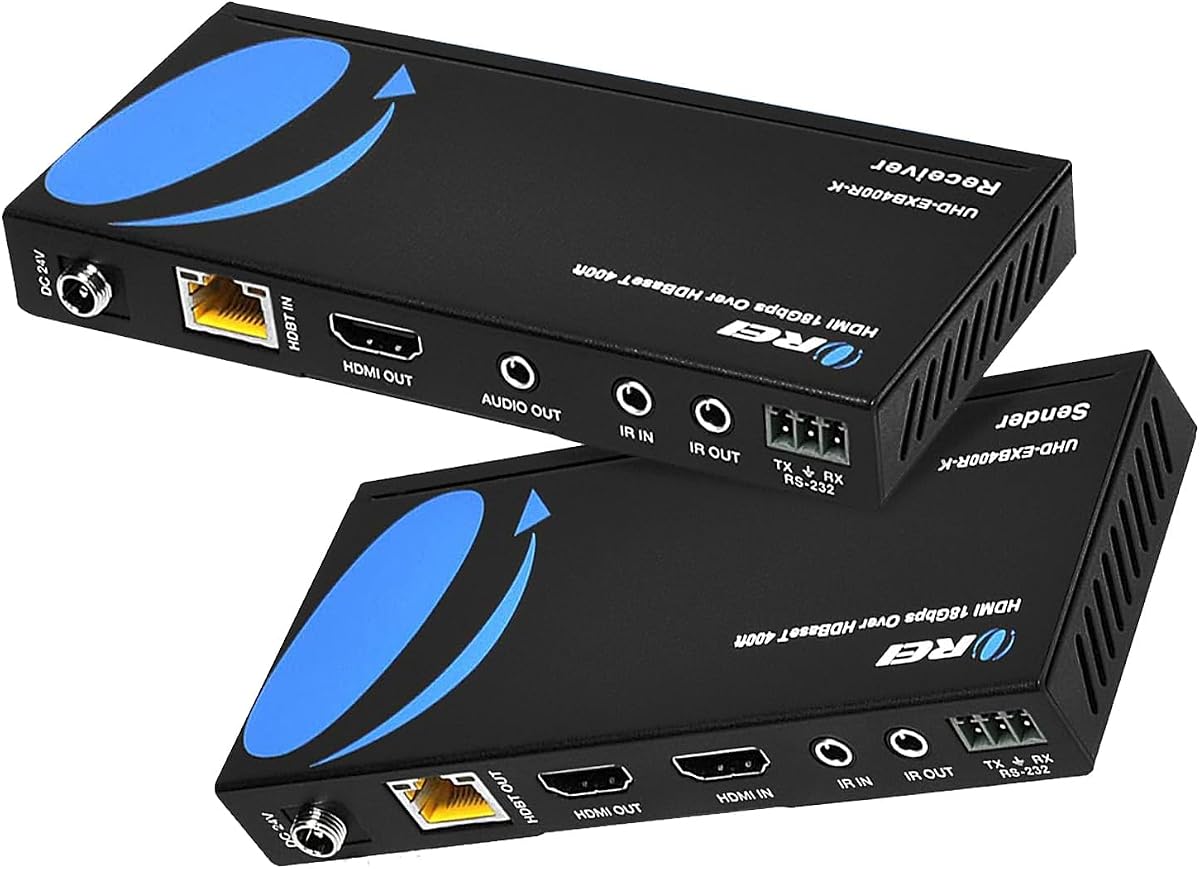
This OREI HDBaseT extender transmits 4K@60Hz over Cat5e/6/7 LAN cables up to 400 feet with zero latency. It supports two-way IR, CEC, and RS-232 command control for professional installations.
We may earn a commission when you buy through this link, at no additional cost to you.
HDBaseT technology ensures lossless video and audio. It supports HDR10+, Dolby Vision, and 18Gbps bandwidth for realistic viewing experiences and immersive audio.
Designed to work only with matching units, this model suits high-end AV deployments where extended range and control are critical.
Invest in this if you need maximum range, advanced control options, and premium video standards for commercial or high-demand home use.
Up to 400 feet range over Cat5e/6/7 LAN cable with zero latency ideal for large venues.
RS-232 command control port and two-way IR enable full source and display control from remote locations.
We may earn a commission when you buy through this link, at no additional cost to you.
This PWAY extender delivers crisp visuals up to 4K@30Hz over Cat5/6/7 cables up to 230ft. It includes IR control, HDMI loop-out, and PoC for easy installation.
We may earn a commission when you buy through this link, at no additional cost to you.
Supports Mirror and Extended Display Modes for flexible dual-screen setups without delay. EDID management helps maintain compatibility between source and display devices.
It is well suited for home theaters, meetings, or live streaming where long-range 4K extension is needed without overspending.
Choose this if you want reliable long-distance performance with essential features and a budget-friendly price.
Supports Mirror and Extended Display Modes allowing flexible dual-screen setups without delay.
Only one power adapter required as the receiver is powered through the Ethernet cable via PoC.
We may earn a commission when you buy through this link, at no additional cost to you.
Choosing the right HDMI over Ethernet extender depends on your required distance, resolution needs, and available cables. This section explains key factors to consider before buying.
HDMI over Ethernet extenders typically support ranges from 100 to 400 feet. Standard CAT6 cables handle most runs up to 200 feet at 4K@30Hz. For longer distances or higher refresh rates, choose models using CAT6A or CAT7.
Ensure the extender supports your display's resolution and refresh rate. Many budget units max at 1080P@60Hz while premium ones support 4K@60Hz. Verify if your source and display support HDMI 2.0 or 2.1 for modern HDR content.
PoC lets the transmitter send power to the receiver over the Ethernet cable, reducing extra adapters. Check if the package includes a power adapter and whether it is suitable for your region or requires an adapter.
One-way IR control lets you operate the source from the receiver side. Two-way IR allows feedback from the remote display. Confirm IR pass-through is included if you need remote access to your player or box.
Loop-out provides a local HDMI port on the transmitter so you can connect a nearby monitor while sending the signal remotely. This is helpful for setups requiring both local preview and remote output.
Look for HDCP 2.2 support if you stream protected 4K content. HDR, HDR10+, and Dolby Vision compatibility ensure vivid visuals on modern displays. Higher bandwidth like 18Gbps handles 4K@60Hz without compression loss.
Some units offer KVM extension for keyboard and mouse control. RS-232 ports enable serial command control for professional installations. Audio extraction ports let you route sound to external speakers at the receiver end.
Use high-quality CAT6 or CAT7 cables for optimal performance. Shielded cables reduce interference. Ensure cables are rated for your required distance since performance varies based on wire gauge and build quality.
Connect the HDMI source to the transmitter and the display to the receiver. Run a single CAT5e/6/7 cable between the units and power the transmitter. Ensure all connections are secure before testing.
Avoid bending the Ethernet cable sharply or running it near power lines to reduce signal interference. Use cable clips or raceways to keep runs neat and protected from physical damage.
Keep the units in well-ventilated areas to prevent overheating. If you notice signal loss, check cable connections and try reducing the cable run or upgrading to higher-grade Ethernet cable.
Most standard HDMI over Ethernet extenders are designed for point-to-point connections and are not compatible with network switches or routers. Only HDBaseT or IP-based extenders support switching. Check the product specs before attempting to plug into your network infrastructure.
CAT6 or CAT6A cables work best for 4K signal extension over long runs. Use certified high-quality cables to avoid signal degradation. For runs beyond 200 feet, ensure the cable is properly shielded and tested for bandwidth requirements.
Many premium models support HDR and 4K@60Hz with HDMI 2.0a and HDCP 2.2. Budget units may limit to 4K@30Hz or 1080P. Check the supported resolution and color depth before purchasing if you need HDR for modern media.
Power over Cable lets the transmitter send electrical power to the receiver through the Ethernet cable. Only the transmitter needs an external power adapter, which reduces clutter at remote TV or projector locations and simplifies installation.
Yes, HDMI extenders carry both audio and video signals together. Some models also include 3.5mm audio extraction ports at the receiver end so you can connect external speakers or soundbars independently of the display.
EDID allows the display to communicate its capabilities to the source. Built-in EDID management helps ensure the source outputs a compatible resolution for stable video. This reduces handshake issues when connecting different monitor or TV models.
Our top picks cover a range of needs from budget 1080P models to premium 4K@60Hz HDBaseT solutions. Each offers reliable long-distance performance with useful extras like IR control and loop-out.
Prioritize resolution support and distance requirements when selecting. For home theaters, choose models with HDR and 4K@60Hz. For offices, 1080P extenders often provide enough performance at lower cost.
Prices and availability fluctuate so check current listings before purchasing. Verify specs match your devices to ensure seamless setup and reliable video extension for your specific environment.